You are currently working on UAT 

Fuzzy matches to a certain language

Hi,

I have performed translation projects same times to German and French, then the fuzzy match counts between two languages becomes widely different. French counts 3 times more segment as fuzzy match. When I open the sdlxliff files and check if the report is correct, then some files doesn't have fuzzy match segments, although report says there is. I found most of 95%-99% matches are actually 100% matches or context matches. The report detect these segments as 95%-99% matches.

Does anyone know why this issue occurs?

If I set the target languages to German, French, Thai, and Traditional Chinese in a project, this issue seems occur in French and Traditional Chinese.

Best regards,

Parents
  • If you have different fuzzy match counts it sounds as though it's probably the result of each Translation Memory containing different amounts of data.  Can you provide more information here... for example screenshots of a segment where there is a difference between languages?

    Paul Filkin | RWS

    Design your own training!
    You've done the courses and still need to go a little further, or still not clear? 
    Tell us what you need in our Community Solutions Hub

  • Hi Mr. Paul. Thank you for your reply.

    I opened the project and saw only one context match to that segment.

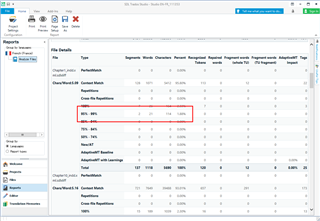
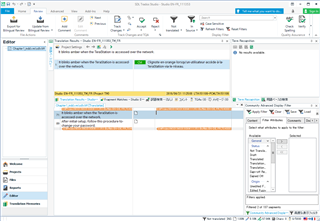
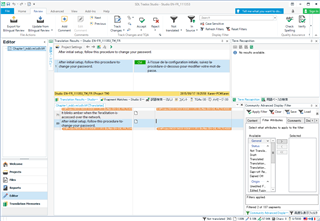
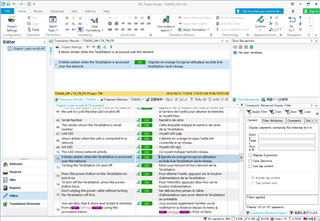
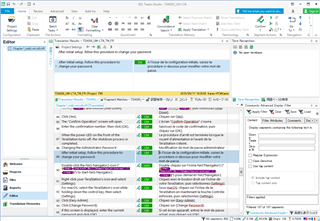
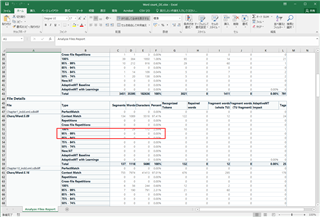
    I have attached some pictures below. The first three pictures are the report from translation agency. The problem occurs on their report. The report shows 2 segments of fuzzy match in chapter 1. When I open the chapter 1 file, there are two untranslated segments, but when I move the cursor to both segments, the context matches exists.

    Translation agency's environment:
    Trados Studio v.15.0.0.29074
    Windows 7

    Trados Studio report showing 2 fuzzy match segments in chapter 1 highlighted in red.

    Trados Studio editor view with one untranslated segment and context match highlighted in orange.

    Trados Studio editor view with another untranslated segment and context match highlighted in orange.

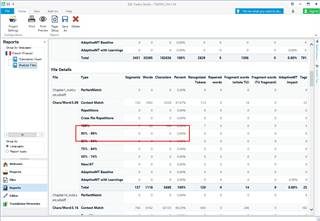
    The following pictures are the project on my computer using the same TM file and source files. The word counts are the same but there's no fuzzy matches. I'm not sure why this occurs.

    My environment:
    Trados Studio v.15.2.0.1041
    Windows 10

    Trados Studio report on a different computer showing no fuzzy matches for chapter 1.

    Trados Studio editor view with all segments translated and no context match issues.

    Trados Studio editor view with all segments translated and no context match issues, different perspective.

    I have also asked to Support about this issue. He asked to the engineer and got answer this is because the source files are updated after the report is created. However, this doesn't make any sense to me.

    When I compare to the German report created at the same time, it doesn't occur. I have done the translation project same times to both languages. It means, same number of translation memories are generated. The slight difference may result but it won't be widely different, I believe.

    Excel report from translation agency showing 2 fuzzy match segments in chapter 1 highlighted in red.

    emoji


    Generated Image Alt-Text
    [edited by: Trados AI at 6:03 PM (GMT 0) on 28 Feb 2024]
Reply
  • Hi Mr. Paul. Thank you for your reply.

    I opened the project and saw only one context match to that segment.

    I have attached some pictures below. The first three pictures are the report from translation agency. The problem occurs on their report. The report shows 2 segments of fuzzy match in chapter 1. When I open the chapter 1 file, there are two untranslated segments, but when I move the cursor to both segments, the context matches exists.

    Translation agency's environment:
    Trados Studio v.15.0.0.29074
    Windows 7

    Trados Studio report showing 2 fuzzy match segments in chapter 1 highlighted in red.

    Trados Studio editor view with one untranslated segment and context match highlighted in orange.

    Trados Studio editor view with another untranslated segment and context match highlighted in orange.

    The following pictures are the project on my computer using the same TM file and source files. The word counts are the same but there's no fuzzy matches. I'm not sure why this occurs.

    My environment:
    Trados Studio v.15.2.0.1041
    Windows 10

    Trados Studio report on a different computer showing no fuzzy matches for chapter 1.

    Trados Studio editor view with all segments translated and no context match issues.

    Trados Studio editor view with all segments translated and no context match issues, different perspective.

    I have also asked to Support about this issue. He asked to the engineer and got answer this is because the source files are updated after the report is created. However, this doesn't make any sense to me.

    When I compare to the German report created at the same time, it doesn't occur. I have done the translation project same times to both languages. It means, same number of translation memories are generated. The slight difference may result but it won't be widely different, I believe.

    Excel report from translation agency showing 2 fuzzy match segments in chapter 1 highlighted in red.

    emoji


    Generated Image Alt-Text
    [edited by: Trados AI at 6:03 PM (GMT 0) on 28 Feb 2024]
Children
No Data