You are currently working on UAT 

Cant translate in trados

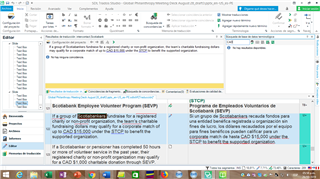
NO puedo traducir un texto en trados. No me está reconociendo los glosarios que suelo abrir con la memoria. Cuando pongo el texto no puedo buscar ningún término ni siquiera en el icono que aparece en el lado superior derecho, el que dice AZ. Tengo que traducirlo hoy día y no se que pasa.

I cant translate my text. I opened some glossaries, but they are not recognized by the memory. I made sure to open the right memory but it's not working. I cant even look for terms through the AZ icon and I've already opened them!!! I dont know what the problem is!

I need to translate it today.

Parents
  • A bit of a confusing post... but it sounds as though you are having problems using your termbase?  Nothing to do with memories right?

    Can you share a screenshot of your project settings where you added your termbase?  You can copy paste your screeshot into your reply here.

    Paul Filkin | RWS

    Design your own training!
    You've done the courses and still need to go a little further, or still not clear? 
    Tell us what you need in our Community Solutions Hub

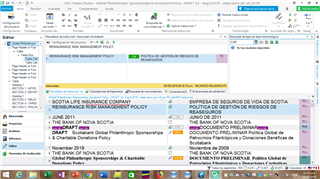
  • I worked it out dont worry. Can you help me with this new question. Last week I aligned two texts the original document and the revised version (I did the translation in TRADOS but after i did it the client reviewed it and sent it back to me with changes, in order to have those changes in my computer, i Aligned both texts the original and the reviewed version). I am working on a ppt document and want to retrieve the document. How do i do  that? Last week when I did it I could see my version and the cllient's reviewed version. Now I can only see my version. 

    I would like to do my translation and see some matches from that document i aligned.

    Note, when i aligned it I kept the aligned version from TRADOS, I did not change anything, because it was a lot!!! But i though the aligned version stayed in the system any way because i was able to see the client's version. Is it not in the memory?

  • I hope you can help me I dont know how this works, I though that since it is a program it's not suppsed to fail...or I am failing maybe.

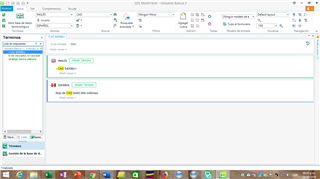
    I have 3 glossaries (actually it's just one which I divided in 3 because multiterm woudnt accept the length of the original glossary) plus one i did from scratch. Well when i look for a word which i have alredy entered before in trados, it doesnt show, but if i view it in multiterm, it shows:

    Trados Studio interface showing a glossary entry for 'CAN' in MultiTerm with no visible errors.

    Multiterm shows the term CAN:

    MultiTerm window with a search field displaying no results for the term 'CAN' despite being in the glossary.

    This glossary is opened in trados, i usally work with it, but i dont find the word if  I put it in trados.

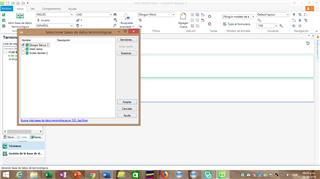
    In addition to that (Oh my god thisis exhausting!!!) when i open multiterm and i clic on open database: it only shows 3 glossaries I have other two, where are those? I opened them in trados, yes, but I also opened Glosario banca 3 and Glosario aportes 2, it seems they are gone, is this witchery? if you dont understand this, imagine me?????? i dont even know how to make tit somple. I hope you can help.

    shows MultiTerm 'Open Database' dialog box showing only 3 glossaries available instead of 5, indicating missing glossaries.

    emoji


    Generated Image Alt-Text
    [edited by: Trados AI at 5:59 PM (GMT 0) on 28 Feb 2024]
  • It would be more helpful if you opened a new thread for each question.  It's hard to keep track of this as you have already marked the thread as having a verified answer.

    Please do this and then we can tackle your questions.

    Paul Filkin | RWS

    Design your own training!
    You've done the courses and still need to go a little further, or still not clear? 
    Tell us what you need in our Community Solutions Hub

  • Well when i look for a word which i have alredy entered before in trados, it doesnt show, but if i view it in multiterm, it shows:

    Trados Studio interface showing a search for a term 'CAN' with no results found in the translation memory.

    Multiterm shows the term CAN:

    Multiterm interface displaying the term 'CAN' found within the termbase entries.

    Your screenshots show that you're doing a search for part of a term, not the whole term as it is entered in your termbase and shown in Multiterm, so you would need to click the Fuzzy Search button (the one with the binoculars and a little squiggly line underneath) for your term to be found.

    Regarding the location of your termbases, that depends entirely on where you saved them. In Multiterm, click on "Examinar" (Browse) and select the location of the termbases you'd like to open, then they will be added to the list.

    emoji


    Generated Image Alt-Text
    [edited by: Trados AI at 5:59 PM (GMT 0) on 28 Feb 2024]
Reply
  • Well when i look for a word which i have alredy entered before in trados, it doesnt show, but if i view it in multiterm, it shows:

    Trados Studio interface showing a search for a term 'CAN' with no results found in the translation memory.

    Multiterm shows the term CAN:

    Multiterm interface displaying the term 'CAN' found within the termbase entries.

    Your screenshots show that you're doing a search for part of a term, not the whole term as it is entered in your termbase and shown in Multiterm, so you would need to click the Fuzzy Search button (the one with the binoculars and a little squiggly line underneath) for your term to be found.

    Regarding the location of your termbases, that depends entirely on where you saved them. In Multiterm, click on "Examinar" (Browse) and select the location of the termbases you'd like to open, then they will be added to the list.

    emoji


    Generated Image Alt-Text
    [edited by: Trados AI at 5:59 PM (GMT 0) on 28 Feb 2024]
Children