You are currently working on UAT 

Studio 2019 TM strange (faulty) behavior

Hi

It seems that Studio 2019 in not doing a proper job of updating main translation memories and in populating the translation file through pre-translation and thereafter. My current example is this:

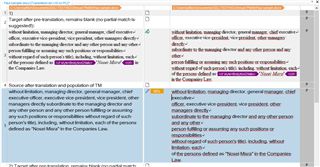
I received a PDF file for translation (not scanned, but "open"), I converted it to plain text and opened a project for it. Subsequently, the client sent me a word file of the same PDF file with minor conversion variations from my file. I started a second project with the client (second) file, worked on it for a while, but then decided to go back to my original conversion project. I updated the main translation memories in the second project, and pre-translated the first project again. To may astonishment, not all segments were transferred to the first file, even if they were identical. Moreover, certain identical segments were not even subsequently identified as a partial match. Identical segments between the two files seem to have simply vanished and not recorded in the TM.

This behavior was identified previously about two years ago, but also since.

Can this be explained / repaired? this is very bad for translation productivity to say the least.

Best

Shmuel

Parents Reply
  • Ok, just to be accurate, both files used for creating both projects are word files. One is the result of a conversion that I made using a ABBYY into plain text then saved to wordx. The other is a wordx file that the client created and provided to me. They both have slightly different formatting and tagging issues and hangups due to the limited capabilities of PDF file conversion software, but they are otherwise identical in terms of text.

    However, this does not seem to be the issue. Even if they are different in terms of tags and cannot be populated during pre-translation, these segments are not so different as not appear as a TM match at all (I am tuned to 70%)

    I can obviously send you the offending segments of both projects, but, do you expect a segment to contain a fatal error that would prevent it from being updated to the TM? without any error message to the user? that sounds extreme. How can you assure, then, that this does not happen right left and center with all documents?

    Since I have them on my machine, wouldn't it be more effective to recreate the problem with those two projects on my machine? We can repeat the process back and forth between them and you can watch this happen.

Children