You are currently working on UAT 

What does the "character-width difference penalty" do?

Hi there,

I recently noticed the appearance of a character-width penalty for Asian source languages.

Checkbox labeled 'Get matches for character-width differences (Asian source languages)' followed by a field labeled 'Character-width difference penalty' with a value of 1.

I tried to search the Studio documentation and release notes for info about what this does, but can't find anything.

Would anybody be able to explain what this penalty does and when best (not) to use it?

Thanks, Neeltje


Generated Image Alt-Text
[edited by: Trados AI at 5:45 PM (GMT 0) on 28 Feb 2024]

emoji
Parents Reply
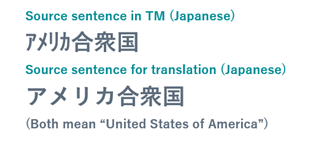
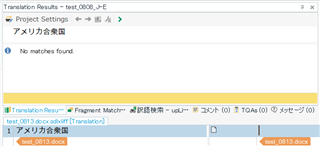
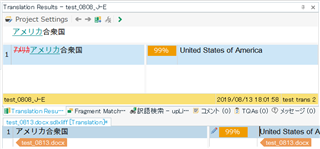
  • Hi - we had long debates whether we should have any penalty at all, since when the text is the same in Japanese and just the character width is different, you don't really need to have any penalty. We settled on 1% in the end, though, as it might be good for such segments to be flagged as very high fuzzy matches so that a translator would at least take a quick look during translation even if the text is identical. BTW this applies to all source/target combinations - e.g. when you go from Japanese to English and the difference in the Japanese segment is just around the width, you will see a 99% match and can then do a quick check to confirm that the text is indeed the same, or if you need to alter the translation in any way (unlikely!). Or you go to 0% and just trust the TM engine to do its magic. I hope this clears things up at least somewhat. Thanks, Daniel

    Daniel Brockmann
    Team Trados @ RWS

Children