You are currently working on UAT 

Rant: Studio 2019 Project Wizard

 I cannot believe this wizard was not out the window in the last update! I am sick and tired of being unable to create simple project files folders, and keep getting error messages that "the file/folder already exists" even after I deleted it in windows explorer, not to mention a renaming, an impossible task. I am sick and tired of hard restarts because of that. I am sick and tired of the annoying messages when I change the project template. I am sick and tired of getting file processing error messages in the wizard that do no come up when processing a file not through the wizard. That wizard is awful. Take it away.

Sorry for the tone, that wizard is just...too much for August!

Shmuel

Parents
  • Hi

    The Studio 2019 project wizard has worked perfectly for me right from the very first beta. I therefore can't reproduce this problem you've been having.

    Firstly, is your version of MultiTerm also up to date? You can find this out by opening MultiTerm then going to the Help tab and clicking 'Check for Updates'.

    Next, have you run a Windows Repair on Studio recently? Or have you tried reinstalling? This can sometimes be all it takes to cure a problem caused by software/environment clashes. Here's how to do both:

    First, try a Windows Repair of Studio and MultiTerm components, as here:

    1. Close all SDL applications.
    2. Open the Control Panel:
      • Windows Vista/7Start > Control Panel > Programs > Programs and Features.
      • Windows 8: Right-click on the screen at bottom-left corner and choose Control Panel > Uninstall a Program.
      • Windows 10: Right-click on Start > Control Panel > Select View by: Small Icons > Programs and Features
      • - or type 'Control Panel' in the search line on your bottom Windows toolbar.
    3. Click/highlight the relevant SDL product from the list (e.g. SDL Trados Studio 2019 etc) and click 'Repair' either on the top toolbar or on the right-click dropdown menu.
    4. Restart Studio/MultiTerm.
    If that doesn't help, try reinstalling both products.
    If that doesn't work, then you have the right to contact Installation Help free of charge, here:

    installation and licensing help

    Select 'Installation' from the 'Case type' dropdown menu.

    Someone will help in the next day or two if you give your correct email address.

    It would be good if you could share the solution here when the help team find it... Thanks!

    All the best,

    Ali :)

  • Hi Allison,

    Thank you for your reply. I will try the procedure you suggest.

    However:

    1. There is a known issue with wordprocessingML v.2 that I already previously complained about, and received a very unhelpful response in this forum. I keep getting error messages of "unexpected content" when preparing perfectly good Word files, both ways of translation, that can be processed just fine without the wizard.

    2. This problem vanished for a while and now returned with vigor after the SR2 update, so now I cannot use the wizard at all. How can this be?

    3. I fail to understand the relation of the wizard and MultiTerm. To best knowledge, MultiTerm is not involved in any way in creating projects. At least not with me.

    4. I just installed the RS2, why would there be a need to reinstall everything?

    Thank you

    Shmuel

  • Hi

    Re no. 1 I'm not enough of an expert to reply to that (I'm just a freelancer who likes helping people)

    Re no. 2, it's possible that something in the update clashes with something in your PC environment, which is why a Windows Repair might solve it. No software house of any kind can cover their updates for every eventuality, which is why the Windows Repair feature was created.

    Re no. 3, I wasn't suggesting a direct correlation between MultiTerm and the Project Wizard, it's just that Studio and MultiTerm both behave more smoothly if they are each the latest update (this didn't used to be necessary but as each piece of software has become more complex, it's become so).

    Re no. 4, I suggested reinstalling because if it doesn't work then you have access to free expert help from the Installation Help Team... Wink

    All the best,

    Ali Slight smile

  • I understand . Can you at least forward this wordprocessingML v.2 issue to those that can handle it? this is not a minor issue, it is recurring, it was not handled in SR2 and it should be resolved as it makes the wizard unusable.

    Thank you

    Shmuel

  • Hi again

    To answer your other question, take a look at this page... 

    wordprocessing mlv2 failed

    You will see there that the user who had problems with this said the following: As a last-ditch measure I de-installed and re-installed Office and miraculously the error disappeared.

    It may be that reinstallation of Office is the solution here too...

    Some say that is a cop-out but actually if it works, it's worth trying.

    All the best,

    Ali Slight smile

  • Hello again

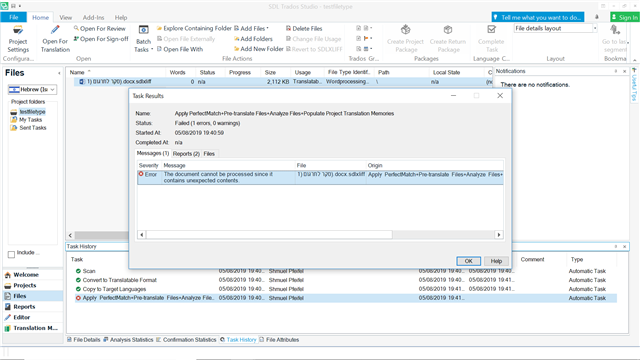
    I tried the repair, and it failed. The problem still exists. The thread you referred me to relates to an error message that I am getting. I am getting:

    Trados Studio screenshot showing an error message 'The document cannot be processed since it contains unexpected contents' in the Messages tab.

    when I requested assistance about this in a previous thread I posted I was referred by your colleague to another thread about another error message pertaining to that file identifier, for Studio 2015, so it was of no help to me. Quite depressing tbh.

    emoji


    Generated Image Alt-Text
    [edited by: Trados AI at 5:40 PM (GMT 0) on 28 Feb 2024]
Reply Children
  • Hi

    There are only a few SDL employees working here on the forums and they physically can't cover everyone's requests. Most of us who help on these forums are doing it on a voluntary basis because we think the software is pretty great and want to help people who are less knowledgeable of it to learn and cope better with it. This means that sometimes we can't give 'expert' advice if something is outside of our knowledge when we see a request for help that nobody else has been able to answer, so we try instead to find an existing solution for the problem, for example, by searching on the forums for threads where someone's been helped before (2015 advice can sometimes be applied to 2019), or in the 'Knowledgebase' if a solution has been found and posted there.

    We don't always find the answers but we do our best. The plus side is that in helping others, we also learn ourselves.

    Please do try a Windows Repair of Microsoft Office, then if that doesn't work and you know how, try reinstalling it. 

    I'm probably stating the obvious here... but huge pieces of complex software that have been programmed by humans are extremely likely to interfere with each other. It's a fact of life and quite unavoidable. The conscientious programmers do try very hard to prepare their software for interaction with all and any of the other complex software out there but it's impossible to know what combination of software is on each individual PC and how it interacts already and will affect and interact with whatever new software the user installs or updates.

    I'm not making excuses, just saying what I know. There are far more knowledgeable experts out there than I so I hope I'm not misinforming you and that, if I am, someone who knows more than I do will contribute a better answer than mine Wink

    Sooooo, can we combine both of my answers to two of your questions and try a Windows Repair on both SDL Trados Studio (& MulitTerm?) AND Microsoft Office...

    THEN, if that doesn't work, please try reinstalling at least Studio. Then, if the problems still persist, you have the right to contact the very knowledgeable guys at SDL Installation Help. They can make suggestions or better still connect to your machine and find out what is causing these issues for you.

    Please try, I'm 99.9% positive they will be able to improve your situation.

    All the best,

    Ali Smiley

  • In addition to my looong reply, I've just re-read your post and saw that you've already tried the Windows Repair... Sorry! So, move on to re-installing (you can download the installer for the latest version from your SDL Account).

    If that does not work, contact Installation help

    Select 'Installation' from the 'Case Type' dropdown menu. Then describe to them both the problems you have had, giving your email address accurately so they can reply to you. You can refer to this post if you wish, to show that you've really been trying to find a solution and say that I , the author of the Jargon Buster recommended you contact them.

    All the best,

    Ali Slight smile

  •  thank you for caring. Tbh, the prospect of uninstalling and reinstalling Windows is so daunting that I hope I wake up tomorrow morning and the problem will have just miraculously disappeared. If not, I will try to reinstall Studio as a lat measure, even though it is annoying, and then I think your installation support advice will be my next step. Thanks again. Shmue

  • Hi 

    Thank you for knowing that I care, I do Blush !

    I wasn't suggesting that you uninstall Windows, only Studio and possibly Office... I'm guessing you know that.

    Anyway, uninstalling and reinstalling Studio doesn't take veeery long but it entitles you to the full possibility of expert help...

    Give it a go and let me know if they find a solution for you...

    All the best,

    Ali Smiley