You are currently working on UAT 

Rant: Studio 2019 Project Wizard

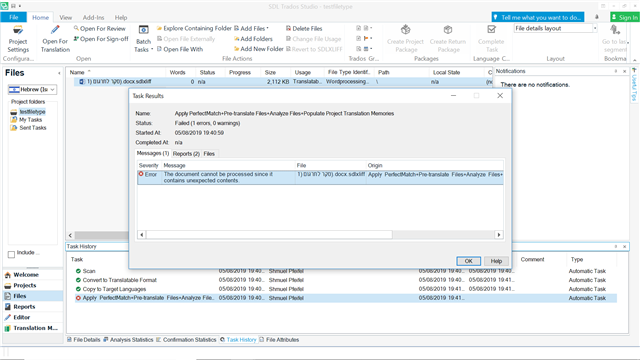
 I cannot believe this wizard was not out the window in the last update! I am sick and tired of being unable to create simple project files folders, and keep getting error messages that "the file/folder already exists" even after I deleted it in windows explorer, not to mention a renaming, an impossible task. I am sick and tired of hard restarts because of that. I am sick and tired of the annoying messages when I change the project template. I am sick and tired of getting file processing error messages in the wizard that do no come up when processing a file not through the wizard. That wizard is awful. Take it away.

Sorry for the tone, that wizard is just...too much for August!

Shmuel

Parents
  • Hi

    The Studio 2019 project wizard has worked perfectly for me right from the very first beta. I therefore can't reproduce this problem you've been having.

    Firstly, is your version of MultiTerm also up to date? You can find this out by opening MultiTerm then going to the Help tab and clicking 'Check for Updates'.

    Next, have you run a Windows Repair on Studio recently? Or have you tried reinstalling? This can sometimes be all it takes to cure a problem caused by software/environment clashes. Here's how to do both:

    First, try a Windows Repair of Studio and MultiTerm components, as here:

    1. Close all SDL applications.
    2. Open the Control Panel:
      • Windows Vista/7Start > Control Panel > Programs > Programs and Features.
      • Windows 8: Right-click on the screen at bottom-left corner and choose Control Panel > Uninstall a Program.
      • Windows 10: Right-click on Start > Control Panel > Select View by: Small Icons > Programs and Features
      • - or type 'Control Panel' in the search line on your bottom Windows toolbar.
    3. Click/highlight the relevant SDL product from the list (e.g. SDL Trados Studio 2019 etc) and click 'Repair' either on the top toolbar or on the right-click dropdown menu.
    4. Restart Studio/MultiTerm.
    If that doesn't help, try reinstalling both products.
    If that doesn't work, then you have the right to contact Installation Help free of charge, here:

    installation and licensing help

    Select 'Installation' from the 'Case type' dropdown menu.

    Someone will help in the next day or two if you give your correct email address.

    It would be good if you could share the solution here when the help team find it... Thanks!

    All the best,

    Ali :)

  • Hi Allison,

    Thank you for your reply. I will try the procedure you suggest.

    However:

    1. There is a known issue with wordprocessingML v.2 that I already previously complained about, and received a very unhelpful response in this forum. I keep getting error messages of "unexpected content" when preparing perfectly good Word files, both ways of translation, that can be processed just fine without the wizard.

    2. This problem vanished for a while and now returned with vigor after the SR2 update, so now I cannot use the wizard at all. How can this be?

    3. I fail to understand the relation of the wizard and MultiTerm. To best knowledge, MultiTerm is not involved in any way in creating projects. At least not with me.

    4. I just installed the RS2, why would there be a need to reinstall everything?

    Thank you

    Shmuel

  • Hi

    Re no. 1 I'm not enough of an expert to reply to that (I'm just a freelancer who likes helping people)

    Re no. 2, it's possible that something in the update clashes with something in your PC environment, which is why a Windows Repair might solve it. No software house of any kind can cover their updates for every eventuality, which is why the Windows Repair feature was created.

    Re no. 3, I wasn't suggesting a direct correlation between MultiTerm and the Project Wizard, it's just that Studio and MultiTerm both behave more smoothly if they are each the latest update (this didn't used to be necessary but as each piece of software has become more complex, it's become so).

    Re no. 4, I suggested reinstalling because if it doesn't work then you have access to free expert help from the Installation Help Team... Wink

    All the best,

    Ali Slight smile

Reply
  • Hi

    Re no. 1 I'm not enough of an expert to reply to that (I'm just a freelancer who likes helping people)

    Re no. 2, it's possible that something in the update clashes with something in your PC environment, which is why a Windows Repair might solve it. No software house of any kind can cover their updates for every eventuality, which is why the Windows Repair feature was created.

    Re no. 3, I wasn't suggesting a direct correlation between MultiTerm and the Project Wizard, it's just that Studio and MultiTerm both behave more smoothly if they are each the latest update (this didn't used to be necessary but as each piece of software has become more complex, it's become so).

    Re no. 4, I suggested reinstalling because if it doesn't work then you have access to free expert help from the Installation Help Team... Wink

    All the best,

    Ali Slight smile

Children