You are currently working on UAT 

Upgrading TMs (context menu vs. ribbon)

If I choose "Upgrade Translation Memories" in the ribbon, I have to go through a huge dialogue and end up with all TM names changed: Test.sdltm will now be Test (2).sdltm and so on.
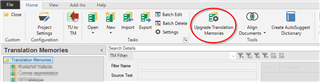
Screenshot of Trados Studio ribbon with 'Upgrade Translation Memories' button highlighted in the 'Home' tab.

If I right-click on the TM and select "Upgrade TM", no further questions are asked and Studio just does the job.

Is the outcome any different? Why does the ribbon option change the name of the TM (has to be changed in all project settings then...)?

Daniel


Generated Image Alt-Text
[edited by: Trados AI at 5:35 PM (GMT 0) on 28 Feb 2024]

emoji
Parents
  • Hello ,

    The two options produce different results.

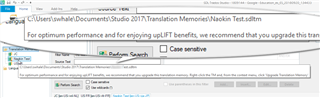
    If you have a single TM that is ready for upgrading...ie large enough to enjoy the benefits of 'upLIFT'...

    Trados Studio screenshot showing a recommendation to upgrade the translation memory to enjoy upLIFT benefits, with the upgrade option highlighted.

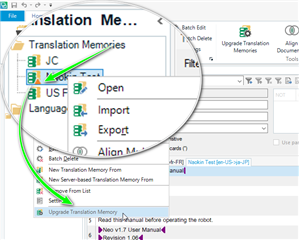
    then the TM will be highlighted with the small triangle and the option to upgrade will be available

    Screenshot of Trados Studio's Translation Memories tab with the 'Upgrade Translation Memories' option available in the dropdown menu.

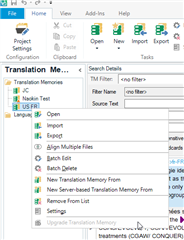
    However, if I choose a small TM (and therefore not ready to benefit from upLIFT- the option to upgrade will be greyed out

    Trados Studio interface displaying the Translation Memories tab with the 'Upgrade Translation Memories' option greyed out, indicating it's not selectable.

    and you cannot upgrade.

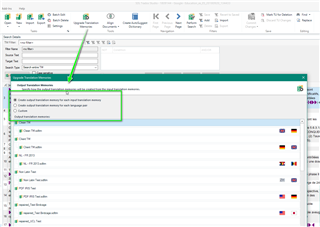
    The second option....

    Trados Studio window showing the 'Upgrade Translation Memories' dialog with options to select multiple TMs for detailed tuning.

    Allows you to upload multiple TMs and fine tune what you want to do in more detail

    ...maybe create one (from multiple) translation memory for each language pair.

    Oana Nagy | QA Engineer | RWS Group

    emoji


    Generated Image Alt-Text
    [edited by: Trados AI at 5:36 PM (GMT 0) on 28 Feb 2024]
Reply
  • Hello ,

    The two options produce different results.

    If you have a single TM that is ready for upgrading...ie large enough to enjoy the benefits of 'upLIFT'...

    Trados Studio screenshot showing a recommendation to upgrade the translation memory to enjoy upLIFT benefits, with the upgrade option highlighted.

    then the TM will be highlighted with the small triangle and the option to upgrade will be available

    Screenshot of Trados Studio's Translation Memories tab with the 'Upgrade Translation Memories' option available in the dropdown menu.

    However, if I choose a small TM (and therefore not ready to benefit from upLIFT- the option to upgrade will be greyed out

    Trados Studio interface displaying the Translation Memories tab with the 'Upgrade Translation Memories' option greyed out, indicating it's not selectable.

    and you cannot upgrade.

    The second option....

    Trados Studio window showing the 'Upgrade Translation Memories' dialog with options to select multiple TMs for detailed tuning.

    Allows you to upload multiple TMs and fine tune what you want to do in more detail

    ...maybe create one (from multiple) translation memory for each language pair.

    Oana Nagy | QA Engineer | RWS Group

    emoji


    Generated Image Alt-Text
    [edited by: Trados AI at 5:36 PM (GMT 0) on 28 Feb 2024]
Children