You are currently working on UAT 

URGENT change language combination

I have updated Studio to the 2019 version. Now I have wrong language combinations, English-Japanese intead of English-Italian. It seems that I can't change it from the settings, what shall I do? 

I need English-Italian but Italian is not an option I am offered. Please help. 

Parents Reply
  • Yes, but I remind you that I followed exactly what you suggested (reset the license with a different department, and reinstall the program instead of the second option because you said it would be safer and would allow me tO change language combinations. This did not happen,  and you need to know it doesn’t work. After reinstalling, (very complicated process as you know, with error messages to solve here too) the languages werFlushedset exactly as they were before, with German instead of Japanese FlushedI was not asked what were the languages I wanted  ( as you affirmed) and there was No way to change them. Just like the point where all this started.

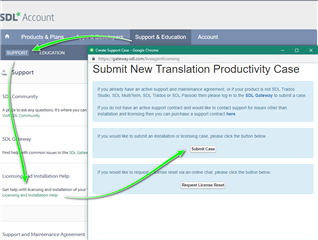
    So I did exactly what you said. I did not realize you were not a support team. Sorry now I know, next time I’ll write to the correct department from the beginning. But I still think that SDL must offer a better and more user friendly platform of assistance to clients. The Support home page is extremely confusing and misleading. Sorry if I was frustrated by the whole situation. I lost two clients in he meantime and I still do not understand why this Update created so many problems. SDL software programming also clearly needs to be improved.

    All the best. Thank you any way for trying to help. 

Children
No Data