You are currently working on UAT 

URGENT change language combination

I have updated Studio to the 2019 version. Now I have wrong language combinations, English-Japanese intead of English-Italian. It seems that I can't change it from the settings, what shall I do? 

I need English-Italian but Italian is not an option I am offered. Please help. 

Parents Reply
  • After 3 days spent struggling with it, I've just found out (from a colleague, not your support team) that it was not necessary to unistall/reinstall the program, which, by the way, generated the error I described in my previous email. 

    After copying a code in the program (also explained in one message in the community) I could change the languages. I hope it will work with all the projects I'm dealing. Why nobody in the support team told me about it? Greta, You, Daniel....  I had to jump from one chat to another, following 5 different people with very complicated instructions. 

    Thank you, You tried to help but the path was easier than we all expected. This service must be improved, and be made more user-friendly in order to satisfy your clients' expectations. 

Children
  • Hello ,

    Thanks for confirming you have been able to resolve this.

    We do not generally give advice on editing the registry in community as errors doing this, can seriously damage Windows itself.

    But good to know everything is back on track.

    Oana Nagy | QA Engineer | RWS Group

  • Hi

    I am glad to hear that you solved the issue, and I am sure we all know how it is to be under pressure and something is not working as we expect it to. However, please note that this is a user forum. Few of us are SDL employees (I am not) and even most of those who are contribute voluntarily.

    Every software update has the potential of things going wrong or needing some "firefighting" before things run smoothly. It's best to schedule updates to times with a bit of slack, so that holdups don't develop into crises.

    Again, glad you solved the issue at hand, and I wish you a very good day!

    Daniel

  • Hello

    Happy to hear it was resolved.
    However, let me please get back to you on the following notes:

    After 3 days spent struggling with it, I've just found out (from a colleague, not your support team) that it was not necessary to unistall/reinstall the program, which, by the way, generated the error I described in my previous email. 

    After copying a code in the program (also explained in one message in the community) I could change the languages. I hope it will work with all the projects I'm dealing. Why nobody in the support team told me about it?

    Kindly check the very first response to your query: 

    Alternatively, there is a workaround (bit technical) to edit the registry - this is quicker but the re-installation might be safer:
    https://community.sdl.com/product-groups/translationproductivity/f/studio/21569/sdl-2017-do-not-prompt-for-default-languages-after-uninstalling-and-reinstalling-it/74782#74782

    I believe this is what you have performed just now, which you say you found out from a colleague (not SDL) after days of struggling. But it was there for you all along.

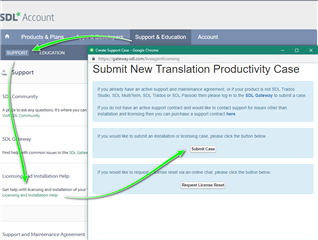
    Furthermore, all of us suggested to you to contact our support team via the provided link to use the free help offered in such cases, but a ticket was never raised. Help was in arm's length. 

    I understand your frustration, but please try to see it from our side as well - we gave you the instructions so you could perform the fix yourself and also showed you a way to get free technical help, so our engineers could do it for you.
    You are right that there were several people in this thread contacting you, and maybe it indeed became confusing, if so we are sorry for that, but as I see it from here you still seemed to have ignored quite a few of the helping hands.

    I hope Studio will serve you well, and will work for you smoothly from now on.

    Best wishes,
    Greta

    Customer Success Consultant - SDL

  • Yes, but I remind you that I followed exactly what you suggested (reset the license with a different department, and reinstall the program instead of the second option because you said it would be safer and would allow me tO change language combinations. This did not happen,  and you need to know it doesn’t work. After reinstalling, (very complicated process as you know, with error messages to solve here too) the languages werFlushedset exactly as they were before, with German instead of Japanese FlushedI was not asked what were the languages I wanted  ( as you affirmed) and there was No way to change them. Just like the point where all this started.

    So I did exactly what you said. I did not realize you were not a support team. Sorry now I know, next time I’ll write to the correct department from the beginning. But I still think that SDL must offer a better and more user friendly platform of assistance to clients. The Support home page is extremely confusing and misleading. Sorry if I was frustrated by the whole situation. I lost two clients in he meantime and I still do not understand why this Update created so many problems. SDL software programming also clearly needs to be improved.

    All the best. Thank you any way for trying to help. 

  • Thank you Steven for your support. Still, all this should not have happened. It is not your (I mean the whole community that tried to help me) fault. ANY update should be easy to install and should maintain the previous settings. I still do not understand why my language combinations changed, and why I could not repair this easily and rapidly as it should be. I definetely won't update Trados any more for a long time. 

    I'm writing all this to the Support Team and SDL to let them know my complaint. TKS.