You are currently working on UAT 

A small TM for each subject VS a big TM for similar subjects? (Need suggestions and advice)

Hi,


What're the best methods for creating and organizing TM and storing them to use for the next projects? As a beginner with Trados Studio; I guess creating a small TM (less TUs) for a subject or a category is better than creating a big TM (more and more TUs) for a few similar subjects.

For example; if I’m going to translate an article about Painting, I’ll create a TM just for it and call it e.g, Painting TM! After that, if I’m going to translate a document about Painting History, I’ll create a specific TM for it, and I think it would be better they'll be separate from each other than merge into one TM.

Maybe it’s not necessary to create a TM for each subject and it’s better to use a big TM that cover similar subjects because there are many similar words, phrases, names, date, and more things that in common with each other.

What do you think and what're your suggestions? Creating and using a small TM for a subject (e.g, MS Word has own TM and MS Outlook has own one, etc..) or creating and using a big TM with a lot of TUs for applying about some similar subjects (e.g. a TM that covers all MS Office software)?

What're the advantages and disadvantages of small TM with less TUs and huge TM with a lot of TUs?


Best,

Masoud

Parents Reply Children
  • Hello

    Upgrading the TM in itself will not help - the functionalities you are looking for is the export/import and the batch editing I believe.

    Are these past TM's customer-specific? Only containing translation units from one customer?
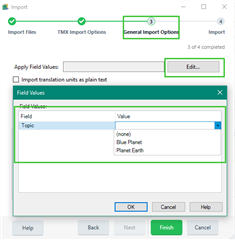
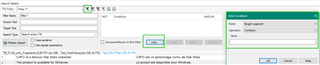
    If so, you can simply export the TM and import it to the new aggregated TM, with defining a field value to apply for all these translation units added with the import:
    Trados Studio import settings window showing the option to apply field values to imported translation units with 'Topic' field and 'Blue Planet' value selected.

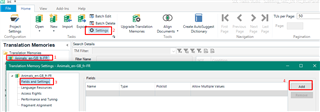
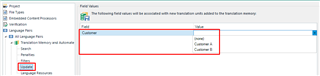
    (Of course these values first have to be defined in the settings of the new TM.)

    Then as you run the import, the TUs will be added to the new TM with all the selected values:
    Trados Studio translation memory settings window displaying custom fields with 'Topic' field and 'Blue Planet' value defined.

    In case your past TMs contain TUs from mixed origin, for more customers, it is a bit trickier.
    In this case I would first batch edit them in the past TM, adding the field value to specific segments based on filters. This is only possible of course if a filter can be defined to differentiate between the TUs for different customers.

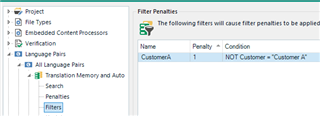
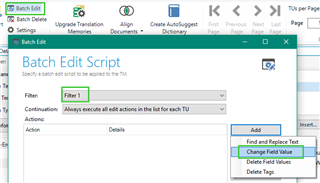
    The filter has to be defined and saved first:
    Trados Studio batch edit settings window with a filter applied and the option to change field values highlighted.

    It can be the date when it was added, or certain words in the source or target, etc. Whatever you feel works to differentiate. If there are more then 2 customers, more filters have to be defined.

    Then once the filter(s) is/are defined, go to the settings and set up the filed values to apply.

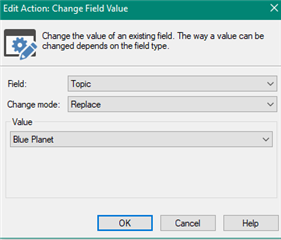
    After this go to Batch Edit and define the what to do, and select the filter so that it would only be applied to the matching TUs:
    Trados Studio batch edit script window showing 'Filter 1' selected and options to add and replace text or change field values.

    Edit action window in Trados Studio for changing field value with 'Topic' field selected and 'Blue Planet' as the new value.

    And then execute it. Once done, the content of the TM can be exported and added to your new aggregated TM.

    This also works without the batch edit: once you defined the filter you can just export the TUs matching the criteria and them import them with adding the field values described above.

    This is a bit labour-intensive but you only have to do this once with your past TMs, and in the upcoming translations you can set the field values before starting the work so the new units would be automatically added with the correct values.

    Hope this helps. In case something is unclear, just let me know.

    Best wishes,
    Greta

    emoji


    Generated Image Alt-Text
    [edited by: Trados AI at 6:29 PM (GMT 0) on 28 Feb 2024]
  • Hello ,

    thank you very much for that detailed explanation. I'll try those instructions as soon as possible.

    My TMs are indeed customer specific.

    Davide