You are currently working on UAT 

A small TM for each subject VS a big TM for similar subjects? (Need suggestions and advice)

Hi,


What're the best methods for creating and organizing TM and storing them to use for the next projects? As a beginner with Trados Studio; I guess creating a small TM (less TUs) for a subject or a category is better than creating a big TM (more and more TUs) for a few similar subjects.

For example; if I’m going to translate an article about Painting, I’ll create a TM just for it and call it e.g, Painting TM! After that, if I’m going to translate a document about Painting History, I’ll create a specific TM for it, and I think it would be better they'll be separate from each other than merge into one TM.

Maybe it’s not necessary to create a TM for each subject and it’s better to use a big TM that cover similar subjects because there are many similar words, phrases, names, date, and more things that in common with each other.

What do you think and what're your suggestions? Creating and using a small TM for a subject (e.g, MS Word has own TM and MS Outlook has own one, etc..) or creating and using a big TM with a lot of TUs for applying about some similar subjects (e.g. a TM that covers all MS Office software)?

What're the advantages and disadvantages of small TM with less TUs and huge TM with a lot of TUs?


Best,

Masoud

Parents
  • Hello ,

    A sensible way of organizing your TM's I would suggest is by topic/subject.

    You only need different TM's if the subject matter is quite varied.

    As an example, if you translate legal documents -you might like to have one main TM for all the general translations and then a second TM if you do lots of say medical translations and a different TM if you also translate legal documents in the financial sector.

    If you were translating an  MS Office manual- then you could i think quite happily put this all in one TM.

    What however is also important- is to ensure you regularly back up your TM's (and other resources).

    https://appstore.sdl.com/language/app/sdl-tmbackup/869/

    Oana Nagy | QA Engineer | RWS Group

  • Hello

    if I create and use subject-related TMs (e.g. in legal field), is it possible to add customer and project details in TM fields?

    I mean that I would use the, say, legal TM for any legal project regardless of the client but I would like to keep track of the customer and project each segment refers to, is it possible by using TM fields?

    If yes, is there a way to make Trados Studio insert customer and project information into such fields ?

    Kind regards

    Davide

  • Hello

    Kindly tag people in the future as I did here (using the @ symbol + the name), otherwise they do not get notified when you write to them.

    This is a very good question and it is absolutely recommended to differentiate where the content is coming from in your TM.

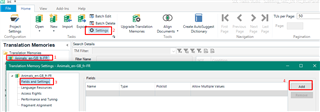
    These are called field values. First, you have to define these values in the given TM's settings in the Translation Memories view:
    Trados Studio Translation Memories view showing the settings button and a highlighted field values section with an 'Add' button.

    Like this for example:

    Close-up of a drop-down menu in Trados Studio with 'Customer A' and 'Customer B' as selectable field values.

    You can define a list to pick values from or choose 'Text' as the type and then you can add the value freely (but might mistype, so I would recommend using pre-defined picklist values wherever possible).

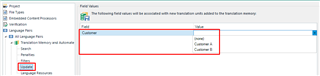
    Once this is set, when you are setting up a new translation project / before you start a new translation, go to the Project Settings > Language Pairs > Translation Memory... > Update to select the values:
    Trados Studio Project Settings window highlighting the field values section with 'Customer' field and values 'None', 'Customer A', 'Customer B'.

    Then once you start confirming segments in the translation thus loading them into the memory (or do a memory update batch task), the segments will be added into the TM with these custom values:
    Trados Studio showing a list of translation units with the 'Customer' field column displaying values 'Customer A' and 'Customer B'.

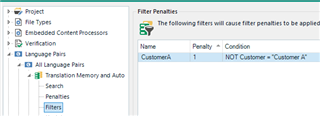
    You can then do several things using these values, for example define filters to prioritize translation units created for 'Customer A' the next time you translate for Customer A. This can be done in the Project Settings > Translation Memories... > Filters:
    Filter Penalties section in Trados Studio Project Settings with a filter named 'CustomerA' applying a 1% penalty to translation units not added with the value 'Customer A'.

    (This filter means for example that every TU that was not added with the value 'Customer A' will be penalized with 1% - can only be 99% match max., so the TUs for Customer A will be preferred.)

    Hope this answers your questions.

    Best wishes,
    Greta

    emoji


    Generated Image Alt-Text
    [edited by: Trados AI at 6:29 PM (GMT 0) on 28 Feb 2024]
  • Hello ,

    thank you very much for your reply and for notifying me about the tag issue. I have corrected it and I will go through the procedure information you described as soon as possible.

    Davide

Reply Children