You are currently working on UAT 

Studio 2019: TM view displayed instead of Editor after changes to project settings

Hi,

Each time I open a file in the Studio editor, then make changes to the TM settings in the Project Settings window of my projects and then close the Project Settings window, the TM view is activated instead of the Editor view with my open file. This behavior seems to be new to Studio 2019 and there is certainly a reason for it, but I find it quite annoying not to come back to the previous view. Would it be possible to change back to the old behavior?

Best

Annette (from Manfred's account)

Parents
  • Hello Annette .

    I fully agree with you and I can reproduce this behaviour with my Studio 2019 SR2 Freelance.

    I was hoping that Studio 2019 SR2 might have rectified this behaviour as this is not a logical step to be moved to the TM View when you are actually working in the Editor View.

    Also, it is worth noting that this behaviour occurs whether or not actual changes are being made to the TM settings - simply looking at the TM settings in Project settings is enough to be taken (against my will) to the TM View!

    Where can we submit a request to keep Studio 2019 on the Editor View after looking at TM Settings in Project Settings? Thanks.

    Alexa

    PS: I am attaching two (before and after) screen captures for other users to visualise this behaviour.

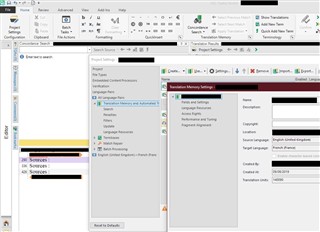
    1) Editor View:

    Screenshot of Trados Studio 2019 SR2 Freelance showing the Editor View with Project Settings window open, displaying Translation Memory Settings.

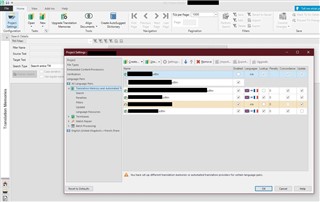
    2) TM View:

    Screenshot of Trados Studio 2019 SR2 Freelance showing the TM View with a warning message about loss of information due to navigation away from the Editor View.

    emoji


    Generated Image Alt-Text
    [edited by: Trados AI at 5:50 PM (GMT 0) on 28 Feb 2024]
Reply
  • Hello Annette .

    I fully agree with you and I can reproduce this behaviour with my Studio 2019 SR2 Freelance.

    I was hoping that Studio 2019 SR2 might have rectified this behaviour as this is not a logical step to be moved to the TM View when you are actually working in the Editor View.

    Also, it is worth noting that this behaviour occurs whether or not actual changes are being made to the TM settings - simply looking at the TM settings in Project settings is enough to be taken (against my will) to the TM View!

    Where can we submit a request to keep Studio 2019 on the Editor View after looking at TM Settings in Project Settings? Thanks.

    Alexa

    PS: I am attaching two (before and after) screen captures for other users to visualise this behaviour.

    1) Editor View:

    Screenshot of Trados Studio 2019 SR2 Freelance showing the Editor View with Project Settings window open, displaying Translation Memory Settings.

    2) TM View:

    Screenshot of Trados Studio 2019 SR2 Freelance showing the TM View with a warning message about loss of information due to navigation away from the Editor View.

    emoji


    Generated Image Alt-Text
    [edited by: Trados AI at 5:50 PM (GMT 0) on 28 Feb 2024]
Children
No Data