 Translate



Hello,
I am having problems with the 2019 version of Trados Studio. It freezes all the time, it will not let me close it, etc. Why is this so?
Kind regards,
Almudena
You are currently working on UAT

Hello,
I am having problems with the 2019 version of Trados Studio. It freezes all the time, it will not let me close it, etc. Why is this so?
Kind regards,
Almudena
Hi again ALMUDENA ROMAY COUSIDO
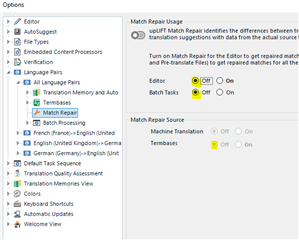
Once you'e done all that, something else that will speed Studio up is to turn off/uncheck the fragment recall/repair functionality if you don't use it, as follows:
File>Options:
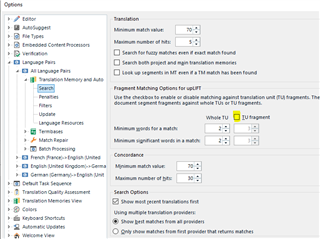
and...
Project Settings:
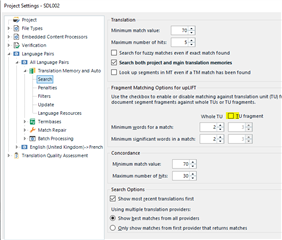
and
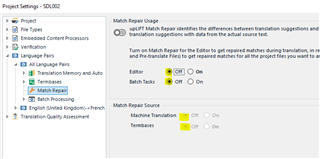
It is worth noting that Project Settings always overrule the profile settings made via File>Options.
All the best,
Alison


Good morning, Alison,
Thank you very much for your reply. I will do that and I will let you know whether it helps.
Kind regards,
Almudena

Good morning ALMUDENA ROMAY COUSIDO
Did you see both my posts?
You may find that the settings in the second post will be enough to stop the crashes. However, the steps in the first post are advisable for a really clean installation of Studio that works to its optimum.
Have a good week!
All the best,
Ali 
Yes, Alison, I will do what you say in both posts and I will let you know.
Thank you so much for your help.
You too!
Best regards,
Almudena
Alison, it seems to be working. :) Thank you so much!
All the best,
Almudena
So that other users can read this thread and find an answer if they're having the same problem, which of my suggestions solve the issue?
All the best,
Ali
So that other users can read this thread and find an answer if they're having the same problem, which of my suggestions solve the issue?
All the best,
Ali
Hi again, Alison,
I did everyhting you told me to do before checking my Trados, so I do not know which one solve the issue.
Kind regards,
Almudena
Ah, OK, so it worked. That's the main thing!
All the best,
Ali