You are currently working on UAT 

numbers not placeable

I am a relatively new user of CAT Tools and I am using the 30-day free trial of Studio 2019. I am translating an editable PDF (not scanned). None of the numbers in the source text are underlined as placeable. I am using a TM, and in settings the box to recognize numbers is checked. Is there something else I have to do? It shouldn’t be a matter of telling Windows to recognize international number formats, because it doesn’t recognize years or footnote numbers, nothing.

Do I have to add a method of recognizing numbers to a variable list? I am unable to download any apps because I am on the free trial. Sorry if I am overlooking something basic.

Parents
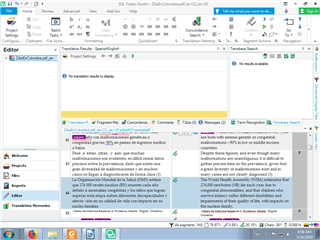
  • If number recognition is turned on in the TM settings Studio will recognize numbers in the active segment:

    Trados Studio editor view showing a segment with numbers highlighted in red, indicating a potential issue with number recognition.

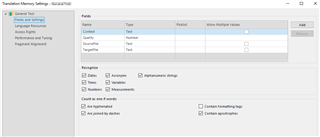
    My settings for this project are default

    Translation Memory settings window in Trados Studio with 'Numbers' option checked under 'Recognize' section, suggesting number recognition is enabled.

    Could you send a screenshot of your TM settings and the editor view where the problem shows?

    Allow me to add that any pdf document as source is problematic because pdf is simply not intended to be used as the source for anything - it is just meant to display and print device-independently. You can use pdfs as source in Studio (and in other CAT programs) but it will always add problems.

    Daniel

    emoji


    Generated Image Alt-Text
    [edited by: Trados AI at 4:35 PM (GMT 0) on 28 Feb 2024]
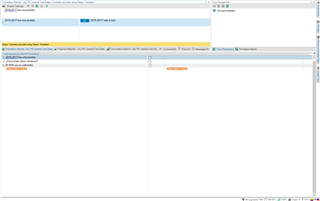
  • Actually, it seems to be recognizing numbers randomly. I've attached three screenshots of different active segments and numbers are highlighted in one of them.

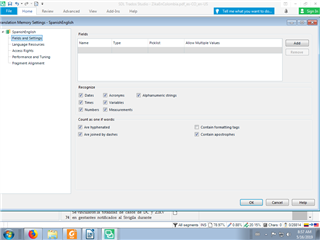
    Trados Studio segmentation settings window showing options for numbers and measurements with no visible errors.

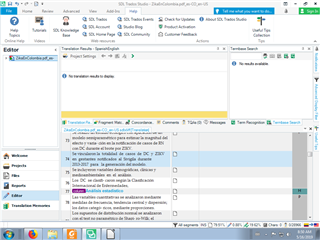
    Trados Studio editor with an active segment containing text and numbers, but no numbers are highlighted or marked.

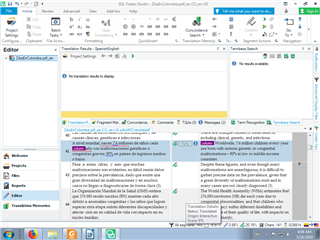
    Trados Studio editor with an active segment where certain numbers are highlighted in blue, indicating random recognition.

    Trados Studio editor with another active segment showing text and numbers with no highlighting or errors.

    emoji


    Generated Image Alt-Text
    [edited by: Trados AI at 4:36 PM (GMT 0) on 28 Feb 2024]
  • Hi 

    I never experienced this to be unreliable and I can't reproduce your issue:

    Trados Studio interface showing a PDF file in the source pane with no visible errors or warnings.

    Close-up of Trados Studio's error message 'No match found' in the target pane.

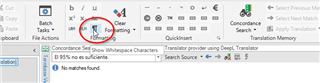
    Since your source is a pdf file, which is always a possible source of problems, try switching on "Show whitespace characters":

    Trados Studio toolbar with the 'Show Whitespace Characters' option circled, indicating a suggestion to enable it.

    Other than that, Studio takes number formats from your Windows setup - maybe  can say more about that?

    Daniel

    emoji


    Generated Image Alt-Text
    [edited by: Trados AI at 4:36 PM (GMT 0) on 28 Feb 2024]
  • Hi , hi 

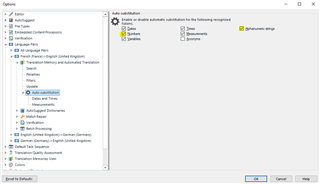
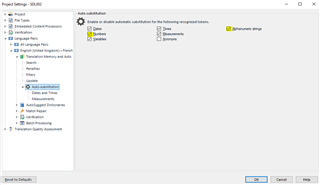
    2013-2017 is an alphanumeric string because of the dash. This may be why it hasn't been recognised... Can you check the following, Masha, to see if 'Numbers' AND 'Alphanumeric strings' are ticked under the Auto-localisation settings of the language pair (Spanish-English) you're working with:

    If you're working with 'Translate Single File', here is where you find the setting:

    File>Options>Language Pairs>[language pair]>Translation Memory and Automated Translation>Auto-substitution

    Trados Studio Options menu showing Auto-substitution settings for a Spanish-English language pair with 'Numbers' and 'Alphanumeric strings' checkboxes.

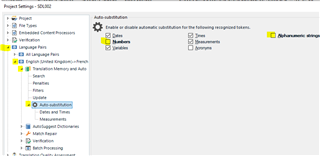
    If you're working with projects, also if you've already created a single file project, then here is where you can check the setting:

    Project Settings>Language Pairs>[language pair]>Translation Memory and Automated Translation>Auto-substitution

    Trados Studio Project Settings menu displaying Auto-substitution settings for a Spanish-English language pair with 'Numbers' and 'Alphanumeric strings' checkboxes.

    Try checking the above settings for a start, and let me know if it works...

    I hope it's as simple as this...

    I'm going out now but will check my emails later today to see if that helped.

    All the best,

    Ali Slight smile

    PS: Project settings ALWAYS overrule the same settings under File>Options

    emoji


    Generated Image Alt-Text
    [edited by: Trados AI at 4:36 PM (GMT 0) on 28 Feb 2024]
  • Hi

    Thanks for pointing that out, although this is not a problem with auto-substitution but with number recognition, and has her TM settings right (see her screenshot above).

    Daniel

  • Hi Masha Isle, hi Daniel Hug

    Of course, you're right Daniel.

    I noted that Masha's TM settings are as they should be. It was just that I know the auto-substitution settings don't work unless the same TM Fields and settings boxes are ticked so I just wondered if the opposite could be true.

    A silly idea... iIt isn't. I've tested it, and ascertained that TM settings overrule auto-substitution settings. 

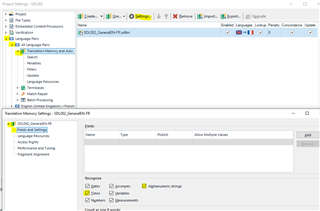
    Language pair Auto-substitution settings:

    Trados Studio project settings showing auto-substitution options for numbers, measures, dates, and alphanumerics strings.

    TM Fields and settings settings:

    Trados Studio translation memory and auto-substitution settings with TM Fields and settings highlighted.

    (this last one also accessible via the Translation memories view approach to TM settings).

    With the settings inconsistent as above, the numbers and alphanumerics are still recognised. I should have tested this to be sure before I suggested it. Was rushing out and didn't have time.

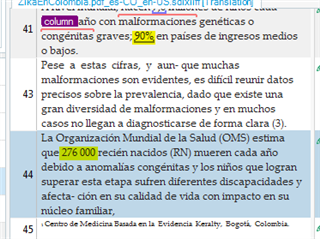
    OK, so, looking at Masha's screenshots, I notice something strange. In one particular screenshot, she has variables underlined in segments that aren't highlighted and the numbers in the highlighted segment are NOT highlighted, here: 

    Trados Studio segment view with variables underlined in non-highlighted segments and numbers not underlined in the highlighted segment.

    These same numbers are not underlined when they're not highlighted in the other screenshots. Two decidedly odd features.

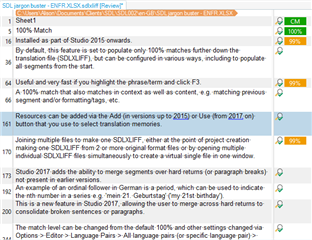
    Here's how mine look:

    Trados Studio SDLXLIFF editor view with segment matching percentages and notes on segment merging options.

    Only the variables in the active segment are underlined, which I think is the default behaviour.

    I wonder why Masha's are different.

    I've checked the PDF filetype settings to see if there's anything there that could make numbers behave differently (given that Masha's file is an sdlxliff made from a PDF). I checked the SDLXLIFF filetype too.

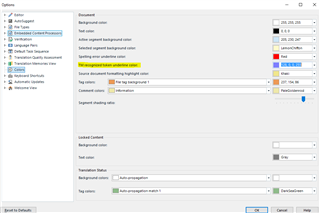
    I also checked the TM Recognised token colour setting under Colour settings and there's nothing there that could make this behaviour so.

    Trados Studio color settings menu with options for text color, background color, and segment shading.

    Thus, I suggest that this may be a 'feature' of the 30-day trial settings and once you start using Studio under license, Masha Isle, you will probably find it behaves correctly.

    When I say 'feature' I mean a small bug...

    Paul  or  - what do you make of this? Have I missed something?

    All the best,

    Ali Slight smile

    emoji


    Generated Image Alt-Text
    [edited by: Trados AI at 4:36 PM (GMT 0) on 28 Feb 2024]
Reply
  • Hi Masha Isle, hi Daniel Hug

    Of course, you're right Daniel.

    I noted that Masha's TM settings are as they should be. It was just that I know the auto-substitution settings don't work unless the same TM Fields and settings boxes are ticked so I just wondered if the opposite could be true.

    A silly idea... iIt isn't. I've tested it, and ascertained that TM settings overrule auto-substitution settings. 

    Language pair Auto-substitution settings:

    Trados Studio project settings showing auto-substitution options for numbers, measures, dates, and alphanumerics strings.

    TM Fields and settings settings:

    Trados Studio translation memory and auto-substitution settings with TM Fields and settings highlighted.

    (this last one also accessible via the Translation memories view approach to TM settings).

    With the settings inconsistent as above, the numbers and alphanumerics are still recognised. I should have tested this to be sure before I suggested it. Was rushing out and didn't have time.

    OK, so, looking at Masha's screenshots, I notice something strange. In one particular screenshot, she has variables underlined in segments that aren't highlighted and the numbers in the highlighted segment are NOT highlighted, here: 

    Trados Studio segment view with variables underlined in non-highlighted segments and numbers not underlined in the highlighted segment.

    These same numbers are not underlined when they're not highlighted in the other screenshots. Two decidedly odd features.

    Here's how mine look:

    Trados Studio SDLXLIFF editor view with segment matching percentages and notes on segment merging options.

    Only the variables in the active segment are underlined, which I think is the default behaviour.

    I wonder why Masha's are different.

    I've checked the PDF filetype settings to see if there's anything there that could make numbers behave differently (given that Masha's file is an sdlxliff made from a PDF). I checked the SDLXLIFF filetype too.

    I also checked the TM Recognised token colour setting under Colour settings and there's nothing there that could make this behaviour so.

    Trados Studio color settings menu with options for text color, background color, and segment shading.

    Thus, I suggest that this may be a 'feature' of the 30-day trial settings and once you start using Studio under license, Masha Isle, you will probably find it behaves correctly.

    When I say 'feature' I mean a small bug...

    Paul  or  - what do you make of this? Have I missed something?

    All the best,

    Ali Slight smile

    emoji


    Generated Image Alt-Text
    [edited by: Trados AI at 4:36 PM (GMT 0) on 28 Feb 2024]
Children