
 Translate



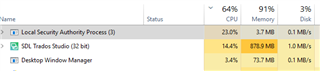
I've had issues with the Local Security Authorization Process running continuously ~20-25% CPU when Studio 2019 is open.It is ONLY when Studio is open.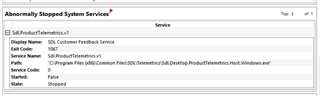
I saw that this was an issue for some with Studio 2017, but it was supposedly resolved. I am not using any server TMs or TBs. I've run several diagnostics on my system and made sure that the OS, software, and all drivers are 100% updated. The only thing I can find is when I run Performance Monitoring when the issue is occurring is that Sdl.ProctTelemetrics.v1 fails and stops.
Studio still opens, but eventually things become so slow that it crashes. Multiterm also runs extremely slowly, despite using local termbases only. Any suggestions as to what might be causing this issue?
Generated Image Alt-Text
[edited by: Trados AI at 4:29 PM (GMT 0) on 28 Feb 2024]


