You are currently working on UAT 

When importing IDML file, the whole content appears repeated several times

Hello!

I have to translate an InDesign file which I have exported to IDML in order to import it into Trados. I have worked with this type of file before with no problem, but this time, when I opened the text in Trados, the content (it's a book) was repeated 5 times, so the file has become huge and difficult to handle. 

Does anyone know what could be the reason for this?

Thanks in advance!

Blanca

Parents Reply Children
  • Hi

    first step would be to turn off "Extract hidden content" in project settings / file type ... BEFORE you add the file to your project.

    If the text is in a hidden layer of the text boxes are individually hidden, this should make Studio ignore them. Try this first and see if it solves the issue.

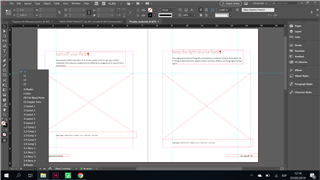
    The other possibility that comes to mind is that the undesired text is either behind an opaque object like an image or simply somewhere on the pasteboard, but off the page. (The grey area around the page on your screenshot.)

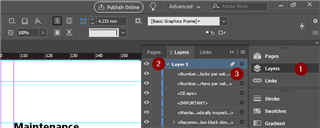
    If this is the case you have to find the respective text frames (text boxes) in order to hide them (CTRL+3). Get to the layers window, select the layers tab and you'll get a list of all layers (Layer 1 in my screenshot) and indented all objects on that layer. An eye to the left indicates that the layer/item is not hidden. You'll have to go through the list of items to decide which ones are to be translated...

    Screenshot of Trados Studio interface showing the Layers window with Layer 1 selected and a list of text boxes on that layer. An eye icon indicates visible layers.

    Just to point out that this is really your client's job: To provide you with a clean translation source.

    To be quite honest - if you have to do so much work in the source material (with the chance of making a mistake) I'd leave my hands off it.

    You can download the Community Advanced Display Filter for Studio from the appstore (it's free) and set a display filter that will only show you the first occurence of a segment - all identical segments will be hidden in the Editor. You can then generate an xliff and work with that. Once you've done your translations, use the xliff as PerfectMatch source or the TM to fill in the target text in the original file. I don't know whether this would really work, but I think it might. Don't split or merge segments as this will create problems when transferring your translations to the idml-based sdlxliff file.

    The solution to this problem is not really in Studio, and it is not the translator's problem either - or should not be. This kind of thing has to be sorted out by the provider of the source text.

    Daniel

    emoji


    Generated Image Alt-Text
    [edited by: Trados AI at 4:27 PM (GMT 0) on 28 Feb 2024]
  • Hi Daniel!

    Thanks a lot for your answer. In the end, the client was able to delete all the text from the master spreads that were giving problems, so it is all fine now :)

    Thank you again!

    Blanca