 Translate



Following some (disastrous) settings adjustment of Studio 2019 SR1 (Which one? I cannot remember!), I can no longer confirm any segment.
Error message: "La valeur ne pas être null. Nom du paramètre: baseUrl".
I am begging for help.
You are currently working on UAT

Following some (disastrous) settings adjustment of Studio 2019 SR1 (Which one? I cannot remember!), I can no longer confirm any segment.
Error message: "La valeur ne pas être null. Nom du paramètre: baseUrl".
I am begging for help.
Resetting Studio should help.
You could try here via File>Options if this is happening with any single file translation or project:
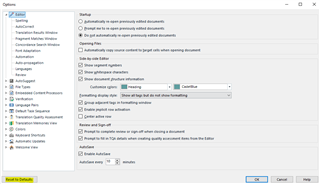
Or here in the Project Settings if it is just with one project that this is happening:
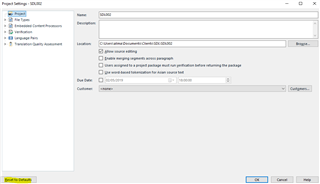
If that doesn't work then a reset may sort this problem:
To do this, rename the following folders, for example add '_old' to the filename:


Thanks, Ali, for your night help! Of course your efforts deserve a balance.
None of the Studio resettings worked.
Right from the start, I had thought of a Studio repair through the Windows Control Panel (no success), still I repeated it: second failure.
I even thought of a fresh Studio installation over the existing one (I did not want to deactivate/activate my licence): it did not work.
WHAT DID WORK: the _old renaming trick of the five folders, although the C:\Users\[User_Name]\AppData\Local\SDL\ProjectApi folder was missing (It was recreated later).
Thanks again! Kind regards.
Gérard

You're welcome! I'm so glad I was able to help!
All the best,
Ali :)
You're welcome! I'm so glad I was able to help!
All the best,
Ali :)