

You are currently working on UAT 

Segment confirmed, added to TM, then edited, and reconfirmed but DOUBLES are made instead of being overwritten

Hello,

One of my team members has been experiencing this problem which I've never seen before and honestly thought was impossible. I can't replicate this phenomenon on my own computer so I don't know which settings were changed on her computer to result in this. 
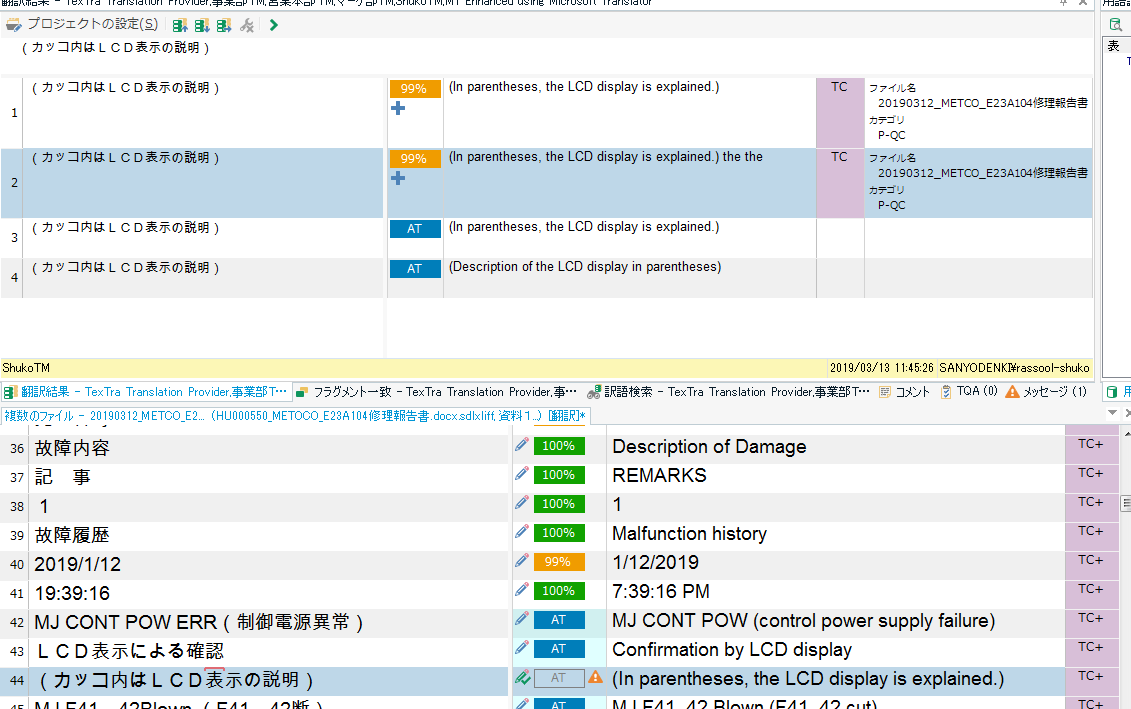
Trados Studio interface showing a segment with the text '(In parenthesis, the LCD display is explained.) the the' confirmed and entered into the TM.

To test the problem she told me about, I typed "(In parenthesis, the LCD display is explained.) the the" and confirmed the segment and it entered the TM. Then I immediately deleted "the the" and confirmed the segment but instead of overwriting the segment and showing a CM/100 match, it shows both most recently confirmed hits with a -1 duplicate penalty. I thought such penalties would only apply to duplicates from different TMs. But this is the same TM and same project so I'm very lost as I thought this went against the very core of Trados's code. Please assist.


Generated Image Alt-Text
[edited by: Trados AI at 3:57 PM (GMT 0) on 28 Feb 2024]

emoji


  • I wonder if it's related to the use of Lookahead? Perhaps the original result is still cached and causes you this problem when you change it immediately.

    Try turning off Lookahead and see if this still happens. You might have to close the file and open again after changing the setting, just to be sure. I'm not sure when Studio holds onto some settings and when not so worth making sure.

    Paul Filkin | RWS

    Design your own training!
    You've done the courses and still need to go a little further, or still not clear? 
    Tell us what you need in our Community Solutions Hub

  • Hi Paul,

    Thank you for your prompt response. I'll pass this on to her and get back with the results tomorrow since she has today off. 

    However, personally, it is disappointing that your proposed workaround (not a solution) involves sacrificing a key function that I been championing within my team as a solution their complaints about the slow "TM searching" that happens every time they move to the next segment. I value Lookahead even though it's buggy and causes the results window to jump to the previous segment (for me at least, but I ignore this problem). It's unfortunate that a key 2017 function that delivers speed and efficiency will have to be sacrificed for the sake of regaining essential TM functionality. I hope I won't be accused of being out of line for saying that.

    This same topic was discussed here:

    https://www.proz.com/forum/sdl_trados_support/271117-studio_2014_duplicates_when_updating_tm.html

    https://www.proz.com/forum/sdl_trados_support/172292-sdl_trados_2009_tm_segments_not_updated_but_added.html

    And several posters shared my (and most disappointingly, my team member's) frustration in a lack of consistency. It didn't seem like any solution was found in either tread. And just to clarify, the duplicates do not occur after an "update main translation" memory batch task where the "always add new translation" option is available. But just in case, is the "Always add new translation to the translation memory" option also applicable to in-editor corrections? I assume since that option only exists in the "update main/project translation memory" batch tasks that that option would only be applicable there for batch tasks and not in-editor updates. http://producthelp.sdl.com/SDL%20Trados%20Studio/client_en/Edit_View/TMs/EVTranslationMemoryActionsUpdate_the_TMwith_New_Translations.htm
    Kindly correct me if I'm wrong. 


  • I think I'd like to know if this was the problem before I respond to you.

    Paul Filkin | RWS

    Design your own training!
    You've done the courses and still need to go a little further, or still not clear? 
    Tell us what you need in our Community Solutions Hub

  • Keenan Cooper said:

    I thought such penalties would only apply to duplicates from different TMs.

    Hi Keenan,

    I just wanted to chime in and say this also happens when you manually add multiple translations to a TM, but that's, of course, intentional.

    However, if I'm understanding correctly, your colleague is not using the Add new translation option, but rather is confirming her segments as usual.

    I was trying to see if I could repro this, as I hadn't necessarily noticed it happening, and I can report that I've been able to reproduce it.

    Here's a video showing the issue as I'm seeing it. It doesn't happen all the time, and it doesn't necessarily happen on the same segments, that is, if you go back to the same segment and change its translation multiple times, sometimes the TU will be overwritten and sometimes it won't. LookAhead is disabled, but that doesn't seem to make a difference. I also tried with my main TM and with a new, empty one, and the issue happened with both.

     are you able to reproduce this as well?


  • Okay. I did Skype screen sharing with my coworker and worked through the setting changes (not incredibly computer literate). To both of our shock, this worked. Thank you, Paul. Turning off Lookahead, then repeating changes and confirmations to the same segment showed just a CM or 100% hit in the results window. No duplicates. As it should be. We turned Lookahead back on and it worked normal, with no duplicates, much to her surprise as well (can't stress this enough). It generally worked fine except a couple times after changing one segment, the same segment would show the previously confirmed edit, not the new one, but not as a duplicate. Just 100% match of an old hit despite confirm a new version of it. This was with Lookahead on, and I know that sometimes there's a lag with the search results so refreshing the view would fix it. I forgot how to refresh the results window (Ctrl something?) but changing the TM project settings a couple of times and it refreshed and worked again. Hopefully, in the future, this lag can be fixed confirming a segment will refresh the results automatically.

    Side note: When not translating myself, I spend a decent chunk of my time troubleshooting for my coworkers... to the point where I take regular support tours to their workplaces to help, fix, teach, and refresh their memories hands-on. Despite my role as the ad hoc expert within the company, I would never have guessed that "resetting" lookahead would fix it. I often encounter problems that baffle me so I just end up apologizing on behalf of the software (it was my idea to use trados in the company so I feel responsible). So yeah, forgive the constructive feedback, but some solutions are not instinctive to me and even less obvious to my less computer-literate, Japanese speaking co-workers. 

  • Nora, this is exactly the problem my coworker was having. Did it not shock you when you saw it?? And it happened randomly? With Lookahead off? It's a mystery. Paul's suggestion of turning off Lookahead (then turning it back on) worked. But dozens of duplicate TUs were registered in past projects apparently and my coworker didn't know that this was a glitch. She thought it was a function. So she didn't bring it up til I was beside her. I have to fix her TM using all her xliffs. Anyway, I hope a clear solution comes up soon that applies to your situation as well.
  • Hi ,

    Thanks for your feedback here. I spent some time this morning trying to reproduce this and eventually I did. I still don't know how to do this on purpose every time, but I somehow managed to get duplicates in a new TM with lookahead enabled.

    I have brought this to the attention of the product owners for Studio so they can add this to the detail they are collecting for development.

    Paul Filkin | RWS

    Design your own training!
    You've done the courses and still need to go a little further, or still not clear? 
    Tell us what you need in our Community Solutions Hub