You are currently working on UAT 

Wrong segmentation in XML file - SDL Studio 2017

Hi,


We've received an XML file from our client, and when adding it to Studio, then the segmentation is not correct.

It is important to mention, that each XML row ends with <CR><LF>


XML file in Notepad++

XML file displayed in Notepad++ showing rows ending with CR LF and string tags not properly segmented.


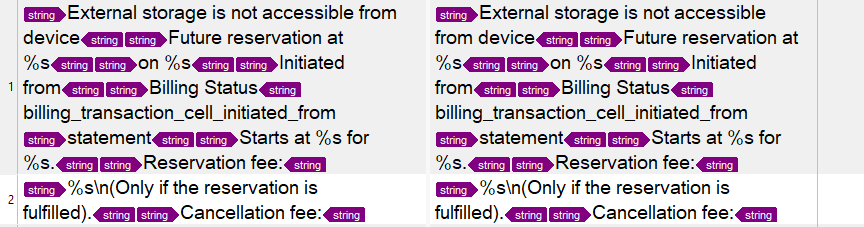
In the Studio Editor

Trados Studio Editor view with incorrect segmentation, where multiple strings are combined into one segment.


How to fix that in order to each string (between the <string> tags) will appear in a separate segment?


Thanks

Fouad


Generated Image Alt-Text
[edited by: Trados AI at 3:26 PM (GMT 0) on 28 Feb 2024]

emoji
Parents


  • If you have created a custom XML and it's still segmenting the same way then I would think you have simply done something wrong. If you want some proper help with it you should provide a sample file. It should be simple to create one that represents your problem and only contains the sort of information you have already shared.

    Paul Filkin | RWS

    Design your own training!
    You've done the courses and still need to go a little further, or still not clear? 
    Tell us what you need in our Community Solutions Hub

  • Hi Paul,

    Attached is a sample file for you check.

    Much appreciated in advance.

    <string name="image_picker_external_na">External storage is not accessible from device</string>
    <string name="home_future_reservation_pending">Future reservation at %s</string>
    <string name="home_future_reservation_pending_suffix">on %s</string>
    <string name="station_charge_transaction_initiator">Initiated from</string>
    <string name="station_charge_transaction_billing_status">Billing Status</string>
    billing_transaction_cell_initiated_from
    <string name="activity_statement_pdf_name">statement</string>
    <string name="item_reservation_start_desc">Starts at %s for %s.</string>
    <string name="item_reservation_reservation_fee_desc">Reservation fee: %s\n(Only if the reservation is fulfilled).</string>
    <string name="item_reservation_dialog_cancellation_fee_desc_suffix">Cancellation fee: %s\n(only if you cancel).</string>


    Fouad

Reply
  • Hi Paul,

    Attached is a sample file for you check.

    Much appreciated in advance.

    <string name="image_picker_external_na">External storage is not accessible from device</string>
    <string name="home_future_reservation_pending">Future reservation at %s</string>
    <string name="home_future_reservation_pending_suffix">on %s</string>
    <string name="station_charge_transaction_initiator">Initiated from</string>
    <string name="station_charge_transaction_billing_status">Billing Status</string>
    billing_transaction_cell_initiated_from
    <string name="activity_statement_pdf_name">statement</string>
    <string name="item_reservation_start_desc">Starts at %s for %s.</string>
    <string name="item_reservation_reservation_fee_desc">Reservation fee: %s\n(Only if the reservation is fulfilled).</string>
    <string name="item_reservation_dialog_cancellation_fee_desc_suffix">Cancellation fee: %s\n(only if you cancel).</string>


    Fouad

Children