You are currently working on UAT 

Why is my Studio 2019 SP1 crashing or freezing?

My Studio 2019 is crashing or freezing several times a day. I have been unable to find a common factor in Studio. This may happen when I'm confirming a segment and moving to the next one, when I'm adding a term to the glossary or in other circumstances. This never happened to me in previous versions (I have owned all versions since 2007) and I regret having upgraded from 2017.

Parents
  • Reset Studio as described here: gateway.sdl.com/.../communityknowledge
    Reset window layout from the view menu.
    Reorganize your termbases.
    Upgrade your translation memories.
    And: if your PC is older than 3 years and as a new one did not have a top specs, you would possibly need to upgrade your hardware.
    Studio is quite hungry for computer power, so when buying a new PC, go for one with top specs.

    _________________________________________________________

    When asking for help here, please be as accurate as possible. Please always remember to give the exact version of product used and all possible error messages received. The better you describe your problem, the better help you will get.

    Want to learn more about Trados Studio? Visit the Community Hub. Have a good idea to make Trados Studio better? Publish it here.

  • Hi Jerzy,

    My computer is fast and up-to-date, with enough RAM and a fast SSD.

    I have tried resetting windows layout so many times but the issue keeps coming back.

    I have reorganized my termbases (I regularly do this).

    I always upgrade my translation memories before starting a translation,

    The only thing I have not yet done is reset Studio, because I cannnot find the following step:

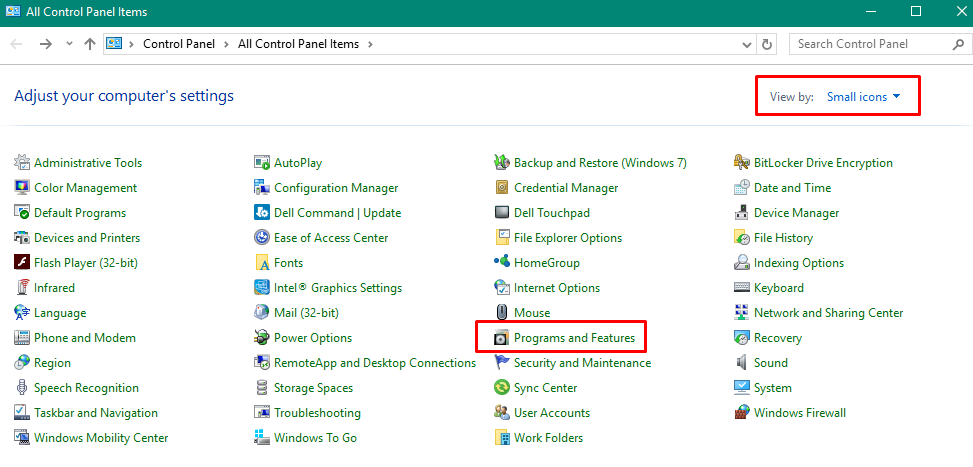
    Windows 10: Right-click on Start > Control Panel > Select View by: Small Icons > Programs and Features.

    Click/highlight the relevant SDL product from the list (e.g. SDL Trados Studio 2015) and click Repair.

    Where can I find the option to view by small icons in the Control Panel? I am just getting the standard Windows 10 control panel, an no option to repair Studio.

Reply
  • Hi Jerzy,

    My computer is fast and up-to-date, with enough RAM and a fast SSD.

    I have tried resetting windows layout so many times but the issue keeps coming back.

    I have reorganized my termbases (I regularly do this).

    I always upgrade my translation memories before starting a translation,

    The only thing I have not yet done is reset Studio, because I cannnot find the following step:

    Windows 10: Right-click on Start > Control Panel > Select View by: Small Icons > Programs and Features.

    Click/highlight the relevant SDL product from the list (e.g. SDL Trados Studio 2015) and click Repair.

    Where can I find the option to view by small icons in the Control Panel? I am just getting the standard Windows 10 control panel, an no option to repair Studio.

Children