

You are currently working on UAT 

What is this? (at TermbaseView window)

at SDL Trados Studio's EditorView (not at separated MultiTerm)

I used termbase once(or twice) in a year.
Today I have found that it has three windows amazingly.
- TermRecognition, TermbaseViewer, TermbaseSearch
- Three of them should be combined into One, I guess.
- They are so scattered that very inconvenient. 


Question;

What is this ?
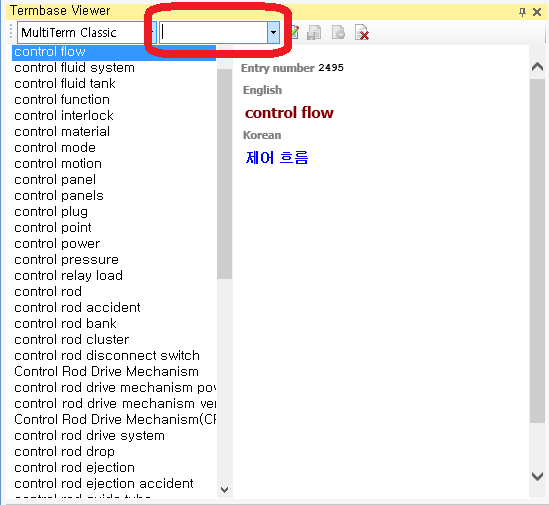
Screenshot of Trados Studio's Termbase Viewer window showing a list of control-related terms with an entry number highlighted at the top.

At first time, I thought "is it a Search function" ? 
(But, in a minute, I have found TermbaseSerch separately). 
And, it actually do nothing.


regards


Generated Image Alt-Text
[edited by: Trados AI at 2:48 PM (GMT 0) on 28 Feb 2024]

emoji
Parents
  •  

    Many companies work with more complex terminology than just a glossary which could make adding terms quite a daunting process as the translator may not be responsible for completing all the fields.  So MultiTerm provides for this by supporting the use of "Input Models".  You can create a model that only exposes the parts of the termbase for entry that are needed so the process becomes easier.

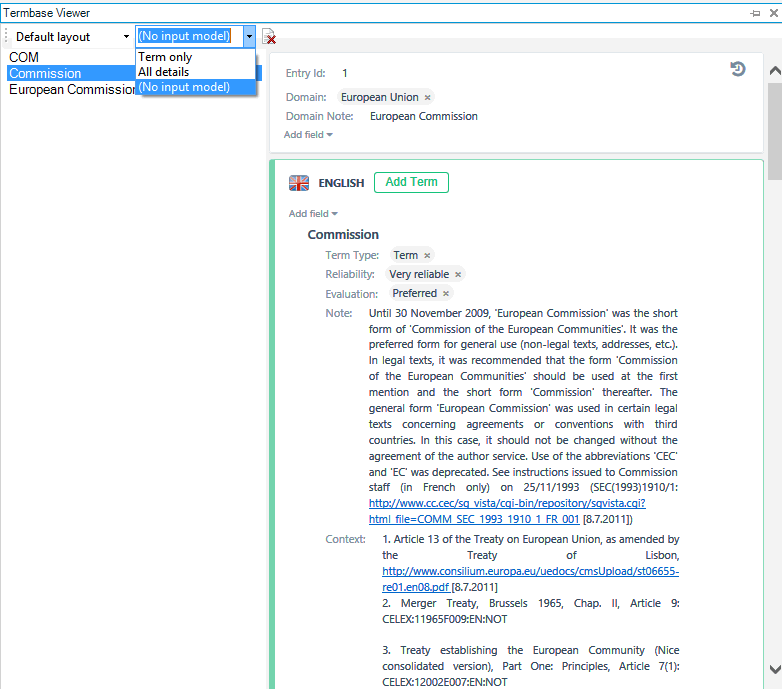
    If you work with "Input Models" then your view could look like this, for example:

    Trados Studio Termbase Viewer with 'No input model' selected, showing details for the term 'Commission' in English with notes on usage and legal context.


    Here I created two models, one that would only expose the term making it really simple when you add a new entry, and the other that might expose more fields for a terminologist working in MultiTerm.

    The termbase viewer is also useful because when you search in the small simplified window that you found you can also "View Term" from there and this will display the full details of that term in this termbase viewer.  In my screenshot you can see a rough example of something that contains a lot more information than just the terms and obviously you would not want to see this with just simple term recognition or search.

    Hope that explained it a little?

    Paul Filkin | RWS

    Design your own training!
    You've done the courses and still need to go a little further, or still not clear? 
    Tell us what you need in our Community Solutions Hub

    emoji


    Generated Image Alt-Text
    [edited by: Trados AI at 2:48 PM (GMT 0) on 28 Feb 2024]
Reply
  •  

    Many companies work with more complex terminology than just a glossary which could make adding terms quite a daunting process as the translator may not be responsible for completing all the fields.  So MultiTerm provides for this by supporting the use of "Input Models".  You can create a model that only exposes the parts of the termbase for entry that are needed so the process becomes easier.

    If you work with "Input Models" then your view could look like this, for example:

    Trados Studio Termbase Viewer with 'No input model' selected, showing details for the term 'Commission' in English with notes on usage and legal context.


    Here I created two models, one that would only expose the term making it really simple when you add a new entry, and the other that might expose more fields for a terminologist working in MultiTerm.

    The termbase viewer is also useful because when you search in the small simplified window that you found you can also "View Term" from there and this will display the full details of that term in this termbase viewer.  In my screenshot you can see a rough example of something that contains a lot more information than just the terms and obviously you would not want to see this with just simple term recognition or search.

    Hope that explained it a little?

    Paul Filkin | RWS

    Design your own training!
    You've done the courses and still need to go a little further, or still not clear? 
    Tell us what you need in our Community Solutions Hub

    emoji


    Generated Image Alt-Text
    [edited by: Trados AI at 2:48 PM (GMT 0) on 28 Feb 2024]
Children
