You are currently working on UAT 

I can't open packages from Studio 2017 any longer

I originally bought Studio 2014 and updated to 2017 at the beginning of the year.

Today I desinstalled 2014 that I haven't used since, but now when I try to open a package in Studio 2017, it's not able to. The packages are there in the folder but Studio doesn't seem to see them as packages and isn't able to open them.

Do you know if it's possible that 2017 was somehow relying on the installation of 2014?

WHat can I do to sort it out?

THank you,


DIana

Parents
  • Hello

    All installs of Studio  are independent of each other- by this I mean each version is a standalone install and not an 'upgrade' of the previous version.

    Therefore, could you post a screen shot of what you are actually seeing in Studio when you browse to the project folder(s) and attempt to open them please, so we can visualise what is happening.

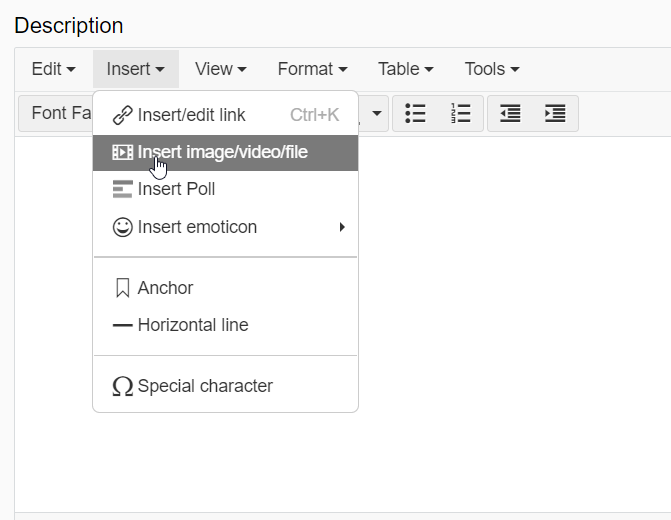
    You can post screen shots simply by going to advanced editing options at the bottom of the screen and then

    Screenshot showing the 'Insert' dropdown menu in Trados Studio with options for inserting image, video, poll, emoticon, anchor, horizontal line, and special character.

    Oana Nagy | QA Engineer | RWS Group

    emoji


    Generated Image Alt-Text
    [edited by: Trados AI at 2:46 PM (GMT 0) on 28 Feb 2024]
  • Hi Steven, Than you, It's not as bad as I thought because I see that it works at the end.


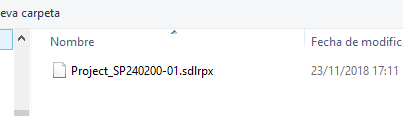
    I'm seeing this (below) when I try to open a package, rather than the normal icon for packages, but I still can open the file. It was just taking longer initially, so I thought that it wasn't working.


    If I go to the file and try to open it from there, it asks me what program I want to use. This isn't a problem, as I can open it from Studio, rather than just clicking on the file. I guess that something has happened, but maybe not so important.


    Is there anything I can do easily to solve it? Otherwise, I seen to be able to work with this anyway.


    Thank you,


    DIana


    Screenshot showing a file explorer window with a single file named 'Project_SP242000-01.sdlrpx' last modified on 23112018 at 17:11.


    emoji


    Generated Image Alt-Text
    [edited by: Trados AI at 2:46 PM (GMT 0) on 28 Feb 2024]
Reply
  • Hi Steven, Than you, It's not as bad as I thought because I see that it works at the end.


    I'm seeing this (below) when I try to open a package, rather than the normal icon for packages, but I still can open the file. It was just taking longer initially, so I thought that it wasn't working.


    If I go to the file and try to open it from there, it asks me what program I want to use. This isn't a problem, as I can open it from Studio, rather than just clicking on the file. I guess that something has happened, but maybe not so important.


    Is there anything I can do easily to solve it? Otherwise, I seen to be able to work with this anyway.


    Thank you,


    DIana


    Screenshot showing a file explorer window with a single file named 'Project_SP242000-01.sdlrpx' last modified on 23112018 at 17:11.


    emoji


    Generated Image Alt-Text
    [edited by: Trados AI at 2:46 PM (GMT 0) on 28 Feb 2024]
Children
No Data