You are currently working on UAT 

TM is not not working

I'm a newbee to Studio 17 and I'm struggling. I'm working on a project that involved a Single file and an empty TM that I've created. My TM is not doing its job and doesn't suggest any terms even though there are repetitions in the text. After saving the files and re opening it, I get the 2 following messages: ' could not connect to the 'sample' termbase so you can not use it for term recognition' & ' unable to find the specified file'.
However, I can see my progress and in the translation results window the selected TM.
The placables are underlined in the ST but I never get any suggestion in the TT segments nor do I get any suggestion in the TT segments for repeated terms from the ST. What have I done wrong or forgotten to do?

Parents
  • Hi

    I'm trying to imagine what you might be doing here, but it's hard without pictures.  First of all it's important to make sure that you refer to TB for termbase, and TM for translation memory or we get confused when we read your post.  For example, your TM will not suggest terms, your TB suggests terms.

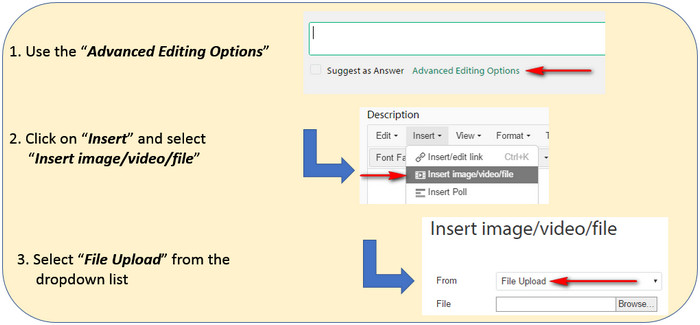
    You can add images to your post like this:

    Step-by-step instructions on how to add images to a post, highlighting the 'Advanced Editing Options', 'Insert' menu, and 'File Upload' selection.

    The messages you get sound as though your project settings may not be linked to your TM or TB, and you seem to have the sample TB referenced, but it might not be there anymore.  Can you share some screenshots of your project settings showing these things:

    1. Your connected TM

    2. Your connected TB

    This will give us a better idea of what might be going on.  I'm assuming you know where to see this because you said you created and added these resources.  So it's the screenshots of where you added them that we're after.

    Paul Filkin | RWS

    Design your own training!
    You've done the courses and still need to go a little further, or still not clear? 
    Tell us what you need in our Community Solutions Hub

    emoji


    Generated Image Alt-Text
    [edited by: Trados AI at 2:33 PM (GMT 0) on 28 Feb 2024]
  • Hi Paul

    Thank you for your reply. I understand the difference between TB and TM. Although one of the message mentions TB ( I dont understand why since my projet has only one file and one empty TM) , I was hoping to understand why my TM seems to stay empty regardless of the fact that I'm populating the TT segments with some repeating terms . Pls correct me if I'm wrong but I thought that my TM specific to that project remembers words that are the same across segments  which should suggested  while typing  in the new to translate segment.- see below some images .

    Many thanks,


    Isabelle

    2705.Questions_TM not working.docx

  • Hi  

    Thanks for the file.  So it looks as though the termbase thing is either a problem with the termbase, or where it's located.  I wasn't sure based on your explanation whether you attempted to specify the location as suggested in the message?  If you removed it and then selected it from wherever it is you might find it works.

    Isabelle Redon said:
    But re my TM, it’s still not doing its job. For ex, seg 46 has the word publicity that I’ve translated in earlier segments but it’s not finding any match. Why? The TM is not remembering any of the content of the segments.

    I think you may be misunderstanding the way a TM works.  You seem to have translated the word "Publicity" in this sentence:

    "Publicity, Public Awareness and Recruitment..........   p. 13"

    You then expected to see a result in this one:

    "Jean-Olivier Bureau, Publicity"

    This would be a really low fuzzy match because TM is comparing the whole contents of the first translation with the new one and looking for some measure of how similar it is.  It's so low that Studio wouldn't even find it (below 30%).

    The TM lookup does not look for specific words in the source, then just know what the translation of that word should be.  It looks for similar translation units and gives you a measure of how close it was to something you translated before.

    The exception to this is fragment matching, and this is maybe where you are getting confused.  If you have a big enough TM then Studio can use a technology called upLIFT to be able to match source and target fragments from things you have translated before.  It will not automatically insert it into your results, but it will be available to you through autosuggest.

    Perhaps this will be helpful for you:

    https://multifarious.filkin.com/2016/11/17/more-power-to-the-elbow-uplift/

    Check out some of the links in that article as they are also helpful.

    Paul Filkin | RWS

    Design your own training!
    You've done the courses and still need to go a little further, or still not clear? 
    Tell us what you need in our Community Solutions Hub

  • Hi Paul

    Thank you for your explanation and patience and this link. If I may, I'd like to ask you a couple more questions. The Uplift seems a very useful tool. According to Emma Goldsmith there is no restriction in terms of minimum TU one needs to build up before using this function. Is that correct? So, in principle by setting the min words fro a match and the min significant words for a match, Studio should then suggest some recurring combination of words that are recurring across the text?

    Also, as a starting translator, I do not currently often use Studio because most of the translating work I do is volunteer-base and these organisations usually have their own Cat tool platform. What's the best way to build-up a base of TU as a Studio virgin?

    Many thanks,

    Isabelle
  • Hi  

    All good questions you're asking!

    Isabelle Redon said:
    According to Emma Goldsmith there is no restriction in terms of minimum TU one needs to build up before using this function. Is that correct?

    Not quite. To use upLIFT with what we call "whole TUs" it will work immediately.  But to use fragment matching, and this is really where the power starts to come in you need a minimum of 1000 TUs in your Translation Memory.  The recommendation is 5000 as this will give better results, but you can build your translation model with 1000+.

    Isabelle Redon said:
    So, in principle by setting the min words from a match and the min significant words for a match, Studio should then suggest some recurring combination of words that are recurring across the text?

    Correct.  The lower the values you set, the more suggestions will be available to you.  So for very larget TMs you might want to raise the value a little to avoid too much noise, but for a small TM you might use a low value to help get some results.

    Isabelle Redon said:
    What's the best way to build-up a base of TU as a Studio virgin?

    More work may be your only option, but if you're lucky and speak European languages then there are a lot of free resources on the internet you can use to extract free, and reasonable quality I'm told, bilingual corpora.  These may help:

    https://multifarious.filkin.com/2012/08/10/making-the-most-of-your-resources/

    https://multifarious.filkin.com/2012/10/22/more-useful-resources-and-multilingual-tms/

    Old links but I believe they are still valid.

    If you do very specialised work then these might be less useful but they at least help you get to a starting point quite quickly so you can use all the benefits a tool like this can offer.  You could also get a termbase from here:

    www.youtube.com/watch

    Paul Filkin | RWS

    Design your own training!
    You've done the courses and still need to go a little further, or still not clear? 
    Tell us what you need in our Community Solutions Hub

  • Hi Paul

    In the middle of a project so will explore all these links later but I really appreciate your time, thank you so much. Kind regards,

    Isabelle
Reply Children
No Data