You are currently working on UAT 

Suggestion - it would be helpful if custom fields were separated by TM in the 'Update' section(s) of Project Settings

Hello,

Since getting (more or less - it's an ongoing process!) to grips with fields and attributes for TMs in Studio (2017), I've noticed that when I've got several TMs attached to one project, each with their own custom fields, the list of fields in my 'Update' section can look something like this:

  • Customer
  • Project
  • Customer
  • Project
  • Subject
  • Client
  • Project ref

This happens when several different TMs have custom fields with same names, often due to a complete (but in my experience not unusual) coincidence, for example because I'm working with my own TM plus a TM provided by a client, and the client happens to have defined fields with the same names as mine.

It would be helpful if the fields were separated by TM, e.g.:

TM_1

  • Customer
  • Project

TM_2

  • Customer
  • Project
  • Subject

TM_3

  • Client
  • Project ref


This is admittedly a somewhat exaggerated (fabricated) example, because there is usually at least some difference between the client's fields and mine which allows me to distinguish between the ones I want to update and those I don't, but I still think separating the fields would be helpful!

And if I happen to have overlooked something glaringly obvious and/or am making a nonsensical suggestion, I would be glad to know more!

Thanks,

Hayley 

Parents
  • Hi

    An interesting question.  I have a couple of points on this scenario I think worth clearing up:

    1. Normally you would not send the Clients TM back to them as it's not included in a package, so on this basis why would you even bother updating the TUs with their fields?
    2. If you uncheck the update box for the TMs that were not yours then you won't see these fields in the list... maybe that would help?
    3. If the fields are the same are they different values or the same?  Fields with the same name are not duplicated in the list so the assumption is probably that they are the same values.

    Interestingly if you have fields with the same name but different types, or settings, then they are not reflected in the update and this needs looking at I think.

    Regards

    Paul

    Paul Filkin | RWS

    Design your own training!
    You've done the courses and still need to go a little further, or still not clear? 
    Tell us what you need in our Community Solutions Hub

  • Hi Paul,

    Thanks for your reply. Here are my comments on your three queries:

    1. I don't actually need or want to update the customer's fields, it's just that they appear in the 'Update' list anyway and it can be hard to identify which fields are the ones I want to update (i.e. my own fields).

    2. I do sometimes have to send the TM back to the customer (although there is no requirement to update their fields), so I don't think I can uncheck 'Update' (unless I misunderstood your question/comment).

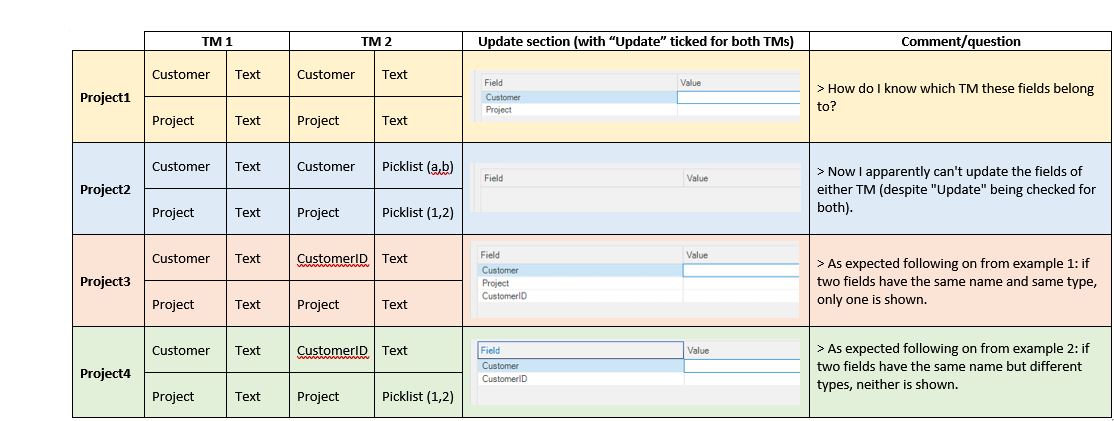
    3. I created some fake projects to try and understand/respond to this point, and I think I might be more confused than I was originally! I'll post the results of my 'experiments' at the end of this post, although I think (?) they only confirm what you said at the end of your message: 

    • if two fields (from two different TMs) have the same name and are the same type, only one of them will appear in the list of updatable fields
    • if two fields (from two different TMs) have the same name, but are different types, then neither of them will appear in the list of updatable fields

    Conclusion: I must have been mistaken in saying that fields with identical names appeared in my update list, but I think it is still true that it is hard to tell which fields belong to which TM when you're looking at the update list (which is at least partly due to the two (unwanted?) behaviours above)!

    Hayley


    Experiments with different TM fields:


    Screenshot of Trados Studio showing a comparison table with columns for TM1, TM2, and Update section. Rows indicate different projects with fields such as 'Customer' and 'Text'. Comments on the side question field ownership and update capabilities.

    emoji


    Generated Image Alt-Text
    [edited by: Trados AI at 2:26 PM (GMT 0) on 28 Feb 2024]
  • Hi  

    Hayley said:
    1. I don't actually need or want to update the customer's fields, it's just that they appear in the 'Update' list anyway and it can be hard to identify which fields are the ones I want to update (i.e. my own fields).

    In this case I would uincheck the updated box for the TMs you don't need to update and this would simplify your view as the fields for the unchecked TMs would not appear in the list.

    Hayley said:
    2. I do sometimes have to send the TM back to the customer (although there is no requirement to update their fields), so I don't think I can uncheck 'Update' (unless I misunderstood your question/comment).

    In this case you can still leave it unchecked, and instead just import the SDLXLIFF into their TM when you've finished, or run a batch task to updated the TMs and check them when you are ready.

    Hayley said:
    Conclusion: I must have been mistaken in saying that fields with identical names appeared in my update list, but I think it is still true that it is hard to tell which fields belong to which TM when you're looking at the update list (which is at least partly due to the two (unwanted?) behaviours above)!

    I'd actually agree with you Hayley.  I did send an email to the development team on this when we started discussing it as I did a similar thing to you and also thought the results were a little confusing in places.

    Paul Filkin | RWS

    Design your own training!
    You've done the courses and still need to go a little further, or still not clear? 
    Tell us what you need in our Community Solutions Hub

  • Hello,

    Thanks for your reply and for passing on the query to the development team - I'm reassured to know my confusion wasn't completely unfounded!


    Hayley

Reply Children
No Data