Translate



Hello,
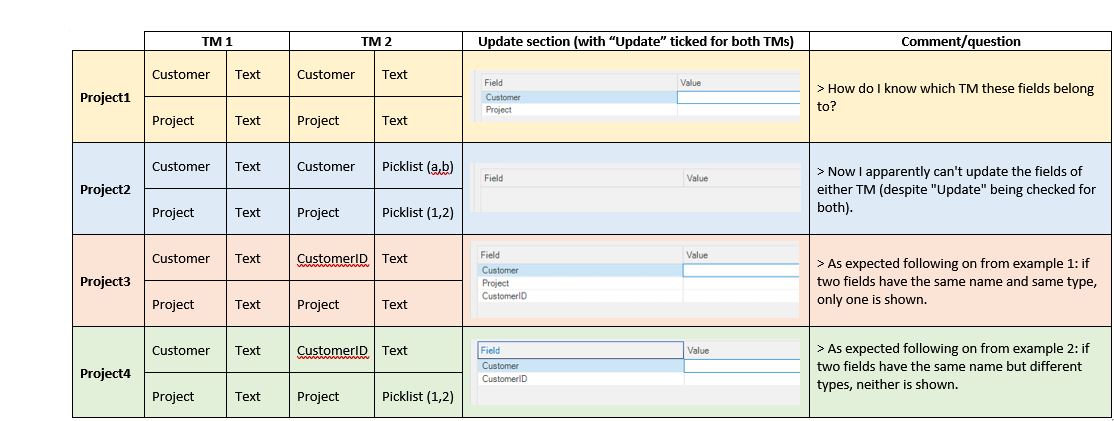
Since getting (more or less - it's an ongoing process!) to grips with fields and attributes for TMs in Studio (2017), I've noticed that when I've got several TMs attached to one project, each with their own custom fields, the list of fields in my 'Update' section can look something like this:
- Customer
- Project
- Customer
- Project
- Subject
- Client
- Project ref
This happens when several different TMs have custom fields with same names, often due to a complete (but in my experience not unusual) coincidence, for example because I'm working with my own TM plus a TM provided by a client, and the client happens to have defined fields with the same names as mine.
It would be helpful if the fields were separated by TM, e.g.:
TM_1
- Customer
- Project
TM_2
- Customer
- Project
- Subject
TM_3
- Client
- Project ref
This is admittedly a somewhat exaggerated (fabricated) example, because there is usually at least some difference between the client's fields and mine which allows me to distinguish between the ones I want to update and those I don't, but I still think separating the fields would be helpful!
And if I happen to have overlooked something glaringly obvious and/or am making a nonsensical suggestion, I would be glad to know more!
Thanks,
Hayley