You are currently working on UAT 

Project wizard in Studio 2019

I have several issues with the new project wizard in Studio 2019 (which, as far as I have experienced it so far, is considerably more time consuming and complex than the previous wizard!):

When I enter an update for the fields during the creation of a project (I have fields such as "Customer", "Order no."), I find that sometimes (irregularly) the updates are not carried over to the project. The field(s) will either be empty or (if I used a template) will still contain the data from the previous project using that template. I have to check the settings after opening the project in Studio to make sure the information is correct.

When I finish creating a project based on a template and close the wizard with the request to update the template, it does not always happen.

Why is the default setting to create a project without a project TM? Wasn't the previous default to create a project TM? Is there any particular reason why (or why not) I should use a project TM?

When I browse project templates and select one different from what is shown in the window, it does not change in the window, although apparently the template I clicked is actually used.

Why does the template not save the location of the projects for that template? I have some general templates for which the location often has to be changed, but many of them are customer-specific and the translations ALWAYS go into specific folders. This was the same in the previous wizard and often annoyed me. Or did I overlook something?

I apologize for so many questions in one post.

  • Hi  ( also cc'ing  )

    Michael Medlinger said:
    When I enter an update for the fields during the creation of a project (I have fields such as "Customer", "Order no."), I find that sometimes (irregularly) the updates are not carried over to the project. The field(s) will either be empty or (if I used a template) will still contain the data from the previous project using that template. I have to check the settings after opening the project in Studio to make sure the information is correct.

    Can you elaborate on this one?  Where do you enter your Order No. field?  Do you mean that even though you selected a customer it is not used in the final project?

    Michael Medlinger said:
    When I finish creating a project based on a template and close the wizard with the request to update the template, it does not always happen.

    It would be good if you can provide some proper steps to follow so we can reproduce this?

    Michael Medlinger said:
    Why is the default setting to create a project without a project TM? Wasn't the previous default to create a project TM? Is there any particular reason why (or why not) I should use a project TM?

    This was changed after Studio 2009... so a long time ago!  Project TMs caused a lot of confusion amongst users as most don't use them.  So the default was changed to not create a project TM.

    Michael Medlinger said:
    When I browse project templates and select one different from what is shown in the window, it does not change in the window, although apparently the template I clicked is actually used.

    Do you mean that you select a template, it doesn't appear as though it is the template that is being used, but then it actually gets used?  These are some pretty strange problems you are having here.  I'm wondering if you are trying to use really old project templates from a previous version and somehow Studio doesn't like it?

    Michael Medlinger said:
    Why does the template not save the location of the projects for that template? I have some general templates for which the location often has to be changed, but many of them are customer-specific and the translations ALWAYS go into specific folders. This was the same in the previous wizard and often annoyed me. Or did I overlook something?

    I don't really follow this, but basically each template has one location for the projects that you can choose to fill or not.  If you fill it then the use of that template should always save projects into that location.  If you don't then it will probably use the last location you used.

    Paul Filkin | RWS

    Design your own training!
    You've done the courses and still need to go a little further, or still not clear? 
    Tell us what you need in our Community Solutions Hub

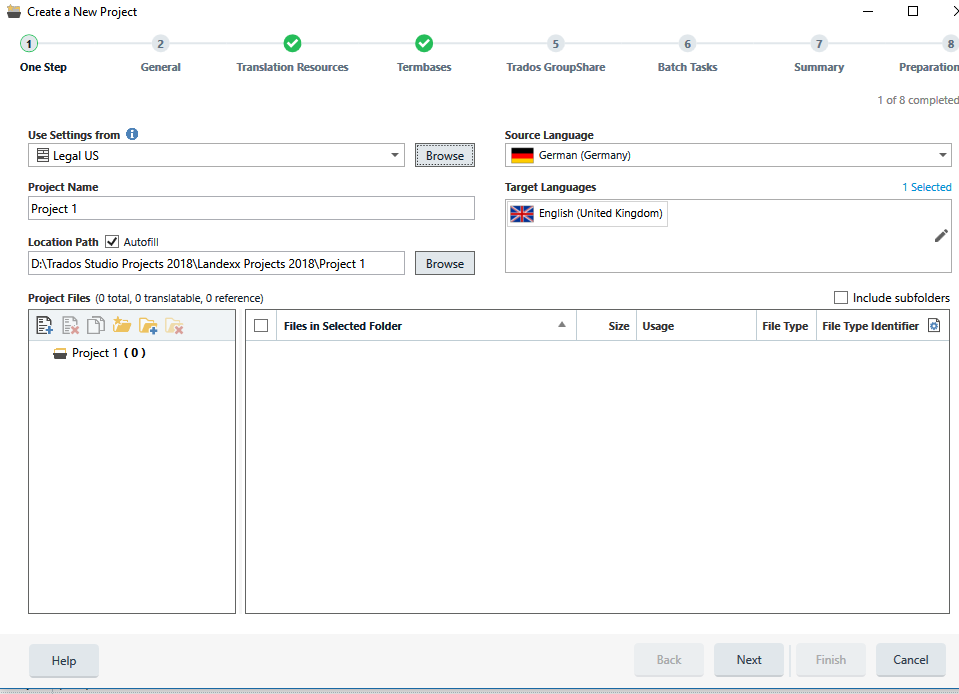
  • Trados Studio screenshot showing the 'Create a New Project' wizard with 'Project TM' selected, displaying the 'Legal US' template in the template window.Hi, Paul,

    Thanks for your replies. Let me see if I can specify these problems more precisely.

    The fields I am talking about in the first question have been created in the TMs. General TMs will have fields such as "Customer" and other information, while customer-specific TMs will have fields such as "Order Number".

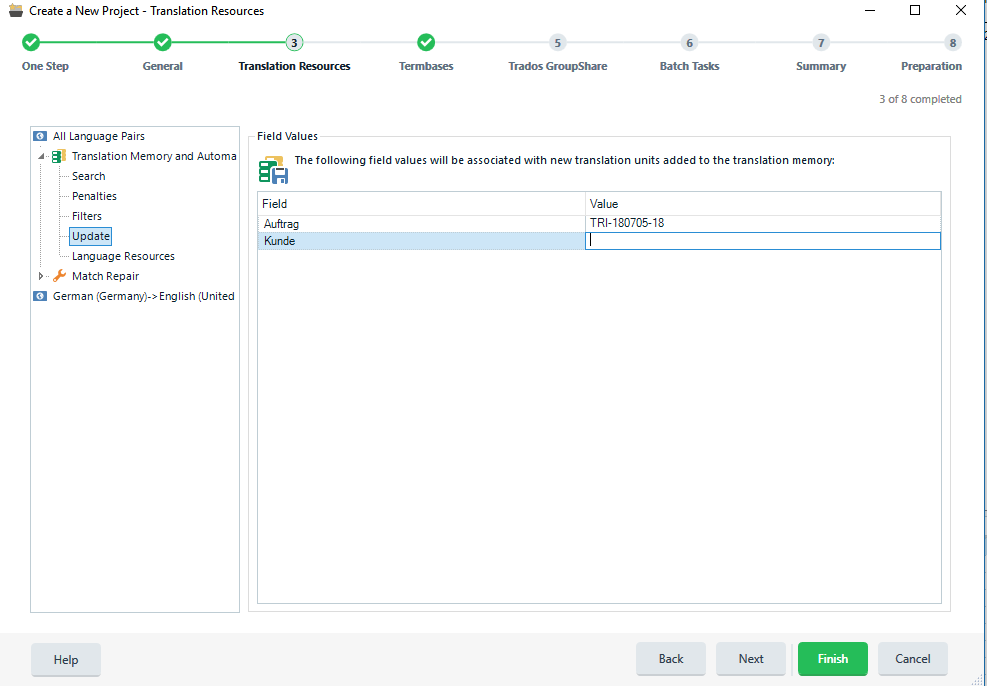
    If you look at the screenshot “Updating TM”, you see where I have fields that need to be updated for this project. In this case, I would enter a new “Auftrag” (Order) and expect it to be in the project settings for the new project. That does not always happen. I just created a new project today with a new TM and entered the required order number; when I opened the new project and checked the project settings, however, the field was blank. I also always select “Update template with the settings for this project”, yet when I use the TM for the next project, the order number for previous project is still there and is carried over into the new project, even though I have changed it again during the creation process.

    Project TM: OK, so I am behind the times. Is it not really necessary to have a project TM? I don’t know why it should be, but I have always created one.

    If you look at the screenshot “Project Wizard Step 1”, you will see the (previously used) template “Legal US” in the window for templates being used. In actual fact, I have browsed and clicked on a template called “Triangle”. This template uses GB English, and that has changed in the display of languages. The location for the project has not changed; it should be in a folder called “Triangle Projects 2018”. This is a customer-specific template and the projects are always saved in this folder. If I understand your comment above correctly, the template should have this location saved as a default.

    Does this help?

    Michael

    Trados Studio screenshot of 'Create a New Project' wizard with 'Translation Memory and Automated Translation' step showing a field 'Auftrag' with value 'TRI-010101-18'.

    Hi  ( also cc'ing  )


    Michael Medlinger
    When I enter an update for the fields during the creation of a project (I have fields such as "Customer", "Order no."), I find that sometimes (irregularly) the updates are not carried over to the project. The field(s) will either be empty or (if I used a template) will still contain the data from the previous project using that template. I have to check the settings after opening the project in Studio to make sure the information is correct.


    Can you elaborate on this one?  Where do you enter your Order No. field?  Do you mean that even though you selected a customer it is not used in the final project?


    Michael Medlinger
    When I finish creating a project based on a template and close the wizard with the request to update the template, it does not always happen.


    It would be good if you can provide some proper steps to follow so we can reproduce this?


    Michael Medlinger
    Why is the default setting to create a project without a project TM? Wasn't the previous default to create a project TM? Is there any particular reason why (or why not) I should use a project TM?


    This was changed after Studio 2009... so a long time ago!  Project TMs caused a lot of confusion amongst users as most don't use them.  So the default was changed to not create a project TM.


    Michael Medlinger
    When I browse project templates and select one different from what is shown in the window, it does not change in the window, although apparently the template I clicked is actually used.


    Do you mean that you select a template, it doesn't appear as though it is the template that is being used, but then it actually gets used?  These are some pretty strange problems you are having here.  I'm wondering if you are trying to use really old project templates from a previous version and somehow Studio doesn't like it?

    It is true that many of my templates have been around for quite a while. There are a lot of them, however, and the thought of recreating all of them again rather makes me shudder.


    Michael Medlinger
    Why does the template not save the location of the projects for that template? I have some general templates for which the location often has to be changed, but many of them are customer-specific and the translations ALWAYS go into specific folders. This was the same in the previous wizard and often annoyed me. Or did I overlook something?


    I don't really follow this, but basically each template has one location for the projects that you can choose to fill or not.  If you fill it then the use of that template should always save projects into that location.  If you don't then it will probably use the last location you used.


    emoji


    Generated Image Alt-Text
    [edited by: Trados AI at 2:14 PM (GMT 0) on 28 Feb 2024]