You are currently working on UAT 

Studio 2019 vs 2017 - a few questions

Hi,


Just installed Studio 2019 and took a peek. I have a few questions:

  1. Do translation memories used in Studio 2017 need any upgrading to ver. 2019?
  2. Can I open the 2017 project templates directly in 2019 or will it break them? (I understand that I can use the migration utility to migrate them).
  3. Can I open projects created in Studio 2017 in Studio 2019 or will it break them? WIll they be backward-compatible if I open and save them in Studio 2019?

Thanks,

Piotr

Parents Reply
  • Hi

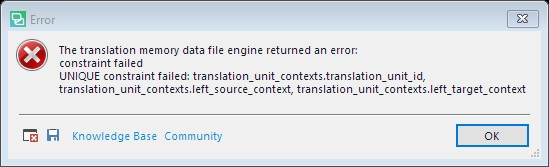
    This a fairly uncommon problem caused by a bug in 2017 where it should be ensuring CM info doesn’t get lost when reindexing due a tokenization change. (Formerly, if you did something like switched off Number recognizer, then reindexed TM content, you’d no longer get CMs where the context involved a number; now the reindex converts the CM hashes.) Under certain rare circumstances that’s causing a constraint violation because the code is trying to update a CM entry but there’s another CM entry that already has the same hash values.

    2017 just ignores the CM info loss whereas 2019 does not.

    The best solution is to create a new TM in Studio 2019 and then import a TMX created with 2017 into the new TM, or upgrade the TM in Studio 2017 first and then use it in 2019. Fortunately 2017 can still be used with 2019 so it should be a one-off workaround.

    Regards

    Paul

    Paul Filkin | RWS

    Design your own training!
    You've done the courses and still need to go a little further, or still not clear? 
    Tell us what you need in our Community Solutions Hub

Children