

You are currently working on UAT 

SDL language cloud machine translation n/a?

Hi experts,

I am doing a DE-->EN (US) translation under Studio 2017.

As usual, along with my own TM, I have also included the "SDL language cloud machine translation" into my list of TMs.

During the translation process, though I am getting "CM" results (out of my own TM), however no "AT" results/suggestions from the cloud are displayed.

A glance at the list of active TMs shows that "SDL language cloud machine translation" is not available (n/a).

Please see the image below:
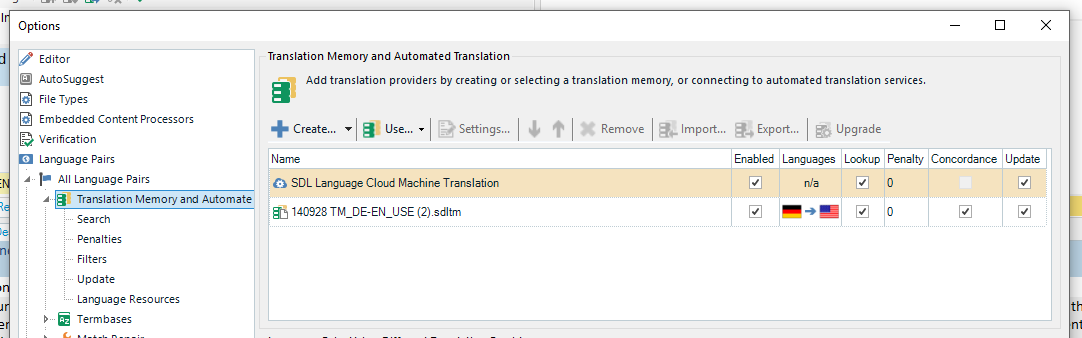
Trados Studio screenshot showing an error message 'Authentication problem in creating a translation memory, or connecting to machine translation service.' with SDL Language Cloud Machine Translation listed as not available.

Up to now, there was no problem with the "SDL language cloud machine translation" availability.

Question:

Is it a problem of wrong setting(s) in my Studio or is it an EU's "DSGVO" (Data Protection Ordinance) related issue or something totally different?

Any comments or suggestions to overcome the problem are most welcome.

Thanks a lot for your help in advance.

Best regards

Shyam Gupta 


Generated Image Alt-Text
[edited by: Trados AI at 3:30 PM (GMT 0) on 28 Feb 2024]

emoji
Parents Reply Children
  • Hi Paul,

    Thanks for your response.

    I tried to make the settings (Oliver's proposal) during the project setting (as you proposed) and not in the file.
    But alas, to no avail. AT is still not available.

    Actually, during the project setting phase, so far as I could see, there is no possibility to select the AT option.
    Once the source and target languages have been selected, SDL automatically displays the fitting TM (from my list of TMs) and shows at the same time that AT is n/a.

    It doesn't matter whether I select 'US English' or 'UK English' similarly it also doesn't make a difference whether I set up a project or proceed to setup translation as a 'single file'.

    The TM window image in SDL always looks like the one I have already attached in my original mail.

    So, there must be something else which is not functioning.
    But why? After all it was working three weeks ago!

    Looking forward to your further advice/suggestion.

    Thanks and best regards
    Shyam
  • HI Paul,

    I need to make a major correction to what I wrote in my last reply to your mail.

    I can make actually the make the setting

    "Advanced --> Translation Memory and Automated Translation --> Searc -->. Make sure Look up segments in MT even if a TM match has been found"

    out of the TM setting window during the translation (single file) setup process.

    So what I had written in my last mail was wrong. Please accept my apologies.

    However, unfortunately the result is still the same. The "AT" is still n/a.

    Regards
    Shyam