You are currently working on UAT 

Error: Failed to activate view: Translation Memories AND The requested data file could not be located - Studio 2017

 Hello!

I am initiating this thread which will seem familiar to many, only it keeps on recurring over and over again and I do not know why. Therefore seeking help please. Thank you in advance.

Both error messages are more and more frequently appearing when I use Trados Studio 2017. I have followed the instructions advised on the forum (rename folders), it works but the problem is that it is recurrent.

Parents Reply
  • Hello ,

    I believe this was originally an issue (often related to GroupShare projects) in Studio 2011/2014 which was resolved in 2015/2017.
    Although you are using Studio 2017, I am left wondering if there is some remnant left over from back then.

    Are the errors occurring on GroupShare projects? or just randomly- no matter the source?

    Due to the issue being intermittent,
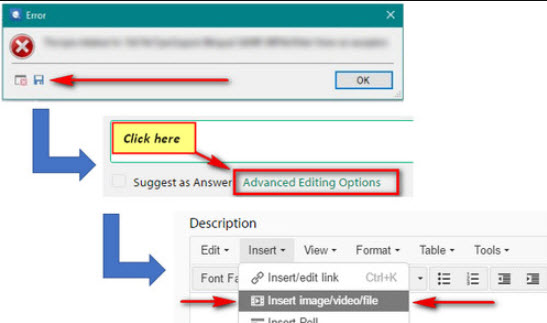
    it would be really useful the next time it happens, to save the error stack and the steps leading up to this.
    The error stack can provide invaluable information as to what might be causing this.
    Please also in the meantime, ensure you save both Studio (and MultiTerm) to your AntiVirus providers 'white list'.

    Oana Nagy | QA Engineer | RWS Group

Children