You are currently working on UAT 

Error when trying to Export and Update/Merge TM in Studio 2017

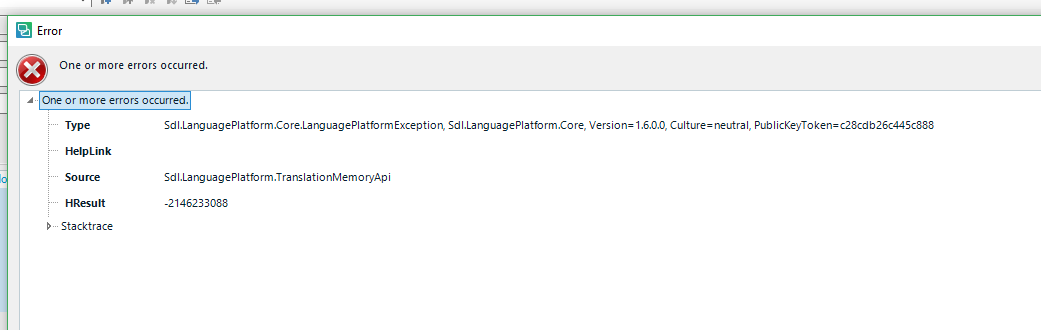
I cannot export (or update/merge, since that requires an export during that process, using the UPGRADE TRANSLATION MEMORIES function). I get the error below with the cryptic "type" and "HRresult" when I try to export. 

Does anyone know what this means and how to resolve? Or what else I can do to find out more info? 

Thanks!

Eve
 

Parents
  • Hi  

    Can you post the error stack and not just a partial screenshot?  It'll be more helpful.

    Paul Filkin | RWS

    Design your own training!
    You've done the courses and still need to go a little further, or still not clear? 
    Tell us what you need in our Community Solutions Hub

  • Thanks, Paul, I think I am uploading the XML file it saved out for me. Can you see it correctly?


    <SDLErrorDetails time="11/5/2017 8:45:52 PM">
      <ErrorMessage>One or more errors occurred.</ErrorMessage>
      <Exception>
        <Type>Sdl.LanguagePlatform.Core.LanguagePlatformException, Sdl.LanguagePlatform.Core, Version=1.6.0.0, Culture=neutral, PublicKeyToken=c28cdb26c445c888</Type>
        <HelpLink />
        <Source>Sdl.LanguagePlatform.TranslationMemoryApi</Source>
        <HResult>-2146233088</HResult>
        <StackTrace><![CDATA[   at Sdl.LanguagePlatform.TranslationMemoryApi.FileBasedTranslationMemoryLanguageDirection.GetTranslationUnits(RegularIterator& iterator)
       at Sdl.LanguagePlatform.TranslationMemoryApi.TranslationMemoryExporter.Export(TMXWriter writer)
       at Sdl.LanguagePlatform.TranslationMemoryApi.TranslationMemoryExporter.Export(String fileName, Boolean overwriteExisting)
       at Sdl.TranslationStudio.Common.Jobs.ExportSdltmToTmxJobRequest.ExportFileBasedTranslationMemory()
       at Sdl.TranslationStudio.Common.Jobs.ExportSdltmToTmxJobRequest.Execute(IJobExecutionContext context)
       at Sdl.Desktop.Platform.Implementation.Services.Job.<_worker_DoWork>b__3()
       at Sdl.Desktop.Platform.Implementation.Services.Log.Resources(Object message, Action action)
       at Sdl.Desktop.Platform.Implementation.Services.Job._worker_DoWork(Object sender, DoWorkEventArgs e)
       at System.ComponentModel.BackgroundWorker.OnDoWork(DoWorkEventArgs e)
       at System.ComponentModel.BackgroundWorker.WorkerThreadStart(Object argument)]]></StackTrace>
      </Exception>
      <Environment>
        <ProductName>SDL Trados Studio</ProductName>
        <ProductVersion>14.0.0.0</ProductVersion>
        <EntryAssemblyFileVersion>14.1.6329.7</EntryAssemblyFileVersion>
        <OperatingSystem>Microsoft Windows 10 Pro</OperatingSystem>
        <ServicePack>NULL</ServicePack>
        <OperatingSystemLanguage>1033</OperatingSystemLanguage>
        <CodePage>1252</CodePage>
        <LoggedOnUser>DESKTOP-FIUV2GM\go-gl</LoggedOnUser>
        <DotNetFrameWork>4.0.30319.42000</DotNetFrameWork>
        <ComputerName>DESKTOP-FIUV2GM</ComputerName>
        <ConnectedToNetwork>True</ConnectedToNetwork>
        <PhysicalMemory>8291416 MB</PhysicalMemory>
      </Environment>
    </SDLErrorDetails>

  • Hi, Paul, Just checking on this - if you had any ideas. Thanks! ~ Eve
  • Have you already tried repairing your Studio installation? And, if that would not help, resetting Studio? Just check this article for learning how to do that: gateway.sdl.com/.../communityknowledge

    _________________________________________________________

    When asking for help here, please be as accurate as possible. Please always remember to give the exact version of product used and all possible error messages received. The better you describe your problem, the better help you will get.

    Want to learn more about Trados Studio? Visit the Community Hub. Have a good idea to make Trados Studio better? Publish it here.

  • Hi ,

    Many apologies for not getting back to you on this yet. I was going to suggest you run a repair on the TM but before doing that I asked the development team if the stack pointed to anything else obvious. I still didn't get a response on this so I'm going to suggest you do the following:

    1. Make sure you are updated to CU8 that was released today (automatic update)
    2. Try it again and if you still get the error run a repair on your TM(s) - appstore.sdl.com/.../

    You can also send me two TMs that give you this problem and I can test it on my machine if you like? email them to pfilkin@sdl.com or at least send me a link to the TMs in dropbox, wetransfer, googledrive or something like that.

    Paul Filkin | RWS

    Design your own training!
    You've done the courses and still need to go a little further, or still not clear? 
    Tell us what you need in our Community Solutions Hub

  • Oh, one thing is....I was easily able to Export/Update other TMs, so not sure if my Studio needs to be reset? But, will try anyway...Thanks!
Reply Children