How can I use Regex to identify a placeable?

Hi, 

I realise - too late - that in a huge file with alphanumeric strings recognised as placeables, that strings needing translation have incorrectly autopropagated without being translated.

For example:

ALFA-1-ANTITRIPSINA

PROTEINASA-3

(to name but a few).

I'd like to filter by

1. All segments containing a placeable (plus any other content).

2. All segments containing a placeable only.

Can anyone suggest a Regex string that would catch Studio placeables that I'd be able to use in the Advanced Display Filter and/or in QA checker>Regular expressions?

I've got as far as ([A-Z]|\d)(-|–|_|\.)([A-Z]|\d) but it's not specific enough (e.g., it also catches \d-\d).

Many thanks,

Emma

Parents Reply Children
  • This is a bit better, but when I use Ctrl+F, only individual characters are found, and segments are still filtered in the Advanced Display Filter that don't have alphanumeric strings (they seem to have tags and full stops).
    Also, a different number of segments are found when I put the string in the ribbon filter compared to the Advanced Filter.

    Not to worry, I'll give up on this one for the moment. :)
  • ok - also very hard to come up with a regular expression without seeing what you are working with. It's one of these funny things that people often look for an off the shelf regex, but the approach should really be to look at the requirement and write it to suit.

    Regards

    Paul

    Paul Filkin | RWS

    Design your own training!
    You've done the courses and still need to go a little further, or still not clear? 
    Tell us what you need in our Community Solutions Hub

  • Hi Emma,

    Ok.. I looked at this a little bit better. First point to note is that this is not a capturing expression, so Ctrl+F will not return what you expected. It's only a lookahead to see if the expression can be matched and then filter accordingly.

    If you want Ctrl+F to work too then try this:

    \b(?=\S*[a-zA-Z])(?=\S*[0-9])\b\S*

    This adds the bit to select your text after asserting it can be found. If you want to use it in QA then you would also create a back reference to remember what it found:

    \b(?=\S*[a-zA-Z])(?=\S*[0-9])\b(\S*)

    Make sense?

    Then to make this work in all your scenarios I'd need to see some more examples... but perhaps this will help you?

    Regards

    Paul

    Paul Filkin | RWS

    Design your own training!
    You've done the courses and still need to go a little further, or still not clear? 
    Tell us what you need in our Community Solutions Hub

  • Last one I promise... Regex does this to me;-)

    \b(?=\S*[a-zA-Z])(?=\S*[0-9])\b([^\s.]*)

    That should ignore the full stops when you have one at the end of a sentence... think you mentioned that earlier too.

    Regards

    Paul

    Paul Filkin | RWS

    Design your own training!
    You've done the courses and still need to go a little further, or still not clear? 
    Tell us what you need in our Community Solutions Hub

  • Paul Filkin said:


    \b(?=\S*[a-zA-Z])(?=\S*[0-9])\b([^\s.]*)

    This is excellent, Paul! Thank you!

    It works almost perfectly in the ribbon filter and with Ctrl+F.

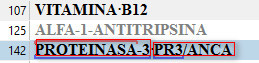
    (It includes forward slashes (see red rectangles) whereas Studio doesn't (see blue line): 

    The Advanced Display Filter picks up the same, but also segments with tag content, so:

    This is an important difference, because at the moment I can't use the Advanced Display Filter to combine with other filters. 

    But still, this is quite workable now. Many thanks for your help.


    P.S. One last request. How could I filter for segments with alphanumeric strings and nothing else? (e.g. segment 125 above)