How to add images in Multiterm /Multiterm online

Hi community,


I'd like to add images to my terms in one of my Multiterm Termbases. So far I have tried adding each image (.jpg) in a cell in the master-Excel, then converting & importing in Termbase, with no success. Then I tried to add paths (image location in Computer) with also no success. The only way I got images in my Termbase is manually adding them one by one, which I find totally impractical.

When I built the .xdt I marked the field "Image" as Multimedia File. Am I missing something? Is there a way of automatically upload images when importing the .xml file into Termbase?


Thanks in advance,


Almudena

Parents
  • Hi Almudena,

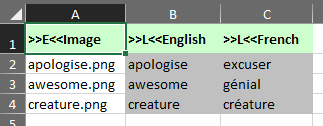
    If using the4 Glossary Converter for this then you need to write the name of each jpg in Excel and then store the images themselves into a folder with the following naming convention:

    media_file

    "file" would be the name of your excel file without the xlsx extension. So the folder and the excel file are in the same location. For example, if your excel file is called termbase.xlsx then create a folder called media_termbase in the same location.

    Regards

    Paul

    Paul Filkin | RWS

    Design your own training!
    You've done the courses and still need to go a little further, or still not clear? 
    Tell us what you need in our Community Solutions Hub

Reply
  • Hi Almudena,

    If using the4 Glossary Converter for this then you need to write the name of each jpg in Excel and then store the images themselves into a folder with the following naming convention:

    media_file

    "file" would be the name of your excel file without the xlsx extension. So the folder and the excel file are in the same location. For example, if your excel file is called termbase.xlsx then create a folder called media_termbase in the same location.

    Regards

    Paul

    Paul Filkin | RWS

    Design your own training!
    You've done the courses and still need to go a little further, or still not clear? 
    Tell us what you need in our Community Solutions Hub

Children