
How to disable case-sensitive sorting in the Termbase Viewer?

When creating a Termbase, you have the option to make the sorting case-sensitive (see image below), but how can we then change that setting to case-insensitive?
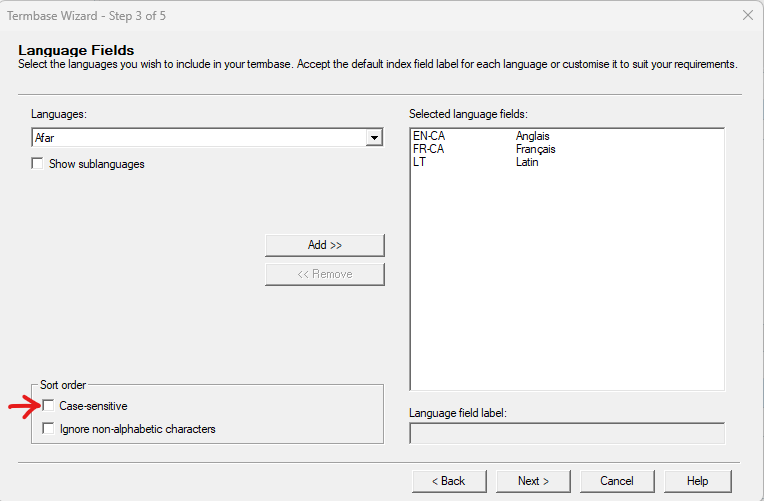
 
Screenshot of Trados Studio Termbase Wizard showing Language Fields step with case-sensitive sort order option checked.

For now, it looks like this in the Termbase Viewer (or “Afficheur de base terminologique”, in the French version):
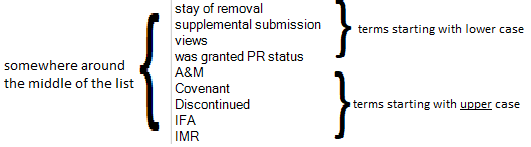
Partial view of Termbase Viewer in Trados Studio with terms sorted in case-sensitive order, 'A&M' appears after terms starting with 'z'.

However, I would like the whole list to be in non-case-sensitive alphabetical order, so that, for example, “A&M” would be at the very start of the list, as opposed to after “z” with the current setting.

I tried using the Termbase settings in the Options, but it is grayed out:
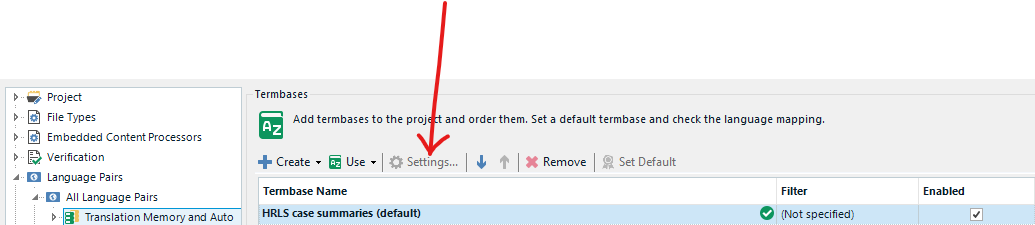
Trados Studio Termbase settings option is grayed out and not clickable in the Termbases section of the Project view.

That would be of great help if someone could tell me how to correct that setting, and I also have at least one collegue who has the same question.

P.S. I am using Trados Studio 2022 Professional, build 17.0.3.11695


Generated Image Alt-Text
[edited by: Trados AI at 2:15 PM (GMT 0) on 5 Mar 2024]

emoji
Parents
  •   

    More importantly... I don't believe you can edit the setting at all, even in Multiterm after the termbase has been created without exporting the content, recreating the termbase with the setting as you prefer and reimporting the content.  I have asked the question of the product manager in case I'm missing something but given you both know what you're doing I think it's not possible.

    Once I get a response we can raise an appropriate enhancement request for it... probably via the ideas site.

    Paul Filkin | RWS

    Design your own training!
    You've done the courses and still need to go a little further, or still not clear? 
    Tell us what you need in our Community Solutions Hub

    emoji
  • Ok. Thanks Paul. You confirm what I/we suspected then. From within the Studio interface (Louis question) it´s not possible to edit at all any of the settings of an already existing termbase. And even with the stand-alone desktop Multiterm tool, even if you can edit the definition of an existing termbase, that particular Sorting setting cannot be changed (my question). The solution you propose is what I had thought too.  Thanks for keeping us updated if you get the response to your question. 

    emoji
Reply
  • Ok. Thanks Paul. You confirm what I/we suspected then. From within the Studio interface (Louis question) it´s not possible to edit at all any of the settings of an already existing termbase. And even with the stand-alone desktop Multiterm tool, even if you can edit the definition of an existing termbase, that particular Sorting setting cannot be changed (my question). The solution you propose is what I had thought too.  Thanks for keeping us updated if you get the response to your question. 

    emoji
Children
No Data