How to disable case-sensitive sorting in the Termbase Viewer?

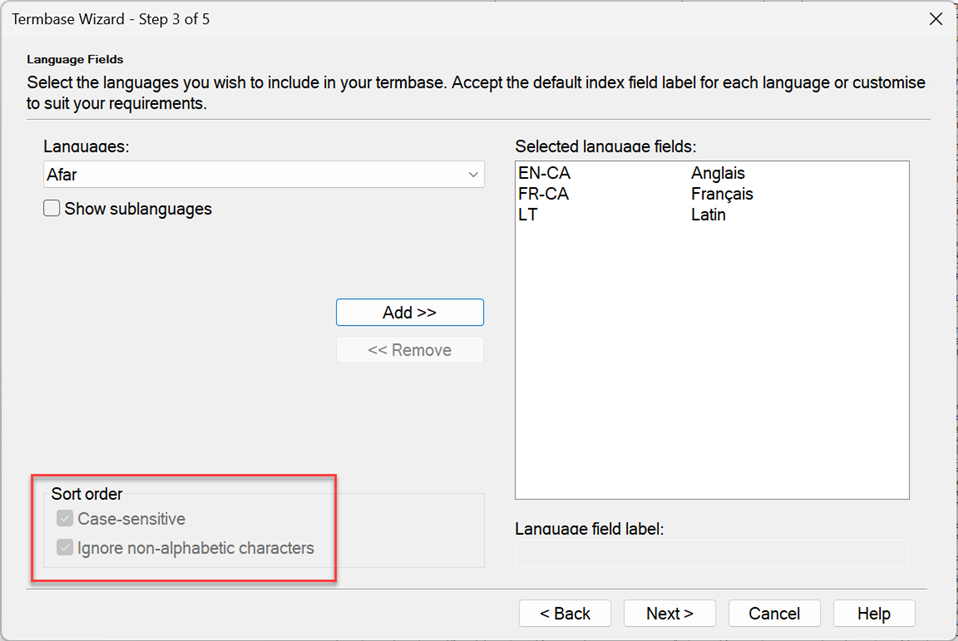
When creating a Termbase, you have the option to make the sorting case-sensitive (see image below), but how can we then change that setting to case-insensitive?
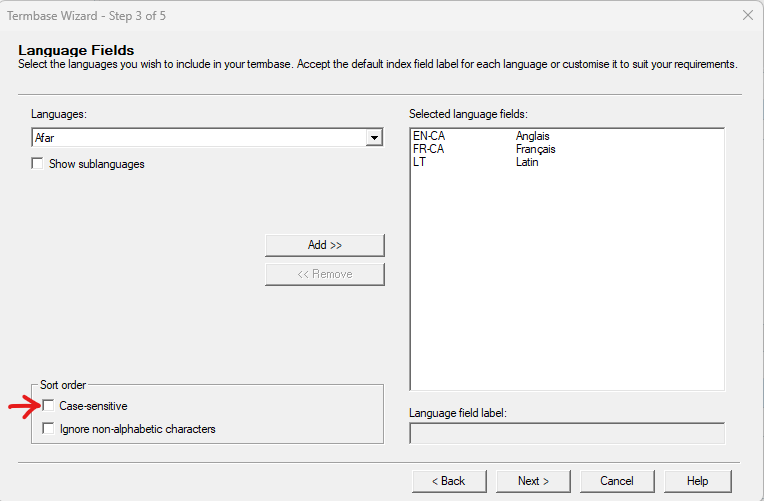
 
Screenshot of Trados Studio Termbase Wizard showing Language Fields step with case-sensitive sort order option checked.

For now, it looks like this in the Termbase Viewer (or “Afficheur de base terminologique”, in the French version):
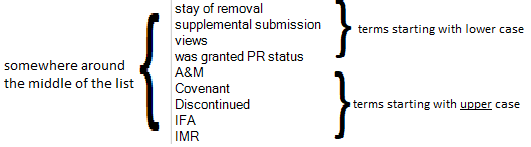
Partial view of Termbase Viewer in Trados Studio with terms sorted in case-sensitive order, 'A&M' appears after terms starting with 'z'.

However, I would like the whole list to be in non-case-sensitive alphabetical order, so that, for example, “A&M” would be at the very start of the list, as opposed to after “z” with the current setting.

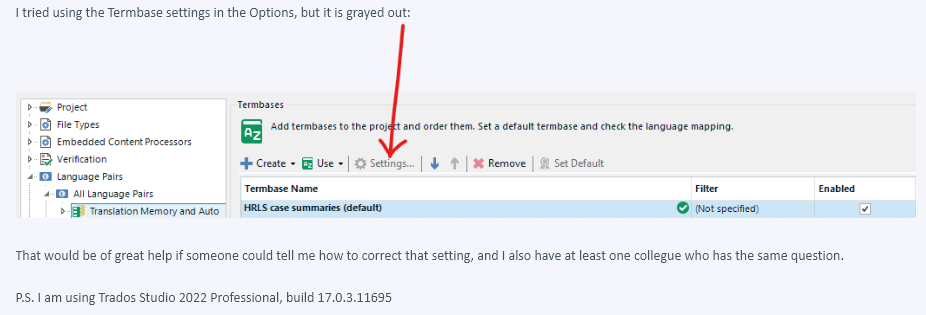
I tried using the Termbase settings in the Options, but it is grayed out:
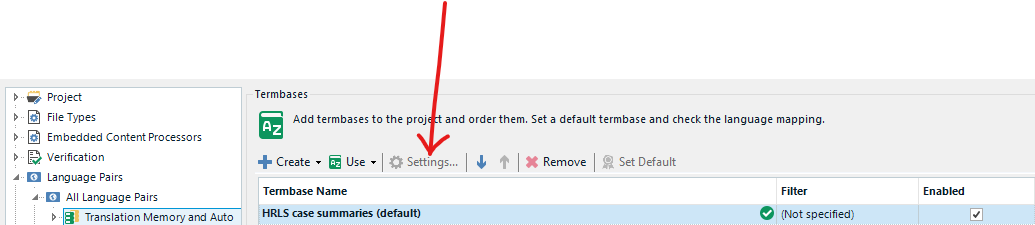
Trados Studio Termbase settings option is grayed out and not clickable in the Termbases section of the Project view.

That would be of great help if someone could tell me how to correct that setting, and I also have at least one collegue who has the same question.

P.S. I am using Trados Studio 2022 Professional, build 17.0.3.11695


Generated Image Alt-Text
[edited by: Trados AI at 2:15 PM (GMT 0) on 5 Mar 2024]

emoji
  • I would like to add that, once the termbase has been created, if I wanted to change those "Sort order" settings, even if I open the termbase in Multiterm Desktop in order to edit the termbase definition, those options are still greyed out. It seems to be the only setting I cannot edit in the definition of an existing termbase when I edit it using the Multiterm Termbase Management module.  

    Screenshot of Trados Studio Termbase Wizard showing language selection with 'Sort order' options 'Case-sensitive' checked and 'Ignore non-alphabetic characters' unchecked.  

    emoji


    Generated Image Alt-Text
    [edited by: Trados AI at 2:15 PM (GMT 0) on 5 Mar 2024]
  • Hi  ,

    Would it be possible to move this thread under Trados Studio > 2. Trados Studio? The question is specifically for Trados Studio users who DO NOT have MultiTerm as a standalone tool (which is the case of most employees at the Government of Canada's Translation Bureau).

    (I had improperly put it under 
    Trados Portfolio > 1. General, and someone moved it here, which is still not the right place.)

    Thank you and have a nice day!

    emoji
  •  

    I moved it.  Reasoning being it's now in the Trados Studio -> MultiTerm forum. This is definitely a MultiTerm topic and not a Studio one.

    Trados Studio website navigation bar with active MultiTerm forum highlighted.

    Paul Filkin | RWS

    Design your own training!
    You've done the courses and still need to go a little further, or still not clear? 
    Tell us what you need in our Community Solutions Hub

    emoji


    Generated Image Alt-Text
    [edited by: Trados AI at 2:15 PM (GMT 0) on 5 Mar 2024]
  • Yet, it doesn't fit with the following description: Screenshot of a Trados Studio forum page, highlighting a section on MultiTerm with text advising to ask questions about using MultiTerm with Studio in the Studio Forum.

    My question is specifically about how to disable the case-sensitive sorting in Studio's Termbase Viewer.

    If a solution implies using “MultiTerm as a standalone tool”, we will be unable to apply it.

    emoji


    Generated Image Alt-Text
    [edited by: Trados AI at 2:15 PM (GMT 0) on 5 Mar 2024]
  •  

    Perhaps that was what you intended, but my reading of this thread is it's pretty much all about Multiterm.  You cannot access the settings for MultiTerm from Studio so to be able to make the change you used most of the post to explain, and Beatriz added to, it's a MultiTerm question.

    The only Studio related part is virtually an additional point where you happened to mention you also tried to make the change through Studio but couldn't.

    Yet, it doesn't fit with the following description: 

    Yes, you are correct about this.  A hangover from before the reorganisation of the forums that we should correct and I will do that.  There actually isn't a seperate Gorup or Subgroup for MultiTerm.  All links will take you to the Trados Studio -> MultiTerm forum where we are now.

    My apologies for your confusion over this, but I still think this is the right forum and I'll correct the description to something more appropriate.

    Paul Filkin | RWS

    Design your own training!
    You've done the courses and still need to go a little further, or still not clear? 
    Tell us what you need in our Community Solutions Hub

    emoji
  •   

    ok - after trying to rewrite this I changed my mind.  I think the description of the forum still works.  This particular post just doesn't seem appropriate for the Studio forum because it's not clear for me that this is actually a question related to Trados Studio.

    If the subject said:

    "How to disable case-sensitive sorting from the Trados Studio Termbase Viewer?"

    and if the post then focused on this part:

    Screenshot of Trados Studio 2022 Professional showing the Termbase settings in the Options menu with the 'Add termbases to the project' option grayed out and an arrow pointing to it.

    Then I would 100% agree with you.

    But as it is it seems more relatable for users questioning the use of the settings in MultiTerm.

    If you really want this in the Trados Studio forum I'll happily edit the post, but like this I don't think it's appropriate.

    Paul Filkin | RWS

    Design your own training!
    You've done the courses and still need to go a little further, or still not clear? 
    Tell us what you need in our Community Solutions Hub

    emoji


    Generated Image Alt-Text
    [edited by: Trados AI at 2:15 PM (GMT 0) on 5 Mar 2024]
  •   

    More importantly... I don't believe you can edit the setting at all, even in Multiterm after the termbase has been created without exporting the content, recreating the termbase with the setting as you prefer and reimporting the content.  I have asked the question of the product manager in case I'm missing something but given you both know what you're doing I think it's not possible.

    Once I get a response we can raise an appropriate enhancement request for it... probably via the ideas site.

    Paul Filkin | RWS

    Design your own training!
    You've done the courses and still need to go a little further, or still not clear? 
    Tell us what you need in our Community Solutions Hub

    emoji
  • Ok. Thanks Paul. You confirm what I/we suspected then. From within the Studio interface (Louis question) it´s not possible to edit at all any of the settings of an already existing termbase. And even with the stand-alone desktop Multiterm tool, even if you can edit the definition of an existing termbase, that particular Sorting setting cannot be changed (my question). The solution you propose is what I had thought too.  Thanks for keeping us updated if you get the response to your question. 

    emoji