Can't open a Language Cloud termbase by double-clicking it in the Resources view

The YouTube video (which seems a bit dated) tells me I can open a termbase by double-clicking on its name. But nothing happens when I do that. So how can I open it (for example to edit the termbase entries)? (The Help tells me to "select inside a termbase row", which seems to mean the same thing as in the video. So no help there.)

Mats

Parents Reply
  • Hi Paul,

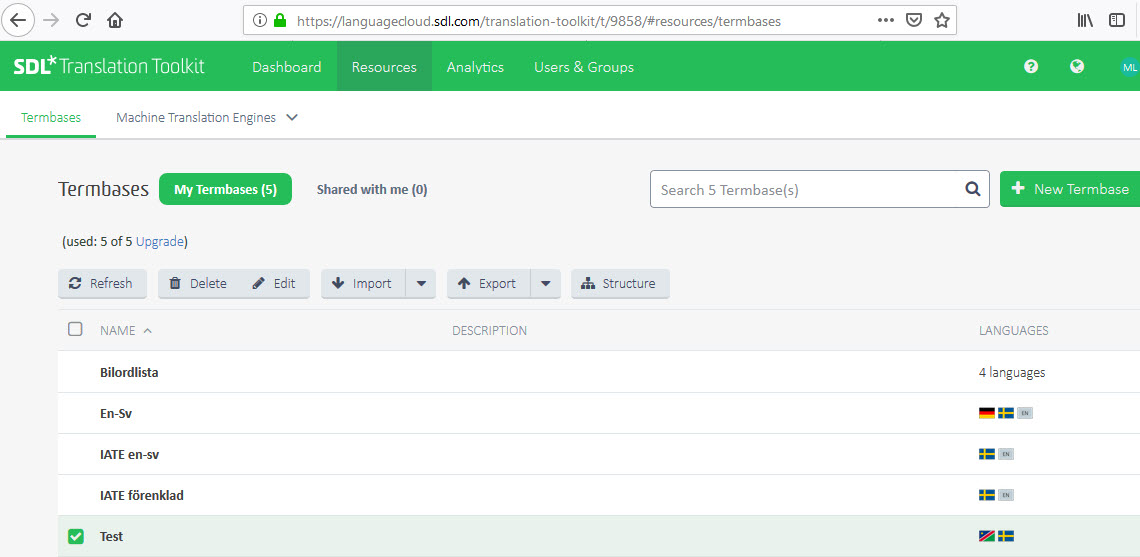
    Thanks for trying. But this is really strange. Here is what the Resources look in both Firefox and Chrome:

    Trados Studio screenshot showing the 'Termbases' tab with 'My termbases' selected. Three termbases are listed but none are clickable or opening.

    I can click or double-click any termbase name as much as I want -- nothing happens.  (Up to that specific action, everything is straightforward and I don't see at what point something could have gone wrong. I can also do everything via the buttons that I am supposed to be able to do. But opening the actual termbase seems impossible.)

    Mats

    emoji


    Generated Image Alt-Text
    [edited by: Trados AI at 5:13 AM (GMT 0) on 5 Mar 2024]
Children