Alignment of XLIFF files fails without error message

Passolo 2016 with .NET
Cascaded project:
-- LPU1, (en-us1 -> en-us2)
-- LPU 2 (en-us2 -> 12 targets, including German)

My project wants to from PO files to XLIFF in the hope of easier updates, thanks to IDs.

Steps so far:

  1. I have successfully added the XLIFF en-us>1 source to LPU1, validated the translation (identical, for now) and saved LPU1.
  2. Opened LPU2 updated/created source and 1 of the targets, namely German, just to test.
  3. Now trying to align LPU2/German with the existing translations in an identically structured German XLIFF file.
    1. Opened the German target string list (there is only one)
    2. Selected from menu: Scan Target File  (Alignment)
      Now in popup:
    3. Apply to --> Translation list myResource German (Germany)
    4. Align > this file > I selected the German.XLF file
    5. Language to extract shows grey [Select a language]  Note: German is not offered, although the XLIFF file specifies target language = de
    6. Options set:
      1. Align all
      2. Overwrite existing translations
      3. All strings in the target file are translated
    7. Click OK
  4. Nothing happens. No error message.

Any ideas what is happening. I enclose the En and the DE  XLIFF files.

Parents
  • The first problem is related to the source-language attribute in the <file> element. You are using en_devel which is not a valid language attribute, but this prevents the alignment. Changing it into en will fix this issue.

    The second problem with the comment is related to a bug that now exists for more than 15 years in the underlying Microsoft MSXML parser and is related to using the xmlns attribute in the <xliff> element.

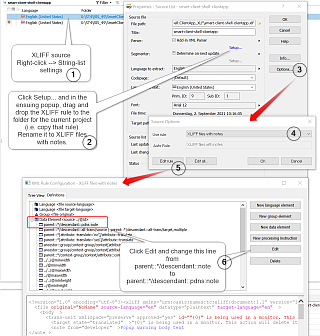
    I would recommend copying the standard XLIFF rule into the Custom rules or directly into the project and adapt it. The Meta Data entry parent::*/descendant::note must be changed into parent::*/descendant::pdns:note. This will fix the issue. See https://docs.sdl.com/785448/403814/sdl-passolo-help/working-with-xml-namespaces for more details.

  • Hi again,
    I have been unable to verify the suggested fix for importing XLIFF notes as passolo comments.
    I have done the following, with many slight variations but all to no avail:


    1) Open LPU1
    2) Right-click the XLIFF source and select String List Settings --> Properties Source List popup appears
    3) In the popup the Parser is listed as "Add-in XML Parser". Click Setup... --> XML Parser Settings popup appears
    4) Drag XLIFF rules from Default rules to the Project
    5) Select the XLIFF rules in the project and renamed to XLIFF with notes
    6) Select the renamed XLIFF rules in the project and exported it to an xfg file
    7) Opened the xfg file in Notepad++ (NOTE: XML parser warns that UTF-16 is declared in the header, but contents are UTF-8)
    8) Edited the xfg file as described by you, so the relevant text reads descendant::pdns::note
    9) Saved the xfg file
    10) back in the popup, select "XLIFF with notes" rules and the project, and imported the edited xfg file.
    11) sub-popup wants me to select which rules I want to import, I select all. --> Now the Custom rules folder is also full of copied rules!
    12) Left popup with OK and tried to generate/update string list.
    Result: No change,  the Comment fields are still not populated.


    Please can you tell me what I'm doing wrong and give the correct steps in detail.  I cannot find them in the documentation.
    Thanks in advance.

  • Problem solved with Peter by changing some project and XML rule settings.

  • Correct.
    Sorry -- I could not upload the full sized PNG, but maybe this helps.
    Screenshot of Trados Studio showing a project settings window with a highlighted error message 'Failed to load the file' in the XMLXLIFF settings tab.

    emoji


    Generated Image Alt-Text
    [edited by: Trados AI at 5:46 AM (GMT 0) on 5 Mar 2024]
  • I am having same/similar problem. I have setup according to this thread. What should it look like in the incoming XLIFF file? I want to have two custom fields coming in from XLIFF and don't know how to define XFG to get to work. 

  • Many years ago, Microsoft had a quite nasty bug in their MSXML components that are used in the background by Passolo to read and write XML files. This bug was related using XML namespaces like this:

    Screenshot of an XML file with XLIFF version and encoding details, displaying an error symbol next to the namespace declaration.

    Result of this bug is that the content of some XML elements can’t be imported into the Passolo projects. The development team has overcome this problem by defining and implementing a special namespace indicator called pdns. More information see here.

    When this additional keyword is used in XPATH expressions the Microsoft bug be fixed. Unfortunately this has to be done for each and every rule. As an example the XLIFF meta data for <context-group> XPATH expression must be changed from

    parent::*/context-group/context/attribute::context-type | parent::*/context-group/context,valueid

    to

    parent::*/pdns:context-group/pdns:context/attribute::context-type | parent::*/pdns:context-group/pdns:context,valueid

    emoji


    Generated Image Alt-Text
    [edited by: Trados AI at 5:46 AM (GMT 0) on 5 Mar 2024]
  • Unfortunately this has to be done for each and every rule.

    Just for posterity, Mr Herrmann, can you make it clearer what kind of "rule" you mean here, and a click-path to find the relevant ones?
    I remember I only changed one line to unblock the import of XLIFF notes along with the source strings into my project.

Reply Children
No Data