Can Passolo Text Parser handle multi-line source file

Hi everybody

I was asked for a suggestion on how to handle this kind of content in Passolo. 

It is the TXT file output with the following structure:

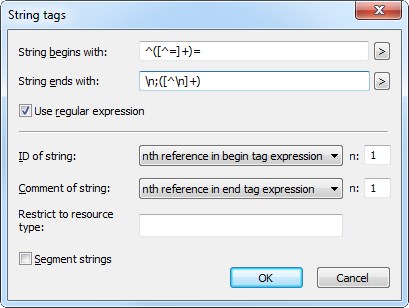
@id=Value
 ;{Locked} comment or trasnlation info

With Tex parser I'm  able to extract the content for ID and Source 

but I don't know how to:


1. Parse the comment content, which is save in the following line of the ResID and source string (as per definition above).

2.  Exclude the strings where comment string contains the {Locked} in the comment line and 

The issue for me is, that the comment content is not in the same line as ResID and Source.

Can anybody help me with any idea on how to handle the 1. and 2. ?


Sample:

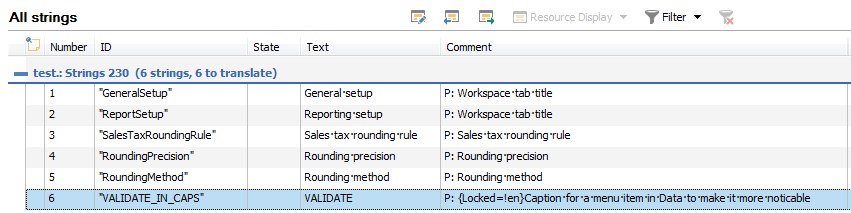
GeneralSetup=General setup
;Workspace tab title
ReportSetup=Reporting setup
;Workspace tab title
SalesTaxRoundingRule=Sales tax rounding rule
;Sales tax rounding rule
RoundingPrecision=Rounding precision
;Rounding precision
RoundingMethod=Rounding method
;Rounding method
VALIDATE_IN_CAPS=VALIDATE
;{Locked=!en}Caption for a menu item in Data to make it more noticable

Parents Reply Children
  • Aha, I see.

    I saw the .ParserComment  in the editor but just didn't look at the remaining options in the filter dialog.

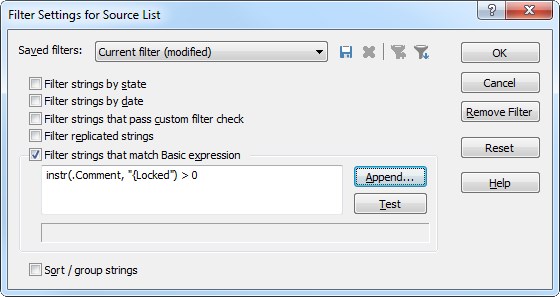
    Interestingly, Passolo 2015 worked well  with instr(.Comment, "{Locked") > 0.

    FYI, I just check the same on my Demo Passolo 2018 and somehow dosn't want to show only the strings with "{Locked" in the ParserComment.


    Maybe it has something to do with the fact that it is a Demo version?


    Anyway, your advice was very helpfull and to the point.


    Thank you again.


    Simon


  • You are right. Back in 2015 there was just one comment property named .Comment. The .ParserComment property was introduced in 2016 to allow a better differentiation between imported comments and project manager comments.

    And your observation regarding the demo version is right too. In the demo version all automation features like the command line interface and the COM object model where these filter properties are used are disabled.

    If you like to do a more deep dive testing please contact your SDL sales representative to get a time limited full version of the product.