 Translate


Hallo,
wie kann ich in einer TBX-Datei (Trados Live) die .xdt-Datei anpassen?


Hallo,
wie kann ich in einer TBX-Datei (Trados Live) die .xdt-Datei anpassen?
The easiest way to "adjust it" would be to use the Glossary Converter.
Now you have the XDT. So either create a new termbase in Trads Live or MultiTerm and then edit it as you see fit in there before you import any data into it.
Keep in mind that if you change the XDT you may not be able to import the associated XML anymore unless you edit the content as well to suit the new definition.
Perhaps it might be helpful if you explain what you are trying to achieve? Is the problem just that you have a TBX that doesn't match the definition of your Trados Live termbase? If this is the problem it might make more sense to convert the TBX to Excel and then change the structure to match the termbase you want to import into. Then create a new XML export to import into Trados Live. All of that can be done easily using the Glossary Converter.
Paul Filkin | RWS
Design your own training!
You've done the courses and still need to go a little further, or still not clear?
Tell us what you need in our Community Solutions Hub


Hallo,
so weit so gut. Das war verständlich. Da ich meine Daten aus TBX beabsichtige zu nutzen, habe ich nun folgende Frage: Wie kann ich das Feld "Definition" in "Kontext" unbenennen? Ist das in Multiterm möglich, ohne dass die Daten verloren gehen? Oder muss ich die XML-Datei in Notepad++ bearbeiten?
Wie gehe ich richtig vor?


The easiest way is to create a new termbase in MultiTerm using the definition (xdt) file, but DO NOT import your data. Then edit the definition in MultiTerm so the field is called whatever you prefer.
Once done you should be able to import your data to the new termbase. Perhaps rename the field in the XML, or convert to Excel and rename the header containing the data for the field you want changed, and then convert the Excel to XML and import it.
Paul Filkin | RWS
Design your own training!
You've done the courses and still need to go a little further, or still not clear?
Tell us what you need in our Community Solutions Hub
Hört sich einfach an, der Automatisierungsprozess für Änderungen ist komplex.

Yes it is! Once you start using a database it becomes harder to change the table names so it's probably better to always recreate.
Paul Filkin | RWS
Design your own training!
You've done the courses and still need to go a little further, or still not clear?
Tell us what you need in our Community Solutions Hub
Ich komme damit nicht klar:
Hier ist die aktuelle Felderliste aus TBLive
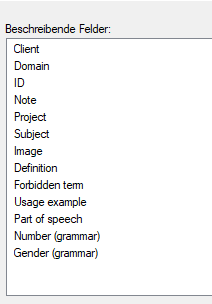
diese (meine Felder) soll wie folgt aussehen: 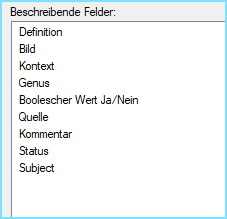
Wie soll ich die obige XDT in die meinige umwandeln. Daten werden doch verloren gehen.
Weniger Automatisierung und mehr an die Praxis der Übersetzer denken.
Was schlagen Sie vor?
I guess you do this step by step. I'd do this:
I hope this is clear enough for you. I probably jumped some detail but hopefully wrote enough for you to understand?
Paul Filkin | RWS
Design your own training!
You've done the courses and still need to go a little further, or still not clear?
Tell us what you need in our Community Solutions Hub
Sehr komplexiert:
Manche Schritte konnte ich umgehen, ABER es gibt folgendes Problem: Meine geänderte XDT-Datei wird zwar eingelesen, aber nicht mit dem geänderten Feld.
Somit werden mir meine Definitionsrechte für eine neue Datenbank einfach weggewischt.
Und warum muss sich der Übersetzer mit solchen Fehler beschäftigen, wenn diese nicht von ihm kommen?
Warum wird in Trados Live mein Feld "Kontext" angezeigt aber nicht aufgenommen?
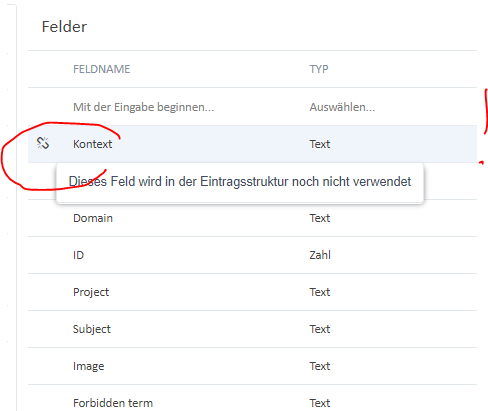
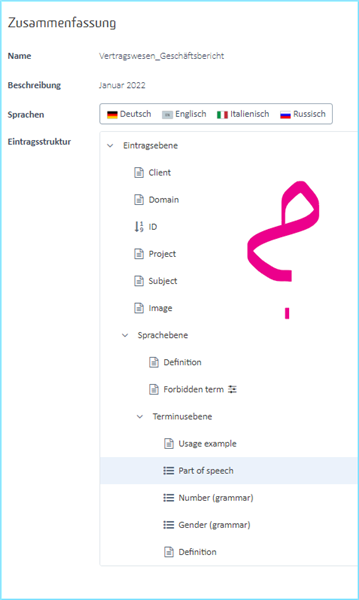

Manche Schritte konnte ich umgehen, ABER es gibt folgendes Problem: Meine geänderte XDT-Datei wird zwar eingelesen, aber nicht mit dem geänderten Feld.
Can you share how you changed the XDT? Did you do this with notepad or did you do it in a controlled manner as I explained?
Und warum muss sich der Übersetzer mit solchen Fehler beschäftigen, wenn diese nicht von ihm kommen?
It's hard to answer this question because the error might have come from you. How do we know what you did? Can you share the original XDT before the change, and then the xdt after the change so I can test it?
Paul Filkin | RWS
Design your own training!
You've done the courses and still need to go a little further, or still not clear?
Tell us what you need in our Community Solutions Hub