 Translate


Hallo,
wie kann ich in einer TBX-Datei (Trados Live) die .xdt-Datei anpassen?


Hallo,
wie kann ich in einer TBX-Datei (Trados Live) die .xdt-Datei anpassen?

Could it be that the field "Kontext" is part of the termbase, but that it hasn't been assigned to a level? I am not that familiar with terminology management in Trados Live (I have been working with MultiTerm for more than thirty years), but it seems to me a disadvantage that you can't create your own custom export definitions (which could be perfect for partial export of entries to an xml file). But maybe I got things wrong when talking about Trados Live terminology management.

Nein, ich habe nur ein Feld hinzugefügt und zwar "Kontext"
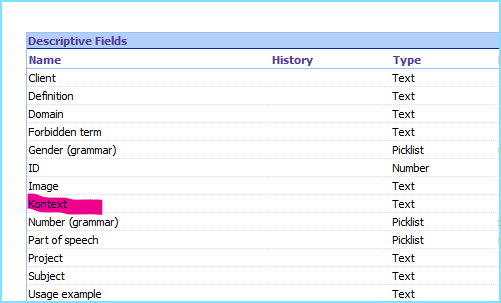
Alles weitere muss die Software schon selbst machen. Beim Erstellen einer neuen TB in Trados Live, wird dieses Feld aus meiner neuen XDT-Datei nicht angezeigt.
Nach dem Hinzufügen des Felds im Trados Live wird mir trotzdem kein Feld "Kontext" angezeigt.
Übersetzer sind immer noch Übersetzer und keine Softwareentwickler.


Could it be that the field "Kontext" is part of the termbase, but that it hasn't been assigned to a level?
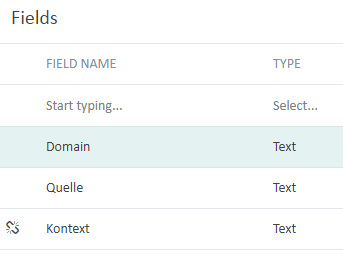
This is most likely the reason. I just found some time to play with this and can repro like this. In my fields list I have this:
In my summary I have this:
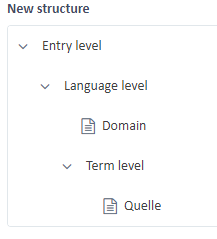
If I go back to the fields and structure menu in the navigation pane it all becomes clear:
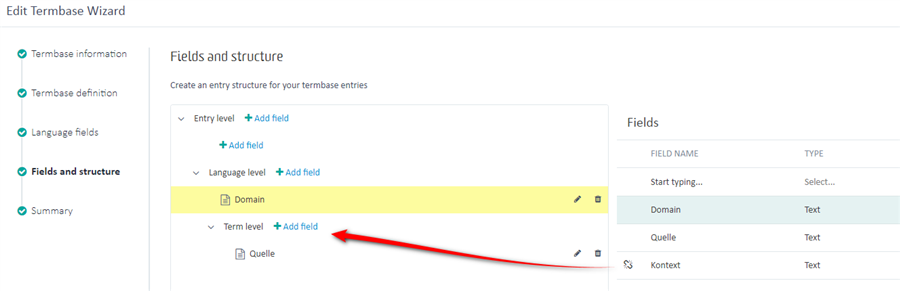
You can see quite obviously that I have not added Kontext to the structure yet. If I do this:
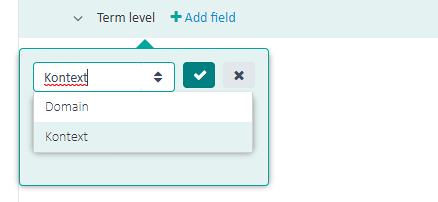
Now I see this in the screenshot Alide showed
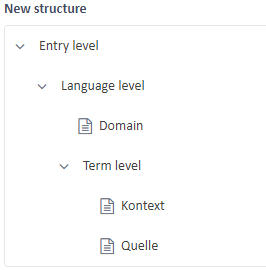
It's often helpful to show a full screenshot of a problem and not just one that only shows where you think the problem may be. More eyes on a problem with all the context can be helpful.
Paul Filkin | RWS
Design your own training!
You've done the courses and still need to go a little further, or still not clear?
Tell us what you need in our Community Solutions Hub