How to programatically get available metadata and levels

Is there a web API call (or calls) which can get all of the available metadata field names configured for an SDL Tridion Docs instance (e.g., FTITLE, FDESCRIPTION, FCHANGES, etc.)?

ListOfValues 2.5 RetrieveLists can get the names of the LOV fields, but this is a limited list of metadata. I'd like to get the list of *all* metadata fields available, not just LOVs. Also, ListOfValues 2.5 RetrieveLists does not return the level for the metadata. Is there a way to get the level, also, in addition to what's included in the LOV List XML Structure?

Parents
  • Hi Mark,
     
    Yes there is... Using ISHRemote in PowerShell ISE... Try
    $ishSession = New-IshSession -WsBaseUrl "https://example.com/InfoShareWS/" -IshUserName "username" -IshUserPassword  "userpassword"
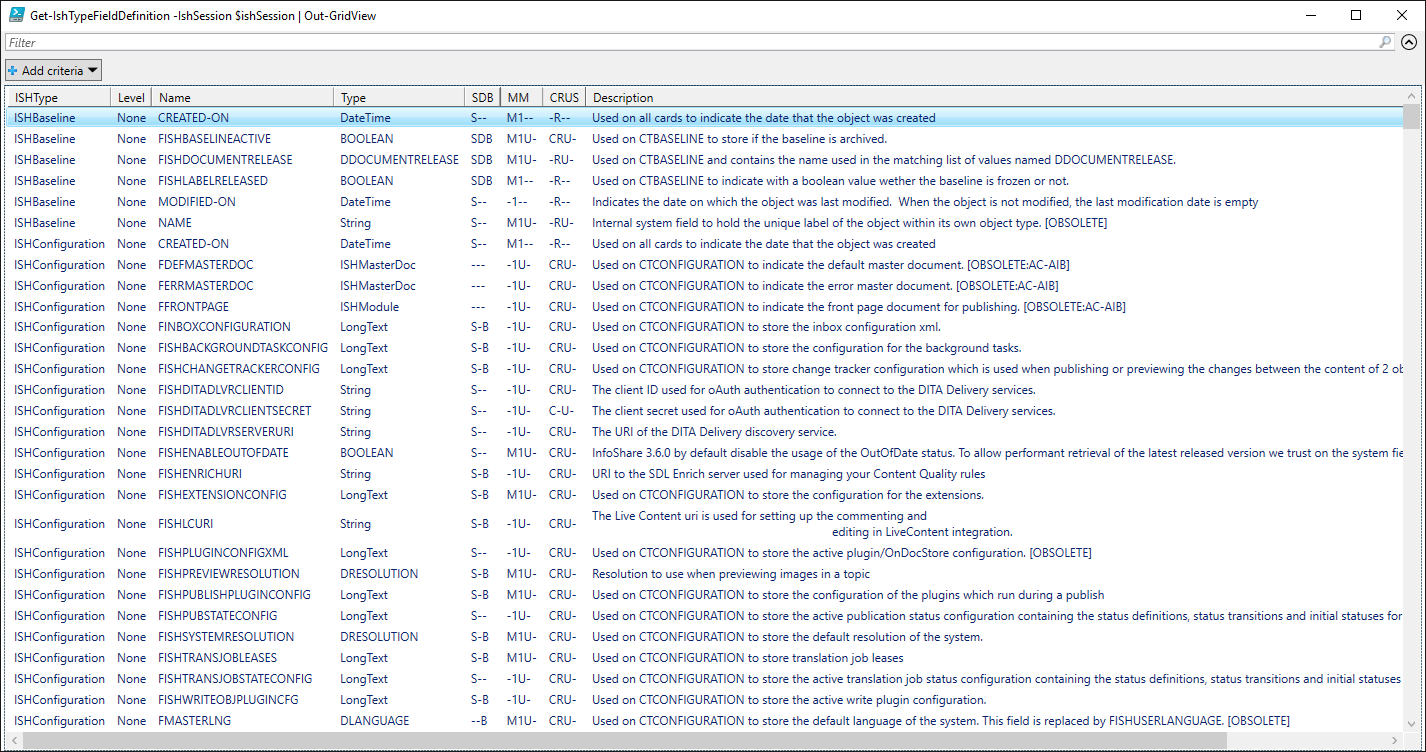
    Get-IshTypeFieldDefinition -IshSession $ishSession | Out-GridView
    It returns you a nice grid view with filtering capabilities
    Screenshot of Trados Studio's PowerShell ISE showing a grid view of ISHTypeFieldDefinition with various fields and data types listed, including descriptions and user constraints.
     
    Within PowerShell have a look at the help of the above cmdlet
    Get-Help Get-IshTypeFieldDefinition -Full
    Now in turn, knowing that ISHRemote is public API-based, there is an API call since 13/13.0.0, look in the documentation for Settings 2.5 RetrieveFieldSetupByIshType and you can look in the open-source code of ISHRemote how it was implemented. This API call returns you the LOV names (domain, hence the 'D'-prefix) which you can use in ListOfValues 2.5 RetrieveLists 
     
     
    Best wishes,
    Dave
     
    PS: If people are interested in more demos around this subject, have a look at the video and examples listed on Automating tasks in SDL Tridion Docs using PowerShell - Examples
    emoji


    Generated Image Alt-Text
    [edited by: Trados AI at 6:34 AM (GMT 0) on 5 Mar 2024]
Reply
  • Hi Mark,
     
    Yes there is... Using ISHRemote in PowerShell ISE... Try
    $ishSession = New-IshSession -WsBaseUrl "https://example.com/InfoShareWS/" -IshUserName "username" -IshUserPassword  "userpassword"
    Get-IshTypeFieldDefinition -IshSession $ishSession | Out-GridView
    It returns you a nice grid view with filtering capabilities
    Screenshot of Trados Studio's PowerShell ISE showing a grid view of ISHTypeFieldDefinition with various fields and data types listed, including descriptions and user constraints.
     
    Within PowerShell have a look at the help of the above cmdlet
    Get-Help Get-IshTypeFieldDefinition -Full
    Now in turn, knowing that ISHRemote is public API-based, there is an API call since 13/13.0.0, look in the documentation for Settings 2.5 RetrieveFieldSetupByIshType and you can look in the open-source code of ISHRemote how it was implemented. This API call returns you the LOV names (domain, hence the 'D'-prefix) which you can use in ListOfValues 2.5 RetrieveLists 
     
     
    Best wishes,
    Dave
     
    PS: If people are interested in more demos around this subject, have a look at the video and examples listed on Automating tasks in SDL Tridion Docs using PowerShell - Examples
    emoji


    Generated Image Alt-Text
    [edited by: Trados AI at 6:34 AM (GMT 0) on 5 Mar 2024]
Children