Trados Business Manager – End of Life Announcement

Trados Business Manager (TBM) has reached end of life. Following the discontinuation of TBM sales on 31 October 2023, all maintenance and support services will conclude on 31 October 2024.
What Does This Mean for TBM Users?

  • End of Services: RWS will no longer provide any services related to the installation or updating of TBM.
  • Existing Installations: TBM will remain functional where already installed, but the RWS support team will not offer assistance in troubleshooting issues, addressing reported problems, or providing further development for TBM.
  • Documentation: The TBM documentation has been removed from docs.rws.com.
  • Community Support: The community forum for TBM will remain accessible in a read-only format for users to reference if needed.

Workload Planner/Labels/Pop Up

Hello,

The workload planner is a great tool.

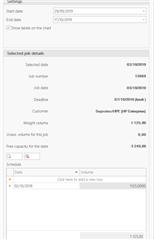
However, I would like to know if it is possible to adapt the label/popup to display data other than the job number in the pop up info that appear when hovering over the graph (Could I for instance decide I want to also see the name of the client or the deadline?) I'm aware this is displayed on the right of the screen but is this layout changeable by the user?

Also, is it possible to select what should appear: for instance, if a job has been assigned to a different contractor or is on hold, can it be hidden from my view?

Thank you

Parents Reply
  • Hello, Aubeline,

    Well, for this planner has horizontal limit line, showing maximum capacity. And any of buttons on the toolbar to automatically re-plan selected job always follow a rule to not exceed this limit when possible. At the end, if user decides to enter higher volume manually, it's assumed that a user does it intentionally, knowing that fact. So, if the app will start to warn/refuse user, it just could be too odd. Don't you agree?

    As for second suggestion (job name in job details) - of course!!

Children