
 Translate


<SDLErrorDetails time="2021-02-22 오후 6:27:42">
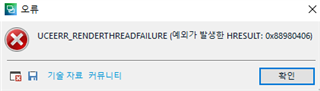
  <ErrorMessage>UCEERR_RENDERTHREADFAILURE (예외가 발생한 HRESULT: 0x88980406)</ErrorMessage>
  <Exception>
    <Type>System.Runtime.InteropServices.COMException, mscorlib, Version=4.0.0.0, Culture=neutral, PublicKeyToken=b77a5c561934e089</Type>
    <ErrorCode>-2003303418</ErrorCode>
    <HelpLink />
    <Source>PresentationCore</Source>
    <HResult>-2003303418</HResult>
    <StackTrace><![CDATA[   위치: System.Windows.Media.Composition.DUCE.Channel.SyncFlush()
   위치: System.Windows.Interop.HwndTarget.UpdateWindowSettings(Boolean enableRenderTarget, Nullable`1 channelSet)
   위치: System.Windows.Interop.HwndTarget.UpdateWindowPos(IntPtr lParam)
   위치: System.Windows.Interop.HwndTarget.HandleMessage(WindowMessage msg, IntPtr wparam, IntPtr lparam)
   위치: System.Windows.Interop.HwndSource.HwndTargetFilterMessage(IntPtr hwnd, Int32 msg, IntPtr wParam, IntPtr lParam, Boolean& handled)
   위치: MS.Win32.HwndWrapper.WndProc(IntPtr hwnd, Int32 msg, IntPtr wParam, IntPtr lParam, Boolean& handled)
   위치: MS.Win32.HwndSubclass.DispatcherCallbackOperation(Object o)
   위치: System.Windows.Threading.ExceptionWrapper.InternalRealCall(Delegate callback, Object args, Int32 numArgs)
   위치: System.Windows.Threading.ExceptionWrapper.TryCatchWhen(Object source, Delegate callback, Object args, Int32 numArgs, Delegate catchHandler)
   위치: System.Windows.Threading.Dispatcher.LegacyInvokeImpl(DispatcherPriority priority, TimeSpan timeout, Delegate method, Object args, Int32 numArgs)
   위치: MS.Win32.HwndSubclass.SubclassWndProc(IntPtr hwnd, Int32 msg, IntPtr wParam, IntPtr lParam)]]></StackTrace>
  </Exception>
  <Environment>
    <ProductName>SDL Trados Studio</ProductName>
    <ProductVersion>Studio16</ProductVersion>
    <EntryAssemblyFileVersion>16.1.3.4096</EntryAssemblyFileVersion>
    <OperatingSystem>Microsoft Windows 10 Home</OperatingSystem>
    <ServicePack>NULL</ServicePack>
    <OperatingSystemLanguage>1042</OperatingSystemLanguage>
    <CodePage>949</CodePage>
    <LoggedOnUser>DESKTOP-VB37DAH\flitto</LoggedOnUser>
    <DotNetFrameWork>4.0.30319.42000</DotNetFrameWork>
    <ComputerName>DESKTOP-VB37DAH</ComputerName>
    <ConnectedToNetwork>True</ConnectedToNetwork>
    <PhysicalMemory>16309396 MB</PhysicalMemory>
  </Environment>
</SDLErrorDetails>
Hi, I'm glad SDL Trados offers a great plugin to process subtitles.
It works just fine when i'm handling short video clip under 10 minutes or so.
But when I processed 40 minutes video, Trados just crashed with above error report.
I want to know if there's a solution.
Thanks
+ Thanks for your kind answer.
I updated windows, nvidia game ready driver, but it didn't worked.
I tested different videos, and I figured something like below.
1. It only crashes when I click 'Show Sound Waveform' option. Linking video works just fine regardless of length.
2. Last time I checked, Video that is 25 minutes length had no problem at all. Sound waveform created successfully.
3. It starts to crash when the video is around 30 minutes or over.
Generated Image Alt-Text
[edited by: Trados AI at 11:00 AM (GMT 0) on 4 Mar 2024]



