UX: Saving a specific Trados editor's display for subtitling

Hello,

Is it possible to save a customized editor's display layout for translating subtitles? A display layout that would contain selected windows and their physical position on the screen.

If it's not possible, is it something that SDL is considering for future releases?

It would be great to just click a button to switch display layouts, depending on the type of document you need to translate (video subtitles vs any other document).

Thank you!

Parents
  • Hi Céline,

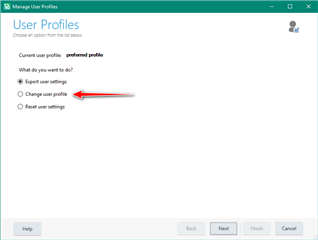
    In theory this is possible by saving your user profile:

    File -> Setup -> Manage User Profiles

    But I could not verify this as I'm getting an error.  I'll look at this with the teams next week but it would be worth you trying that route and see if it works for you.  Backup your user profile with a name related to your subtitling setup, then change the layout and see if you can restore it by changing the user profile to the one you saved.

    Paul Filkin | RWS

    Design your own training!
    You've done the courses and still need to go a little further, or still not clear? 
    Tell us what you need in our Community Solutions Hub

Reply
  • Hi Céline,

    In theory this is possible by saving your user profile:

    File -> Setup -> Manage User Profiles

    But I could not verify this as I'm getting an error.  I'll look at this with the teams next week but it would be worth you trying that route and see if it works for you.  Backup your user profile with a name related to your subtitling setup, then change the layout and see if you can restore it by changing the user profile to the one you saved.

    Paul Filkin | RWS

    Design your own training!
    You've done the courses and still need to go a little further, or still not clear? 
    Tell us what you need in our Community Solutions Hub

Children