You are currently working on UAT 

ALT+ DEL (clear target segment) grayed out in Trados Studio 2015 SR2

Since updating to 2015 SR2 I can no longer clear target segments. ALT+DEL does not work and the option in the ribbon and under the right mouse button are grayed out. The segment status of the segments I wish to clear is "untranslated". Has anyone else experienced this and/or does anyone have a solution to this problem?

Parents
  • Does anyone have a solution to this problem. 3 years on, unfortunately it appears that this problem has not been solved by SDL in the 2019 version. 'Clear target' for some reason has been grayed out and deactivated, no matter how many times I restart Trados.

  • Hi 

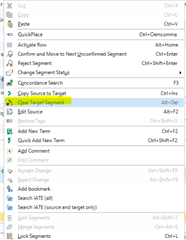
    This isn't now and never has been a problem for me... I only have to click into the target segment then right-click on it and I can select 'Clear Target Segment' from the dropdown menu:

    Also, I can clear the target segment using the Alt+Del shortcut.

    I can also perform this action on any number of consecutive segments by dragging the cursor to highlight them then using Alt+Del or right-click>select Clear Target Segment.

    If it has never worked for you then there must be something about your setup that is preventing it.

    All the best,

    Alison

  • Hi Alison,
    Thanks for your suggestion.

    f it had never worked, this would indeed have pointed to a significant compatibility or installation problem on my computer. However, the problem is not permanent, but occurs unexpectedly without any clear cause or solution some time after installation. it is not related to a specific document, as it occurs with all documents.  It is also not a firewall problem. I have checked that. I have also tried removing basesettings.xml, settings.xml and usersettings.xml and then restarting Studio, but to no avail. The problem is therefore not caused by a corrupted configuration file.

    My understanding is that Trados Studio runs on the Java Platform, so I suspect this is a problem with the communication between Trados Studio and Java, in which case this should not occur, in my view, without some sort of error message.

    'Clear target segment' is greyed out and all other options for clearing the target segment (e.g. ALT+DEL) do not work. This suggests to me that some routine in the software has identified some or other permissions issue and has deactivated this function. For instance, in the case of a read-only text, all editing functions would rightly been greyed out. I cannot find any interface with options that indicate that I have limited my ability to clear target segments.

    So, on my assessment, it boils down to a programming issue.

    Regards,

    Robert

Reply
  • Hi Alison,
    Thanks for your suggestion.

    f it had never worked, this would indeed have pointed to a significant compatibility or installation problem on my computer. However, the problem is not permanent, but occurs unexpectedly without any clear cause or solution some time after installation. it is not related to a specific document, as it occurs with all documents.  It is also not a firewall problem. I have checked that. I have also tried removing basesettings.xml, settings.xml and usersettings.xml and then restarting Studio, but to no avail. The problem is therefore not caused by a corrupted configuration file.

    My understanding is that Trados Studio runs on the Java Platform, so I suspect this is a problem with the communication between Trados Studio and Java, in which case this should not occur, in my view, without some sort of error message.

    'Clear target segment' is greyed out and all other options for clearing the target segment (e.g. ALT+DEL) do not work. This suggests to me that some routine in the software has identified some or other permissions issue and has deactivated this function. For instance, in the case of a read-only text, all editing functions would rightly been greyed out. I cannot find any interface with options that indicate that I have limited my ability to clear target segments.

    So, on my assessment, it boils down to a programming issue.

    Regards,

    Robert

Children