
 Translate


The Autocorrect function under 'Options - AutoCorrect" seems to work only when one is in Translation mode.
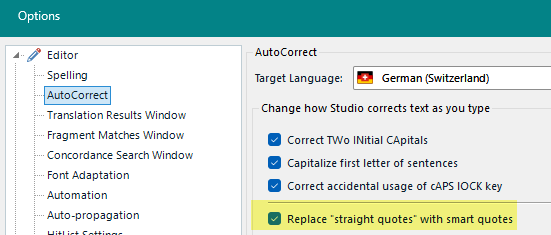
If one reviews a document, these options do not apply.
This is very unappropriate, because it raises situations which are very difficult to overcome.
One example: you are revising a document and the translator has inserted straight quotes instead of curly ones. You want to correct this, but you cannot unless you know the keyboard combination for the curly quote because your typing always inserts a straight quote.
We have this problem in Trados Team where we get translated documents with straight quotes and cannot correct them. We had to implement QA regex rules to make sure that translators get their task returned as long as their text contains straight quotes.
The same is true for all other autocorrected characters.
Is this by design or a bug?
It seems that this problem exist since quite a while, see this post:
(70) Straight apostrophe when Tracks Changes is activated. I need curvy one. - 1. Trados Studio - Trados Studio - RWS Community
Removed AI Suggestion
[edited by: Walter Blaser at 11:37 AM (GMT 1) on 12 Aug 2026]



