
 Translate


Subject:
Dear Trados Support Team,
I am writing to report a recurring stability issue in Trados Studio 2024 while working on a standard IDML project containing approximately 58,000 words.
Studio crashes intermittently, particularly during saving, and displays errors such as:
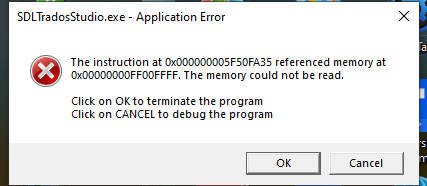
System.OutOfMemoryException- “The memory could not be read”
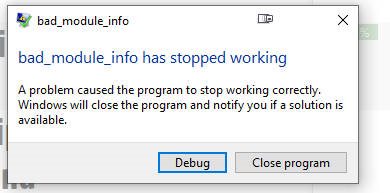
- “bad_module_info has stopped working”
The SDL error report indicates that the failure occurs during the process of writing the SDLXLIFF file, specifically while escaping XML content and embedding or linking the original dependency file. The relevant stack trace includes:
XmlEscape
WriteZippedFile
EmbedDependencyFile
WriteSdlXliff
SaveBilingualImpl
The affected environment is:
- Trados Studio 2024, version 18.1.4.6694
- Windows 10 Pro
- Approximately 64 GB of installed physical memory
The error log confirms that Studio throws a System.OutOfMemoryException during the SDLXLIFF save operation rather than during translation or TM lookup.
I appreciate that Trados Studio 2026 is now available and that its 64-bit architecture should address many memory-related limitations. I already have Studio 2026 myself. However, this does not eliminate the need to investigate and, where technically possible, correct the problem in Studio 2024.
Many professional users may continue relying on Studio 2024 for valid operational, compatibility, licensing or client-related reasons.
<SDLErrorDetails time="7/31/2026 7:18:55 PM">
  <ErrorMessage>Exception of type 'System.OutOfMemoryException' was thrown.</ErrorMessage>
  <Exception>
    <Type>System.OutOfMemoryException, mscorlib, Version=4.0.0.0, Culture=neutral, PublicKeyToken=b77a5c561934e089</Type>
    <ExceptionMessage>Exception of type 'System.OutOfMemoryException' was thrown.</ExceptionMessage>
    <HelpLink />
    <Source>mscorlib</Source>
    <HResult>-2147024882</HResult>
    <StackTrace><![CDATA[   at System.String.ReplaceInternal(String oldValue, String newValue)
   at System.String.Replace(String oldValue, String newValue)
   at Sdl.FileTypeSupport.Bilingual.SdlXliff.XmlNodeBuilder.XmlBuilder.XmlEscape(String unescaped)
   at Sdl.FileTypeSupport.Bilingual.SdlXliff.XmlNodeBuilder.XmlBuilder.AddText(String text)
   at Sdl.FileTypeSupport.Bilingual.SdlXliff.FileManager.WriteZippedFile(XmlBuilder builder, String filePath)
   at Sdl.FileTypeSupport.Bilingual.SdlXliff.XliffWriter.EmbedDependencyFile(XmlBuilder builder, IDependencyFileProperties file)
   at Sdl.FileTypeSupport.Bilingual.SdlXliff.XliffWriter.AutoEmbedOrLinkDependencyFile(XmlBuilder builder, IDependencyFileProperties file)
   at Sdl.FileTypeSupport.Bilingual.SdlXliff.XliffWriter.AddDependencyFile(XmlBuilder builder, IDependencyFileProperties file)
   at Sdl.FileTypeSupport.Bilingual.SdlXliff.XliffWriter.SetDependencyFiles(FileSkeleton fileHeader, XmlBuilder builder)
   at Sdl.FileTypeSupport.Bilingual.SdlXliff.XliffWriter.WriteFileComplete(FileSkeleton fileHeader, XliffFormattingXmlTextWriter writer)
   at Sdl.FileTypeSupport.Bilingual.SdlXliff.XliffWriter.WriteSdlXliff(XliffFormattingXmlTextWriter writer)
   at Sdl.FileTypeSupport.Bilingual.SdlXliff.XliffFileWriter.WriteSdlXliffToFile(String tempOutputFile)
   at Sdl.FileTypeSupport.Bilingual.SdlXliff.XliffFileWriter.Complete()
   at Sdl.FileTypeSupport.Framework.Integration.AbstractBilingualProcessorContainer.Complete()
   at Sdl.FileTypeSupport.Framework.Core.Utilities.BilingualApi.BilingualContentHandlerAdapter.Complete()
   at Sdl.FileTypeSupport.Framework.Integration.AbstractBilingualProcessorContainer.Complete()
   at Sdl.FileTypeSupport.Framework.Integration.MultiFileConverter.ParseNext()
   at Sdl.FileTypeSupport.Framework.Integration.MultiFileConverter.Parse()
   at Sdl.TranslationStudio.Editor.TranslationEditor.TranslatableDocument.SaveBilingualImpl(String[] bilingualFilePaths, Boolean copy, IJobExecutionContext context)
   at Sdl.TranslationStudio.Editor.TranslationEditor.TranslatableDocument.Save(IJobExecutionContext context)
   at Sdl.TranslationStudio.Api.Editor.SaveJobRequest.Execute(IJobExecutionContext context)
   at Sdl.Desktop.Platform.Implementation.Services.JobExecuter.Execute(JobData jobData)
   at Sdl.Desktop.Platform.Implementation.ResourceLoggingInternalCommandExecuter`1.ExecuteWithResourceLogging(TCommandData commandData, String message)
   at Sdl.Desktop.Platform.Implementation.Services.Job._worker_DoWork(Object sender, DoWorkEventArgs e)
   at System.ComponentModel.BackgroundWorker.OnDoWork(DoWorkEventArgs e)
   at System.ComponentModel.BackgroundWorker.WorkerThreadStart(Object argument)]]></StackTrace>
  </Exception>
  <Environment>
    <ProductName>Trados Studio</ProductName>
    <ProductVersion>Studio18</ProductVersion>
    <EntryAssemblyFileVersion>18.1.4.6694</EntryAssemblyFileVersion>
    <OperatingSystem>Microsoft Windows 10 Pro</OperatingSystem>
    <ServicePack>NULL</ServicePack>
    <OperatingSystemLanguage>1033</OperatingSystemLanguage>
    <CodePage>1256</CodePage>
    <LoggedOnUser>ADMINSAM\Ahmed</LoggedOnUser>
    <DotNetFrameWork>4.0.30319.42000</DotNetFrameWork>
    <ComputerName>ADMINSAM</ComputerName>
    <ConnectedToNetwork>True</ConnectedToNetwork>
    <PhysicalMemory>64653400 MB</PhysicalMemory>
  </Environment>
</SDLErrorDetails>
 A file of this size should not cause Studio 2024 to terminate repeatedly without allowing the user to save their work reliably.
I would therefore appreciate it if your technical team could:
- Confirm whether this is a known defect in Studio 2024.
- Advise whether a cumulative update, hotfix or practical workaround is available.
- Consider correcting the issue in a future Studio 2024 maintenance update, particularly the memory handling involved in writing SDLXLIFF files and embedding large IDML dependencies.
- Ensure that, where a memory limit cannot be avoided, Studio fails gracefully and provides a clear warning rather than terminating unexpectedly and potentially placing the user’s work at risk.
I am attaching the SDL error report and screenshots of the Windows error messages for your investigation. The report identifies the crash as occurring within the bilingual-file save process.
Thank you for looking into this matter. I would be grateful if the case could be escalated to the relevant Studio development or file-type engineering team, as this appears to be a product-stability issue rather than a problem with the available hardware.
Kind regards,
Sameh Ragab
Removed AI Suggestion
[edited by: Sameh Elsharkawy at 5:09 PM (GMT 1) on 31 Jul 2026]



