
 Translate


Hi there,
I wanted to create a template to work on some MDX files, for example, you can save the following code block to a .mdx file locally to reproduce:
---
title: Get started with LM Studio
sidebar_title: Overview
description: Download and run Large Language Models like Qwen, Mistral, Gemma, or gpt-oss in LM Studio.
index: 1
---

import { Step, Steps } from "fumadocs-ui/components/steps";

Double check computer meets the minimum [system requirements](/docs/system-requirements).

<Callout type="info" title="Info">
You might sometimes see terms such as `open-source models` or `open-weights models`. Different models might be released under different licenses and varying degrees of 'openness'. In order to run a model locally, you need to be able to get access to its "weights", often distributed as one or more files that end with `.gguf`, `.safetensors` etc.
</Callout>

<hr />

## Getting up and running

First, **install the latest version of LM Studio**. You can get it from [here](/download).

Once you're all set up, you need to **download your first LLM**.

<Steps>
  <Step>
    <h3>Download an LLM to your computer</h3>

    Head over to the Discover tab to download models. Pick one of the curated options or search for models by search query (e.g. `"Llama"`). See more in-depth information about downloading models [here](/docs/basics/download-models).

    <img src="/assets/marketing/docs/discover.png" style={{ width: "500px", marginTop: "30px" }} data-caption="The Discover tab in LM Studio" />
  </Step>

  <Step>
    <h3>Load a model to memory</h3>

    Head over to the **Chat** tab, and

    1. Open the model loader
    2. Select one of the models you downloaded (or [sideloaded](/docs/advanced/sideload)).
    3. Optionally, choose load configuration parameters.

    <img src="/assets/marketing/docs/loader.png" data-caption="Quickly open the model loader with `cmd` + `L` on macOS or `ctrl` + `L` on Windows/Linux" />

    <h4>What does loading a model mean?</h4>

    Loading a model typically means allocating memory to be able to accommodate the model's weights and other parameters in your computer's RAM.
  </Step>

  <Step>
    <h3>Chat!</h3>

    Once the model is loaded, you can start a back-and-forth conversation with the model in the Chat tab.

    <img src="/assets/marketing/docs/chat.png" data-caption="LM Studio on macOS" />
  </Step>
</Steps>

<hr />

### Community

Chat with other LM Studio users, discuss LLMs, hardware, and more on the [LM Studio Discord server](https://discord.gg/aPQfnNkxGC).
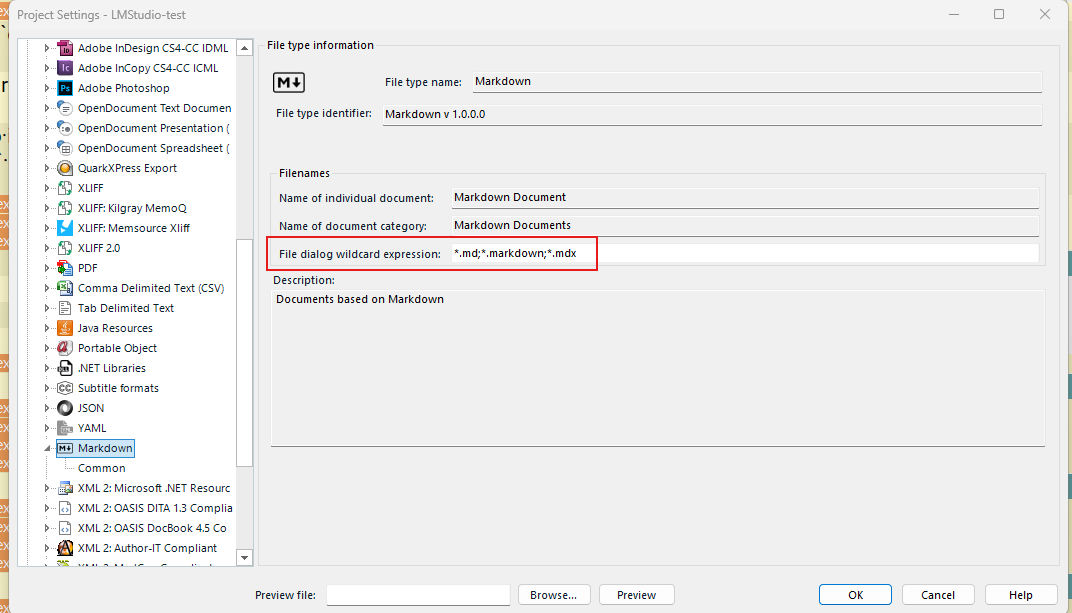
I made the following setup in the newly created project template:
added .mdx to the Markdown filetype:
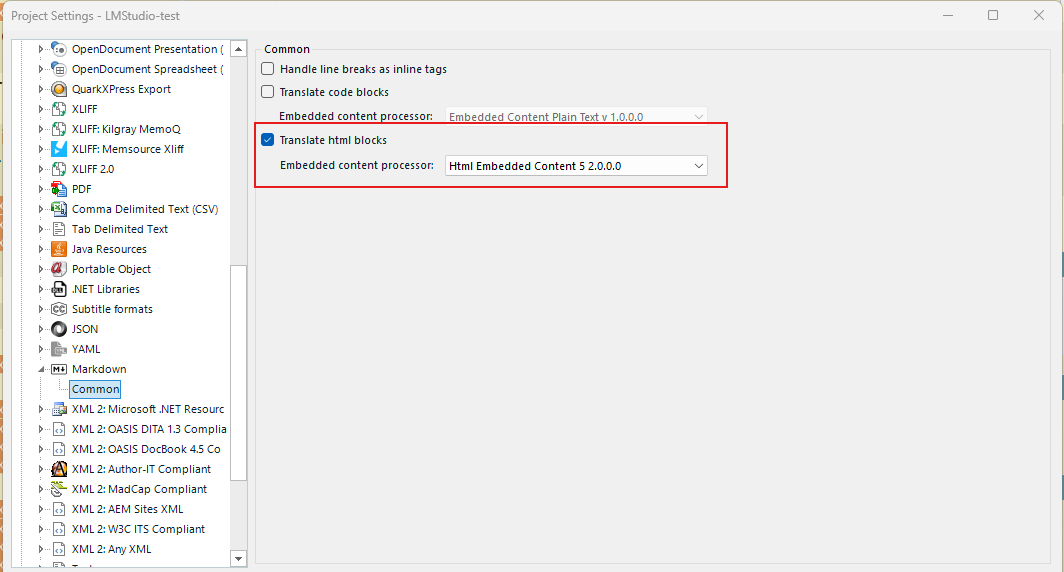
Checked "Translate html blocks" using Html Embedded Content 5 2.0.0 under the Markdown > Common:
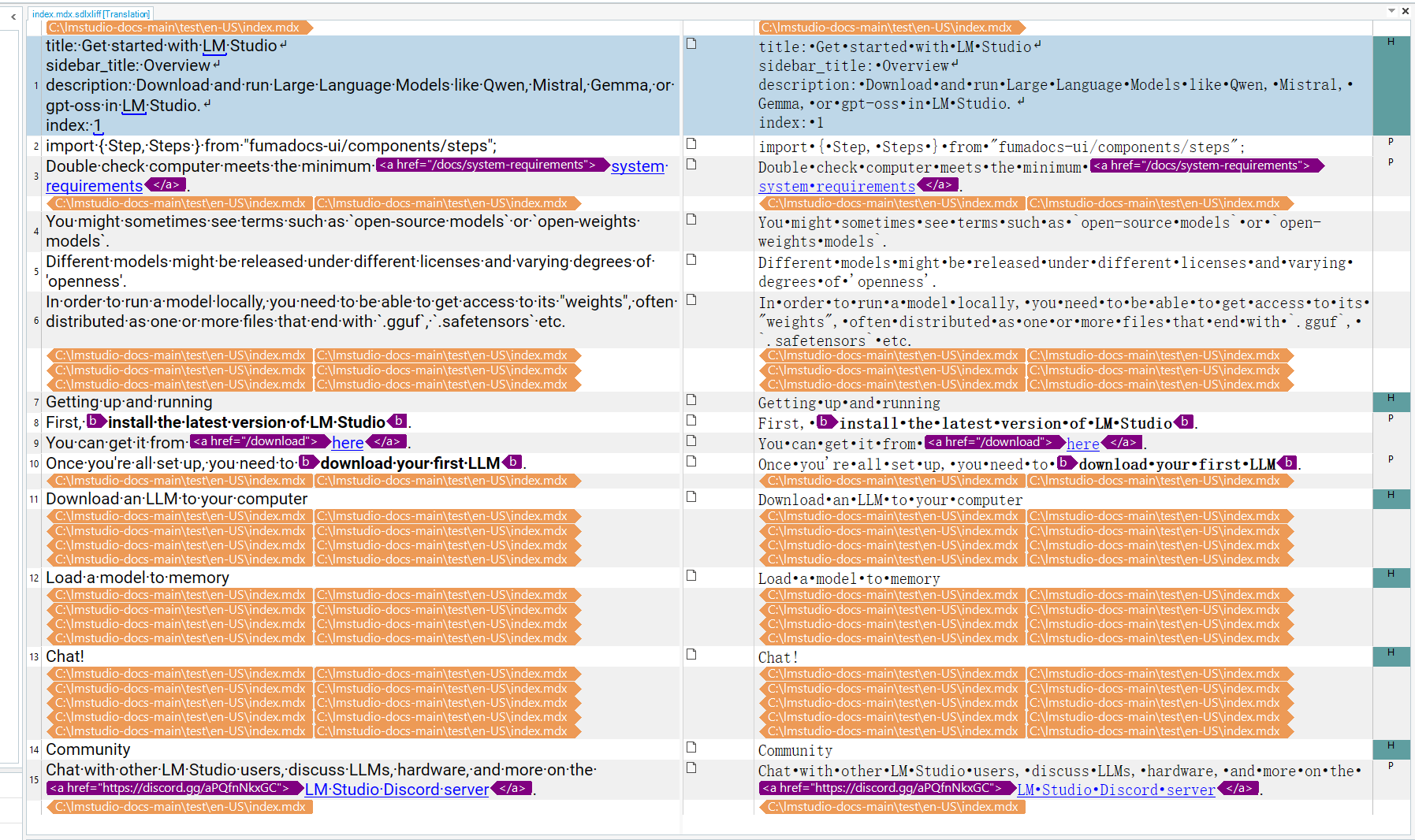
Added Callout, Steps, Step, img with data-caption as translatable, etc. to the Embedded Content Processors > HTML 5 > Parser. Yet, the content in the Steps, Step, h4, etc., failed to be recognized as translatable in the project created.
Fixed some typo.
[edited by: Jay Chen at 3:58 AM (GMT 1) on 27 Jul 2026]


