Any plans to develop a more fully featured way of managing new .ttb termbases (in Trados Studio 2026)?

So, I have been playing around with Trados Studio 2026 for a couple of days now and am quite impressed with the speed increase resulting from the switch to a 64-bit system. Over the years, I have had a love-hate relationship with MultiTerm, but mainly because terminology recognition in Trados Studio has been so flaky, I never relied on Trados Studio's built-in termbases. They were just not reliable enough for professional use.

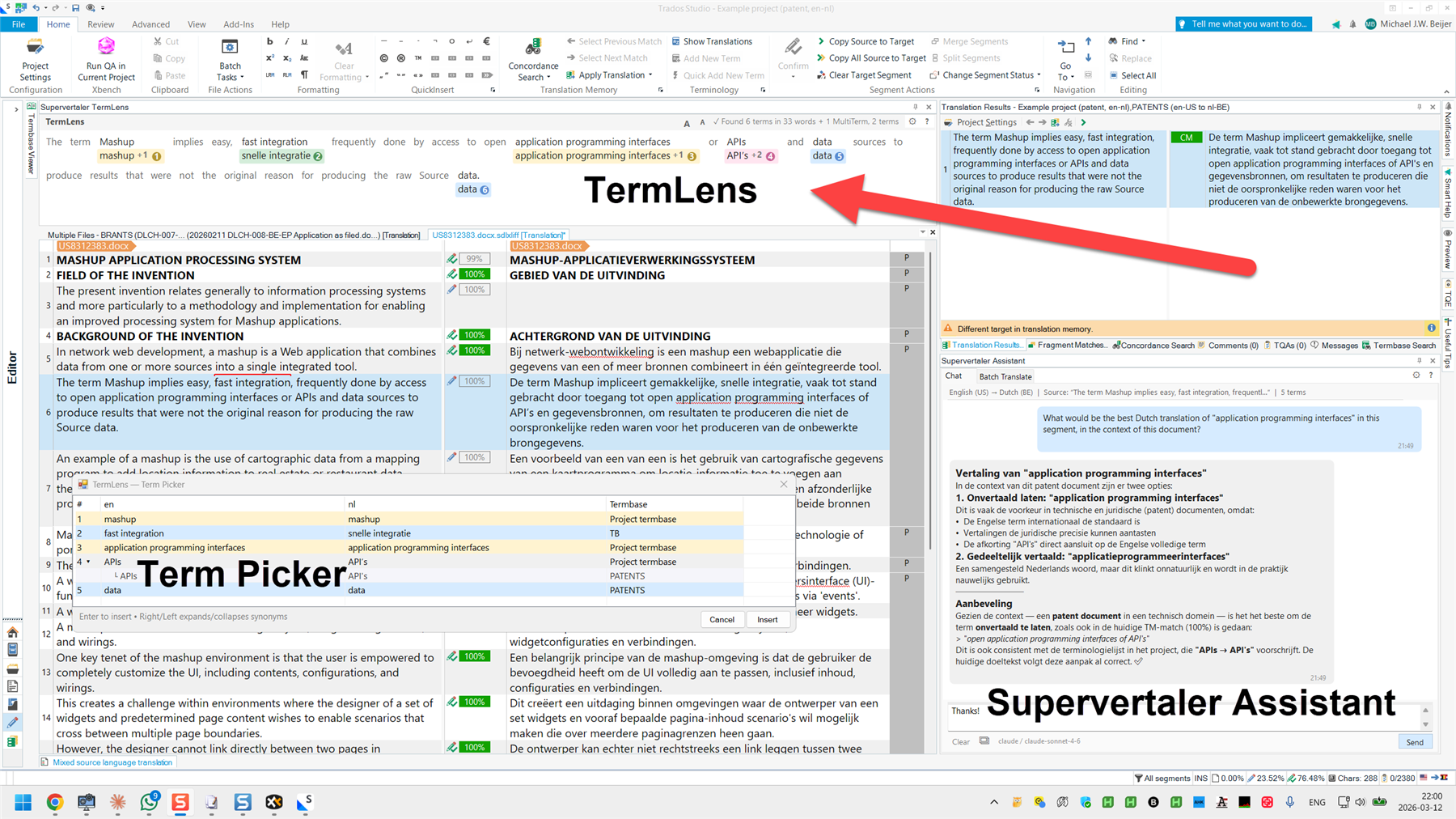
Instead, I used to use a plug-in that has gone through a couple of name changes and is currently called "RYSTUDIO Post-editing Package" (https://appstore.rws.com/plugin/135). This little plug-in presents termbase matches in a novel way, mimicking the layout of your source segment and showing target-language matches from the termbase beneath each source word. Recently, however, I decided to create my own Trados Studio plugin (Supervertaler for Trados / https://appstore.rws.com/plugin/432), which not only offers all kinds of AI translation magic, but also has its own built-in terminology system, with a dedicated window called "TermLens". See: https://docs.supervertaler.com/trados/termlens/

Supervertaler termbases are SQLite databases and are rock solid. Anyway, to get back to my original point - so I have been playing around with Trados Studio 2026 a bit and testing their new SQLite-based term-based system. So far, they seem reliable, which is great. They use the same old-fashioned term recognition window, however, and those red lines over any terms with matches in your source segment, which I have never enjoyed. However, ignoring that for the moment, are there any plans to develop a more fully featured way to manage these new termbases? Basically, something similar to MultiTerm, but for managing the new .ttb-format termbases?   

I'm asking both out of general curiosity and also because I was considering developing something like this myself, and adding it to Supervertaler for Trados.

Supervertaler for Trados already provides (read-only) support for MultiTerm termbases, and I am right now working on adding support for the new .ttb format.   

Michael


Removed AI Suggestion
[edited by: Michael Beijer at 6:24 PM (GMT 1) on 13 Jul 2026]
emoji
  • Hi   - yes, this is currently in the works and will be a continuous effort over the next months - it's the natural evolution of local terminology management in Studio. An initial term search and editing view within the new Termbases area will be the next big milestone. More info when we get closer but just to give you this early information already now. Thanks, Daniel

    Daniel Brockmann
    Team Trados @ RWS

    emoji
  • Hello Daniel,

    I have been looking at what I can/cannot do with termbases and .ttb and legacy .dltb files within Studio 2026. I may well have missed something but specific questions:

    1. I can view the contexts of a ttb file in Editor  / Termbase Search / and typing * in the search box but will you offer this as a feature? It took me a while to work out that the asterisk would do this. If so what is the road map for this?

    2. In the termbases view - Export Terms I am only offered mtf files. Are there plans to offer tbx and xlsx? If so what is the road map for this?

    3. There seems to be a need to more effortlessly go between .ttb and .sdltb file types (both ways). The old glossary converter app was wonderful to switch filetype and so much easier than going through the Multiterm Convert steps, but I imagine the change to 64-bit will mean it is not possible just to add .ttb to the filetypes. Is there a plan to introduce something similar that can handle ttb to sdltb conversion (and vice versa).  Given the forward looking limitations of Multiterm 2026 and the contorted way of looking back in Studio 2026 through Package Creation to get a ttb file back into sdltb (I stand to be corrected) something like the Glossary Converter App for ttb <=> sdltb would be wonderful. If so, would there be a road map for this?

    Thank you for your time and may I say after all these years how much I admire the enthusiasm you show in the webinars introducing new versions!

    David Hardisty

    Lisbon

    emoji
  • Hi David,

    Thanks a lot for your feedback and questions, some initial answers as we see them at this point:

    1. This will all be offered by the new term search and editing functionality within the new Termbases view. This is coming together nicely.
    2. Yes, export definitions will become more flexible down the line, including TBX support, other formats TBD. This will not be in the next release yet.
    3. Yes, as a next step we'll do batch conversion from SDLTB to TTB but we are also looking at a more direct back conversion to SDLTB.

    Also I am tagging   in this thread as I believe he has developed an app that does most, if not all, of the above already. It's not the Glossary Converter but could be worth looking at. I believe the URL is TWAS Termbase Migrator 2026 | Fast SDLTB to TTB & Batch Termbase Workflows, plus there's many more apps at his home page at TWAS — Translation Workflow Automation Suite | Sameh Ragab.

    Thanks, Daniel

    Daniel Brockmann
    Team Trados @ RWS

    emoji
  • Thank you for your reply. So, features coming soon and eventually. In the meanwhile, Sameh (of whom I have heard many positive things) has an app/apps to fill the gap while we wait, for a fee of 35 dollars for his TWAS Termbase Migrator, which sounds very similar to a (.ttb) Glossary Converter. Is the glass half full or half empty?  Is patience a virtue or is there a legitimate case for, to quote Queen, "I want it all and I want it now". Slight smile

    One opinion. At a time when CAT Tools may be seen to be fighting to justify their existence within AI workflows (don't hate me - not arguing for or against this) it is surely a truism to state that one of the most important features these tools have is the "experienced translator" data they can store such as TMs and TBs and the ability to use and modify that data easily. So I am surprised that standard terminology functions (editing TBs, importing and exporting data including various filetypes) has not been planned to be there from the outset. This was the same when you introduced the Trados Team Online Editor and we (translators) could not even add a term to a termbase (unless we went through Trados Studio on the desktop) for several years.  I understand that you have had to change the format of termbases. That a 64-bit version of Trados was a lot of work. But it comes down to priorities I suppose and I would argue that termbases and their functionality have become even MORE important in the current workflow and some of their functionality should not be considered as a secondary or tertiary implementation feature. In fairness, I have the same complaint with one of your main rivals! Anyway, just a gentle bit of lobbying to reconsider the important and prioritiorisation of TB functions! Slight smile

    PS More nerdy, but would be very interesting to hear if when changing the filetype you considered changing the threefold nature of a TB entry record i.e. the entry v language v term levels, especally in terms of the most suitable way of dealing with some of the filetypes popular in modern terminology work e.g. skos/rdf semantic formats,  which seem to be used in large databases such as IATE and EuroVoc.

    emoji
  • Thanks David! It was a pure question of timing and best sequence of events - we felt that 64-bit and better performance was key to launch, along with the ability to search and edit terms as part of the translation flow in the Editor. But totally agreed this is very key to have. As a fresh update, it is coming very soon and looking great already, I can promise that :). If you are in the beta community, you'll see it soon-ish there - I would guess within the next four to eight weeks for sure, so it's imminent. Re. terminology feeding into semantic work, we are thinking about this in the context of Trados terminology in the Trados cloud platorm, where it would be best placed to be added. Plus also here we work with partners like Kaleidoscope who already today offer great semantic augmentation capabilities on top of what we offer out of the box with Trados Terminology in the cloud. Thanks, Daniel

    Daniel Brockmann
    Team Trados @ RWS

    emoji