The display of quotation marks in Trados Studio 2024 sp1 causes trouble

Dear administrator and friends,

In Trados Studio 2024,

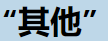
when doing EN to ZH-CN tasks, quotation marks display as   rather than 其他,
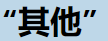
其他and其他 both display as  in target panel in trados studio 2024,

which makes it impossible to distinguish left quotation mark from right quotation mark。

Do we have any plugins to solve this display issue,or how to correctly set the software configuration?


Removed AI Suggestion
[edited by: Kangxing Shen at 8:49 AM (GMT 1) on 12 Jul 2026]

emoji
Parents
  • Hello,

    Thank you for bringing up this issue regarding the display of quotation marks in Trados Studio 2024 SP1. It seems like the problem is related to how the software handles the display and conversion of quotation marks during translation. Let me guide you through the steps to address this:

    ### Step 1: Adjust Entity Conversion Settings

    1. Open **Trados Studio 2024**.

    2. Navigate to **File > Options > File Types**.

    3. Select the file type you are working with (e.g., **HTML 5** or the specific file type causing the issue).

    4. Under the selected file type, go to **Entities**.

    5. Uncheck the option **Enable entity conversion**. This will prevent Trados Studio from converting quotation marks into HTML entities.

    6. If you only want to disable entity conversion for specific characters, click on **Advanced** and adjust the settings under the **Writer settings** section.

    ### Step 2: Verify Language-Specific Quotation Mark Settings

    1. Go to **File > Options > Editor > Auto-substitution**.

    2. Select **Quotation Marks** from the list.

    3. Ensure that the correct quotation mark styles are selected for both the

    emoji
Reply
  • Hello,

    Thank you for bringing up this issue regarding the display of quotation marks in Trados Studio 2024 SP1. It seems like the problem is related to how the software handles the display and conversion of quotation marks during translation. Let me guide you through the steps to address this:

    ### Step 1: Adjust Entity Conversion Settings

    1. Open **Trados Studio 2024**.

    2. Navigate to **File > Options > File Types**.

    3. Select the file type you are working with (e.g., **HTML 5** or the specific file type causing the issue).

    4. Under the selected file type, go to **Entities**.

    5. Uncheck the option **Enable entity conversion**. This will prevent Trados Studio from converting quotation marks into HTML entities.

    6. If you only want to disable entity conversion for specific characters, click on **Advanced** and adjust the settings under the **Writer settings** section.

    ### Step 2: Verify Language-Specific Quotation Mark Settings

    1. Go to **File > Options > Editor > Auto-substitution**.

    2. Select **Quotation Marks** from the list.

    3. Ensure that the correct quotation mark styles are selected for both the

    emoji
Children
No Data