
 Translate


This is what I see:
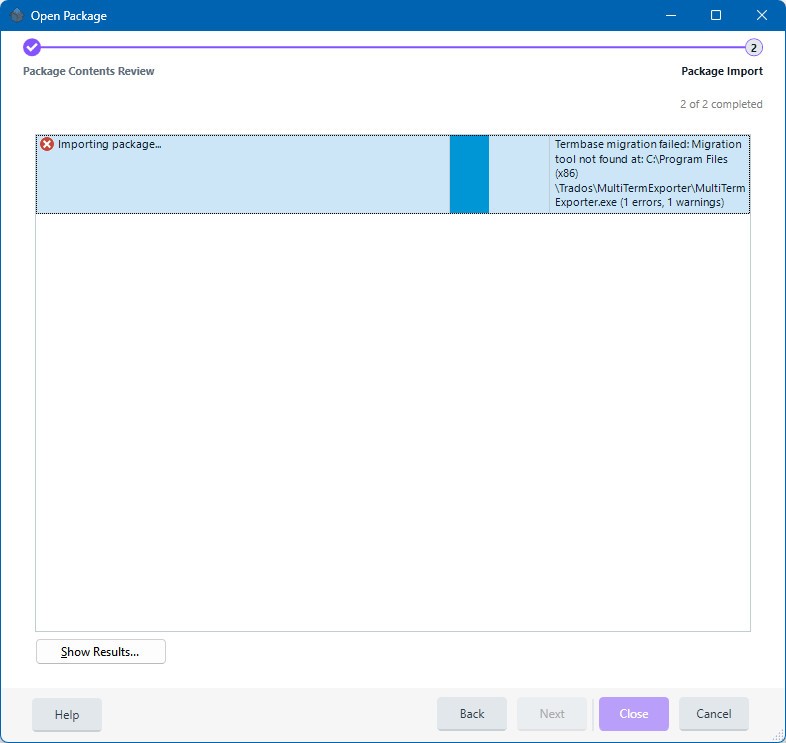
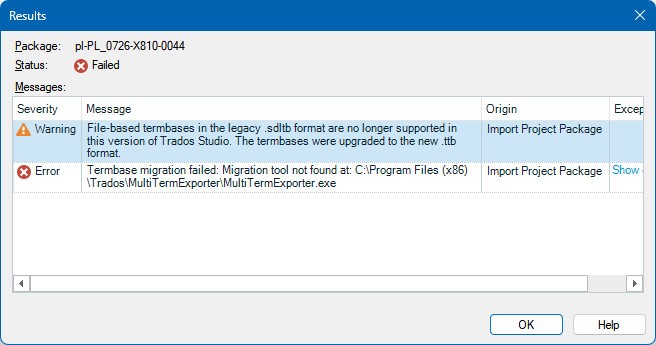
<SDLErrorDetails time="7/2/2026 3:20:01 PM">
  <ErrorMessage>Termbase migration failed: Migration tool not found at: C:\Program Files (x86)\Trados\MultiTermExporter\MultiTermExporter.exe</ErrorMessage>
  <Exception>
    <Type>Sdl.ProjectApi.ProjectApiException, Sdl.ProjectApi, Version=19.0.0.0, Culture=neutral, PublicKeyToken=c28cdb26c445c888</Type>
    <ExceptionMessage>Termbase migration failed: Migration tool not found at: C:\Program Files (x86)\Trados\MultiTermExporter\MultiTermExporter.exe</ExceptionMessage>
    <HelpLink />
    <Source>Sdl.ProjectApi.Implementation</Source>
    <HResult>-2146233088</HResult>
    <StackTrace><![CDATA[   at Sdl.ProjectApi.Implementation.PackageOperation.CopyLocalTermbase(IProjectTermbase sourceLocalTermbase, TermbaseSettings sourceLocalTermbaseSettings, String targetLocalTermbaseDirectory, ITermbaseMigrationService termbaseMigrationService)
   at Sdl.ProjectApi.Implementation.PackageOperation.CopyProjectTermbases(IProject sourceProject, IProject targetProject, Boolean includeFileBasedTermbases, Boolean includeTermbasesForLegacyStudio)
   at Sdl.ProjectApi.Implementation.ProjectPackageImport.ImportPackageProject(IPackageProject packageProject, Boolean& isNewProject)
   at Sdl.ProjectApi.Implementation.ProjectPackageImport.StartImpl()
   at Sdl.ProjectApi.Implementation.PackageOperation.Start()]]></StackTrace>
  </Exception>
  <Environment>
    <ProductName>Trados Studio</ProductName>
    <ProductVersion>Studio19</ProductVersion>
    <EntryAssemblyFileVersion>19.0.0.3043</EntryAssemblyFileVersion>
    <OperatingSystem>Microsoft Windows 11 Pro</OperatingSystem>
    <ServicePack>NULL</ServicePack>
    <OperatingSystemLanguage>1031</OperatingSystemLanguage>
    <CodePage>1252</CodePage>
    <LoggedOnUser>AzureAD\JerzyCzopik</LoggedOnUser>
    <DotNetFrameWork>4.0.30319.42000</DotNetFrameWork>
    <ComputerName>SPITFIRE-IX</ComputerName>
    <ConnectedToNetwork>True</ConnectedToNetwork>
    <PhysicalMemory>66799260 MB</PhysicalMemory>
  </Environment>
</SDLErrorDetails>
How can I solve this error?
Removed AI Suggestion
[edited by: Jerzy Czopik at 1:21 PM (GMT 1) on 2 Jul 2026]

_________________________________________________________
When asking for help here, please be as accurate as possible. Please always remember to give the exact version of product used and all possible error messages received. The better you describe your problem, the better help you will get.
Want to learn more about Trados Studio? Visit the Community Hub. Have a good idea to make Trados Studio better? Publish it here.


